20
EN
TECHNICAL OWNER MANUAL
4.3 Servicing or Replacing Freewheel
Set the NuVinci Optimized CVP in
full overdrive with the front shifter
or Nfinity Hub Interface prior to
removal.
1. Remove the rear wheel per section 2.4.
2. Remove the Nfinity Hub Interface per
section 4.2.
3. Reference the exploded view in section
5.3. Remove the sprocket snap ring (12),
sprocket spacer (13, if installed), and
sprocket (14).
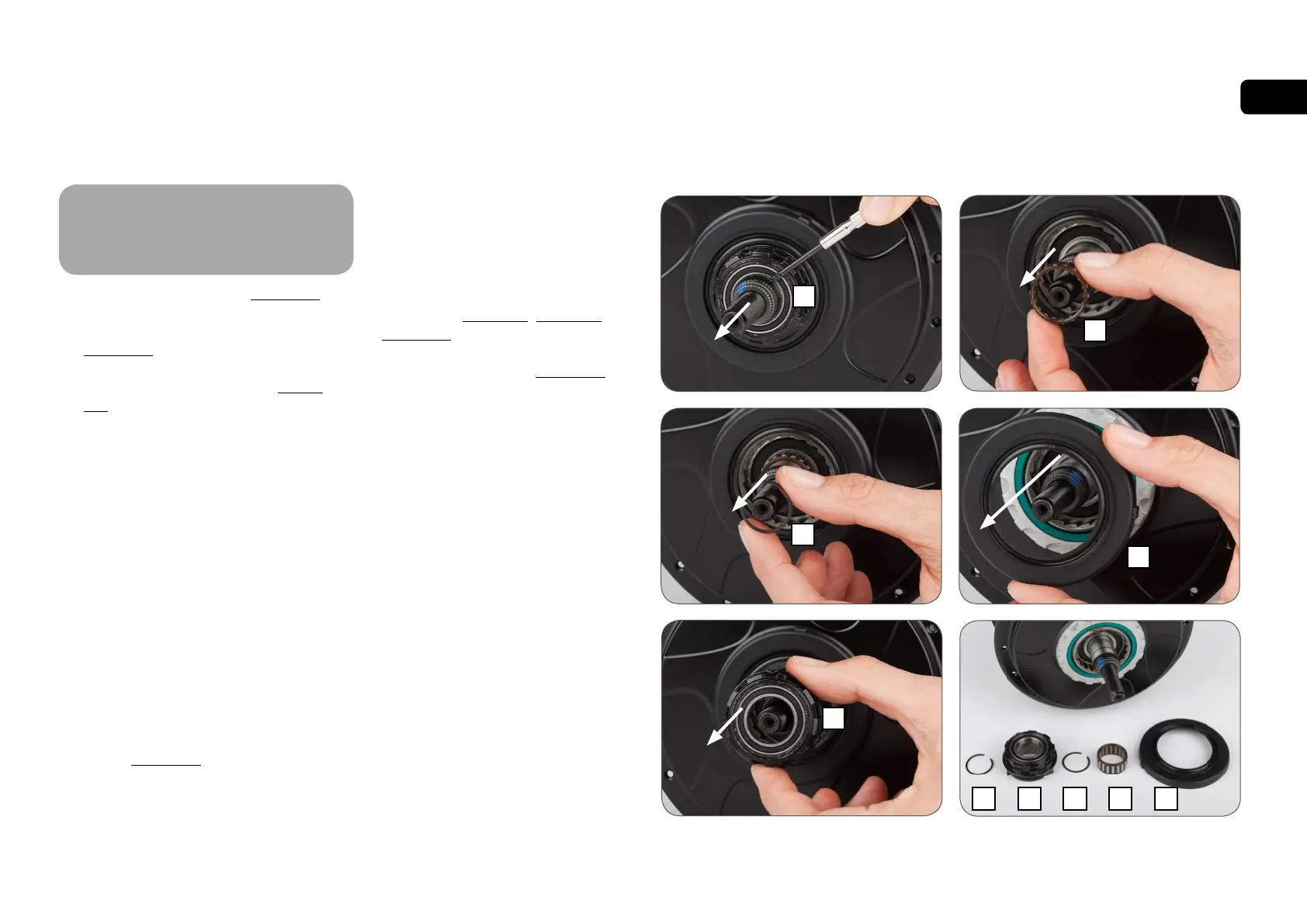
4. Remove the snap ring (15) on the shift
driver, and remove the freewheel assembly
(16).
• If servicing or replacing, use a medium-
weight oil or very lightweight water-
resistant grease and check pawl and
spring function.
5. Remove the Interior snap ring (17), needle
bearing (18), and r.h. shield (19) if these
components are being replaced.
6. Install the serviced / new freewheel
components according to the exploded
view in section 5.3.
NFINITY SERVICE INSTRUCTIONS
7. Install the sprocket and Nfinity Hub
Interface per section 3.2, section 3.3, and
section 3.4.
8. Install the rear wheel per section 2.5.
!
191817
16
15
15
18
19
15
16



 To Next Page