19
After a surface interval of 12 hours, you may choose to fly, provided that
your dive profile(s) did not enter decompression. If your diving could be
considered as decompression or repetitive, multi-day, it is strongly recom-
mended that you wait the full 24 hours after your last dive to add a greater
degree of protection. (See page 24 for more information about flying after
diving and DAN's guidelines).
WARNING: During the remaining 12 hours, the unit is in a count-
down mode only, and must be reactivated before it can be used for
another dive.
TELLING THE DIFFERENT MODES APART
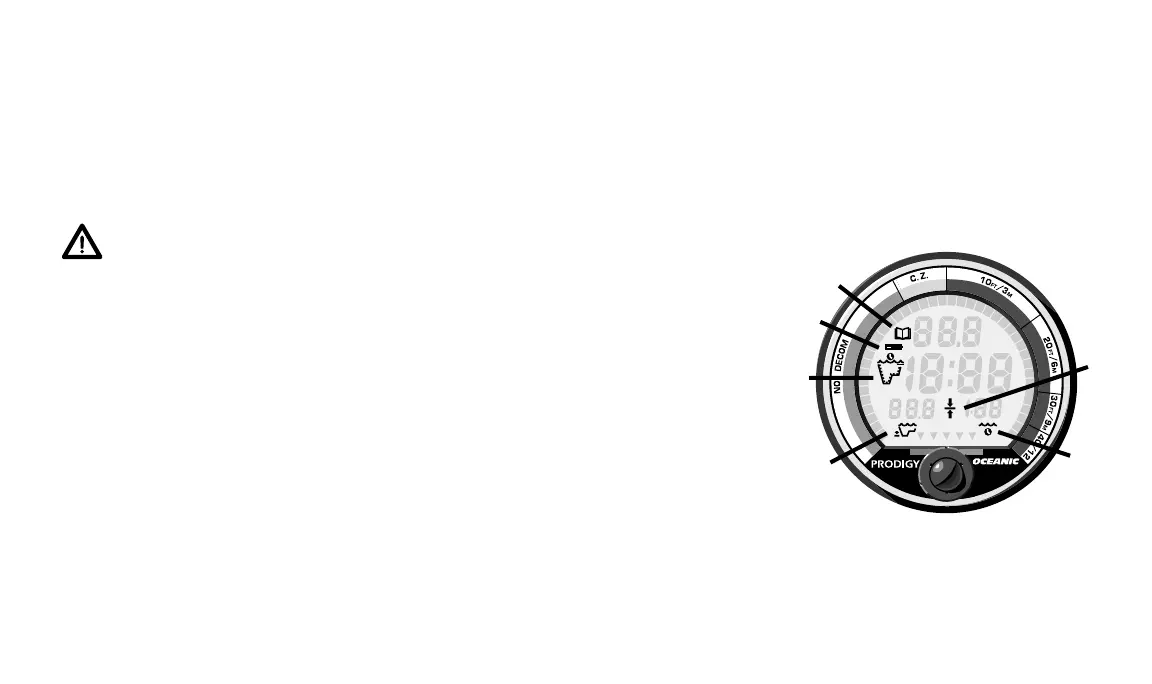
The PRODIGY’s different operating modes are easy to tell apart. Each is
clearly identified with graphic Mode Icons (Fig. 16) which provide quick
visual reference during the various modes of operation. You will not see
Decompression Dive, Violation, or Gauge Modes unless you dive to extremes.
Diagnostic and Dive Log Modes are displayed upon request by pressing the
activation button. The modes you will see underwater are No-decompression,
or Decompression and Alternate Decompression Dive. Above water, you will
see the Pre Dive Planning Sequence, Surface Display, and Time to Fly Modes.
Become familiar with all modes so that you understand exactly what informa-
tion the PRODIGY is providing you at any specific time.
Fig. 16 – Mode Icons
®
FT
M
a.
b.
d.
f.
e.
c.
a. log book
b. battery
c. surface/dive
d. max depth
e. stop ceiling
f. elapsed dive time














 To Next Page