17
®
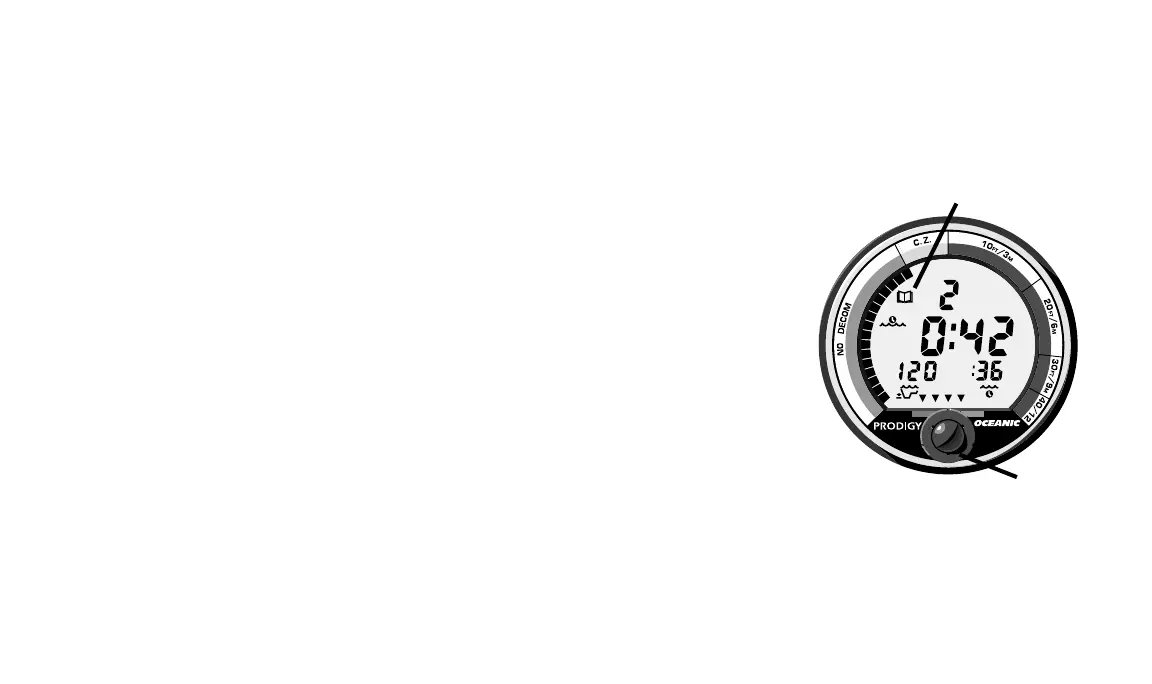
Fig. 14 – Dive Log Mode
VIOLATION MODES
The PRODIGY enters one of three different Violation Modes when you
exceed its ability to predict an ascent procedure. These modes are explained
fully in the “Handling the Extremes” section beginning on page 27.
GAUGE MODE
If the PRODIGY enters a Permanent Violation Mode, it will operate only
in Gauge Mode on subsequent dives. The PRODIGY removes displays that no
longer provide correct information because of the violation (see page 35). No
dives must be made for 24 hours for the PRODIGY to reset itself.
DIVE LOG MODE
Dive Log Mode, identified by the Dive Log Icon (Fig. 14a) located above
the Surface Display Icon, can be accessed on the surface by pressing the
button on the front of the PRODIGY (Fig. 14b). Pressing and releasing the
button will start the Automatic Dive Log Sequence. Dive Log Mode displays
information of your latest ten dives, and will retain the information indefi-
nitely, even if the batteries are removed. After exceeding ten dives, the
PRODIGY will add the most recent dive while deleting the oldest.
Information provided includes dive number, surface interval, max depth
(and Max Depth Icon), bottom time (and Elapsed Time Icon), maximum
ascent rate (VARI), and end of dive tissue loading (TLBG).
Dive Log Mode recalls dives in reverse order from the one most recently
a.
b.














 To Next Page