15
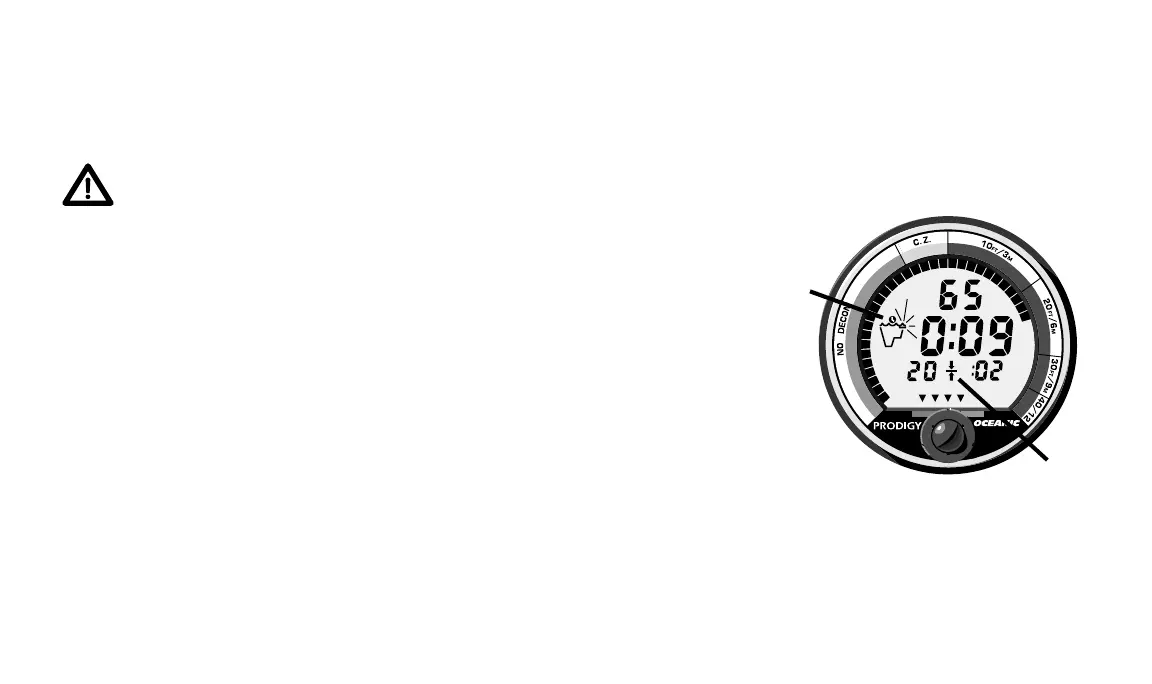
Fig. 12 – Decompression
Dive Mode
DECOMPRESSION DIVE MODE
The PRODIGY will help you to avoid, or easily manage, decompression.
Before explaining further, read the following warning.
WARNING - Oceanic recommends the application of responsible
diving practices and does not recommend decompression diving,
or diving deeper than 130 feet, as these practices will greatly
increase your risk of decompression sickness.
Decompression Dive Mode, identified by the Decompression Dive Icon
(Fig. 12a) located to the left of the Time Display, activates when the theoreti-
cal no decompression dive time/depth limits are exceeded causing the TLBG
to enter a red decompression zone (Fig. 12). Information provided includes
current depth, current decompression stop ceiling depth and time (and Stop
Ceiling Icon - Fig. 12b), and total decompression stop time at all ceilings
combined. The Graphic Diver Interface will continue to display the VARI bar
graph and the TLBG, that now acts as a Decompression “ceiling” indicator
showing the ceiling depth that you must stay below. An alternate display (Fig.
13) appears automatically for 3 seconds at 12 second intervals displaying
individual stop information with maximum depth and elapsed dive time.
After entering decompression, you must immediately change the focus of
your dive to getting back to the surface. Upon seeing the TLBG enter the 10
FT (3 M) STOP zone, you should immediately begin a 60 foot (20 meter) per
a.
b.














 To Next Page