OFITE, 11302 Steeplecrest Dr., Houston, TX 77065 USA / Tel: 832-320-7300 / Fax: 713-880-9886 / www.ote.com 21
Software
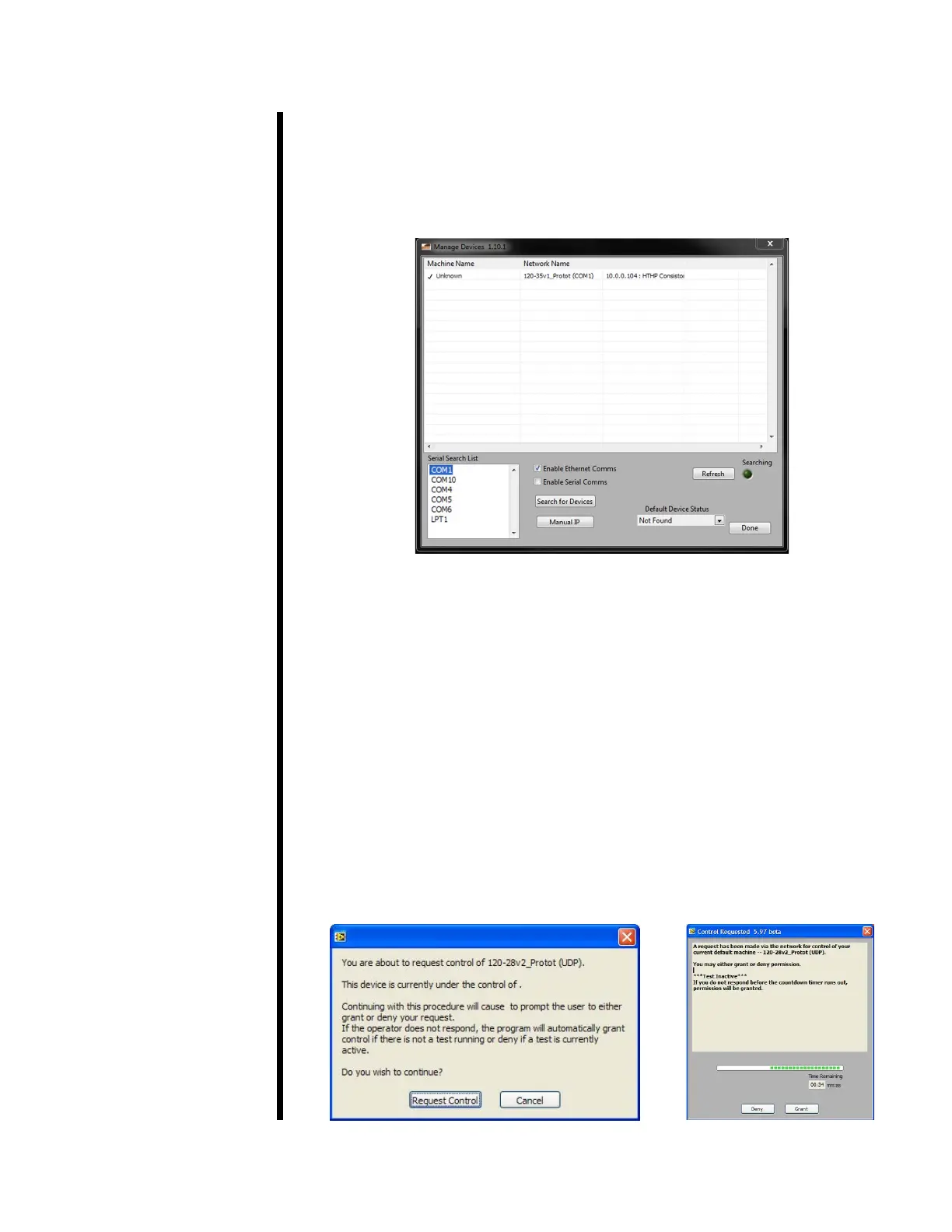
To open the software, double-click the “HTHP Consistometer” icon on the
desktop. The “Manage Devices” screen will automatically open. From this
screen you assume control of an HTHP Consistometer that is connected
to the network via Ethernet or directly connected to your computer via
RS-232 (serial). This screen can also be accessed by selecting “Manage
Devices” from the “Utilities” menu.
1. If the HTHP Consistometer is connected via Ethernet, make sure the
“Enable Ethernet Comms” option is selected. If it is connected via serial,
make sure “Enable Serial Comms” is selected.
2. If your instrument does not show up in the list at the top of the screen, click
the “Search for Devices” and “Refresh” buttons. If the device still doesn’t
show up, check the connection and try again. If the software is still unable
to locate the device, contact OFITE support.
3. Locate the device you want to manage. Right-click the device and click
“Select Default Device” to assume control.
4. If another user already has control of the device, you have the option
of requesting control. When you request control, the other user has 60
seconds to deny control, otherwise, control will automatically be transferred
to you.
5. Click “Done” to return to the main screen.



 To Next Page