OFITE, 11302 Steeplecrest Dr., Houston, TX 77065 USA / Tel: 832-320-7300 / Fax: 713-880-9886 / www.ote.com 27
Software
Custom Test Prole
Builder
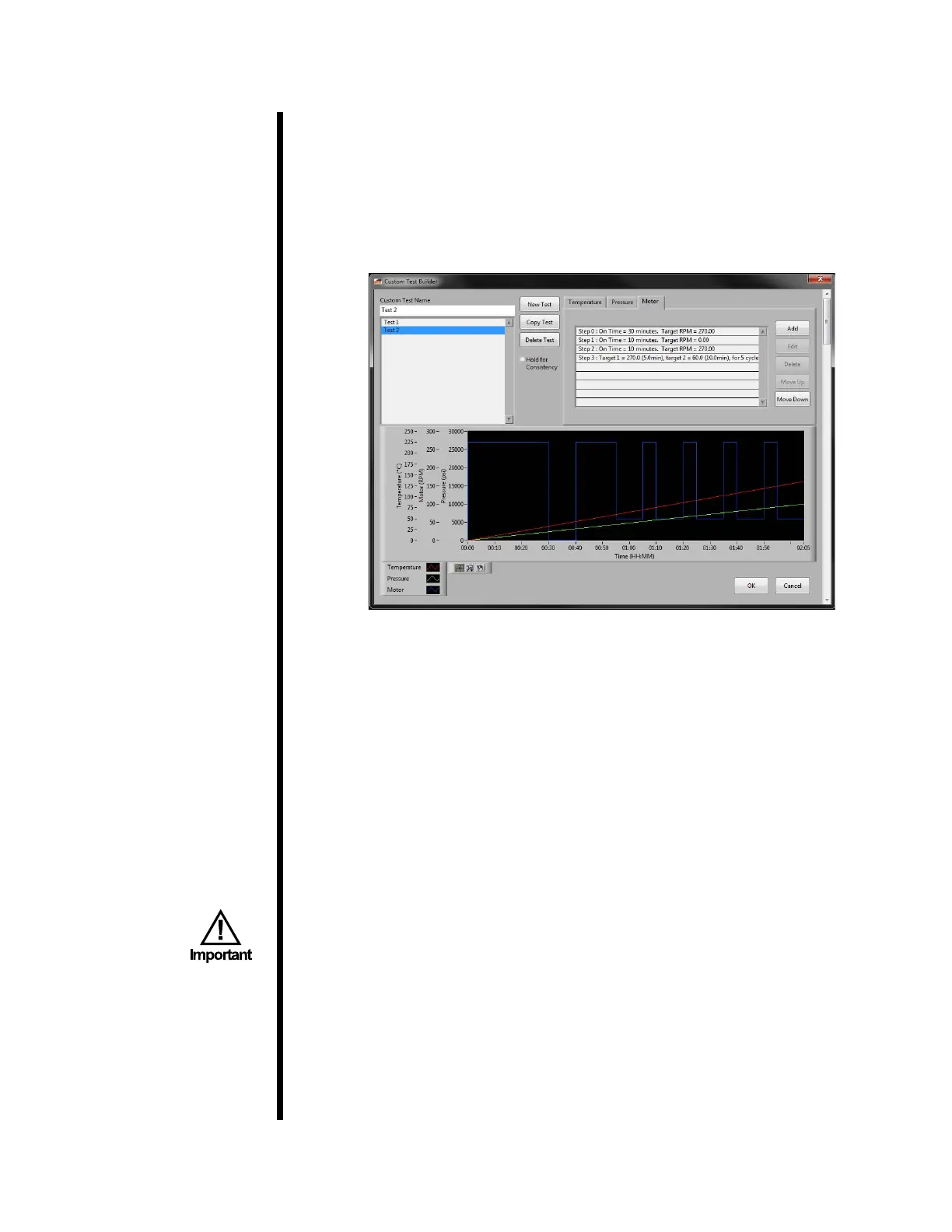
With the Custom Test Prole Builder, you can create and edit tests on the
computer.
1. Select Utilities → Test Prole Builder → Custom Test Proles.
2. Either select a test from the list on the left-hand side of the screen, or click
“New Test” to build a new test.
3. Enter a test name.
4. Each test prole has three main parameters: temperature, pressure, and
motor speed. For each parameter, there are a series of steps. Each step
species the setpoint and other options for that parameter.
To add a line, click the Temperature, Pressure, or Motor tab and then click
the “Add” button. As you add lines to the test prole, the graph below will
change to reect the new data.
To change the scale of the graph, double-click the maximum value on the
axis and enter a new value. The graph will automatically rescale to t the
new value.
When building a test at temperatures above 200°F, be sure to apply a
minimum of 5,000 PSI to prevent the sample from boiling.
a. Temperature - First choose Sample or Bath. This will specify which
thermocouple to use for determining temperature. There are three
types of temperature settings:
i. Hold - This will hold the current temperature for a set number of
minutes. You will be prompted for the hold time.



 To Next Page