EasyManua.ls Logo

OHAUS MB95 - Sound; Device Settings; Date and Time

OHAUS MB95
56 pages
Print Icon
To Next Page IconTo Next Page
To Previous Page IconTo Previous Page
Loading...
MB95 EN-21
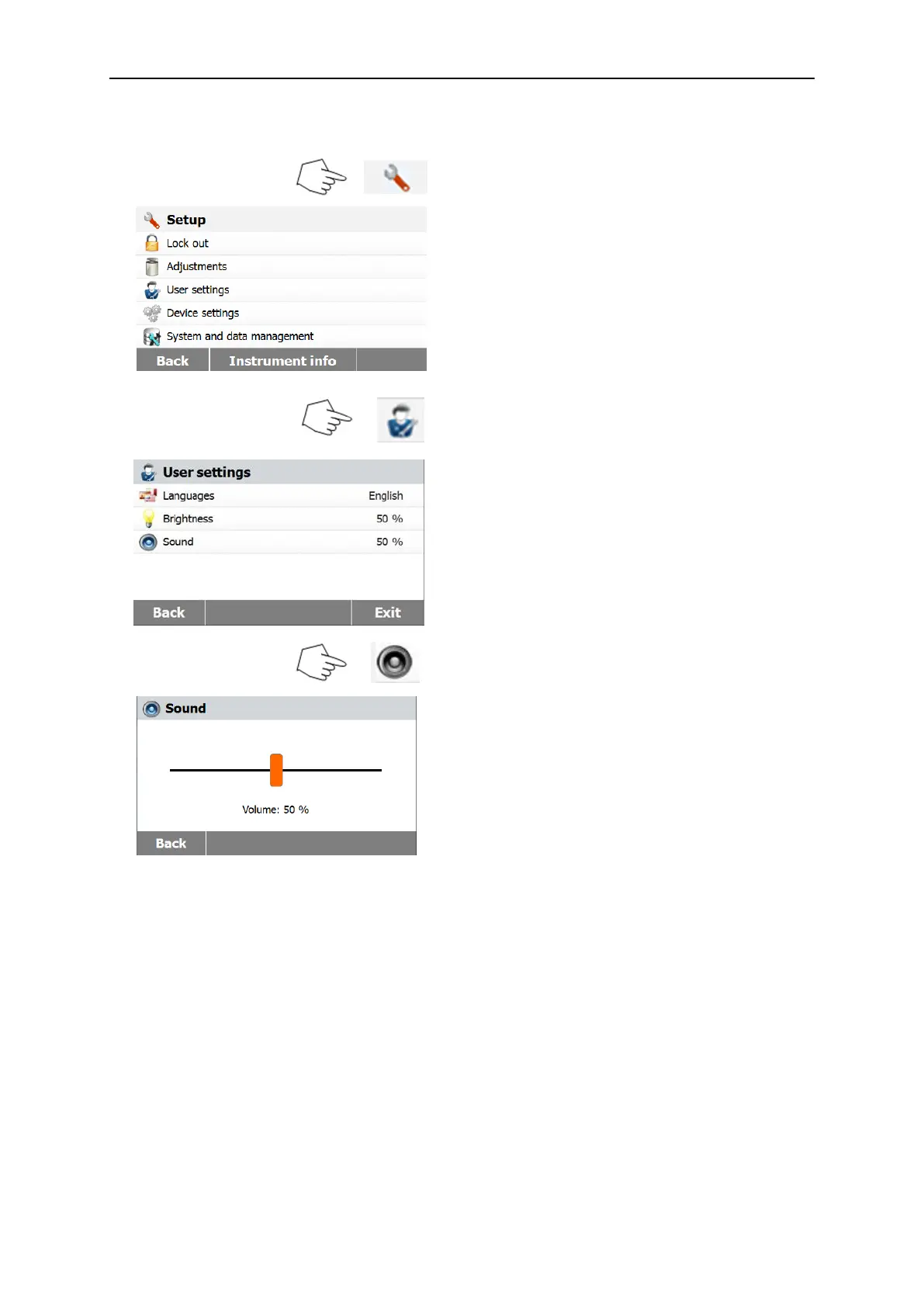
6.3.3 Sound
Press Setup button to access the Setup
menu.
Press Back to return to previous screen.
Press User settings button to access the
User settings menu.
Press Back to return to previous screen.
Press Exit to return to Home screen.
Press Sound button.
Adjust the volume of the beep to desired
level.
.
6.4 Device settings
6.4.1 Date and Time
This Moisture analyzer has a communication output which allows printing the date and time
on every record. When this instrument is put into operation for the first time, you should enter
the current date and time. These settings are retained even if you disconnect your
instrument from the power supply. A built-in battery will maintain all data. To set the date and
time, proceed as follows:

Table of Contents

Related product manuals