EN-48 MB95
11.2 Replacing Power Line Fuse
If the instrument display fails to light after switching it on, check the power outlet first. If
power is available, and the instrument fails to operate, the power fuse may be open (blown).
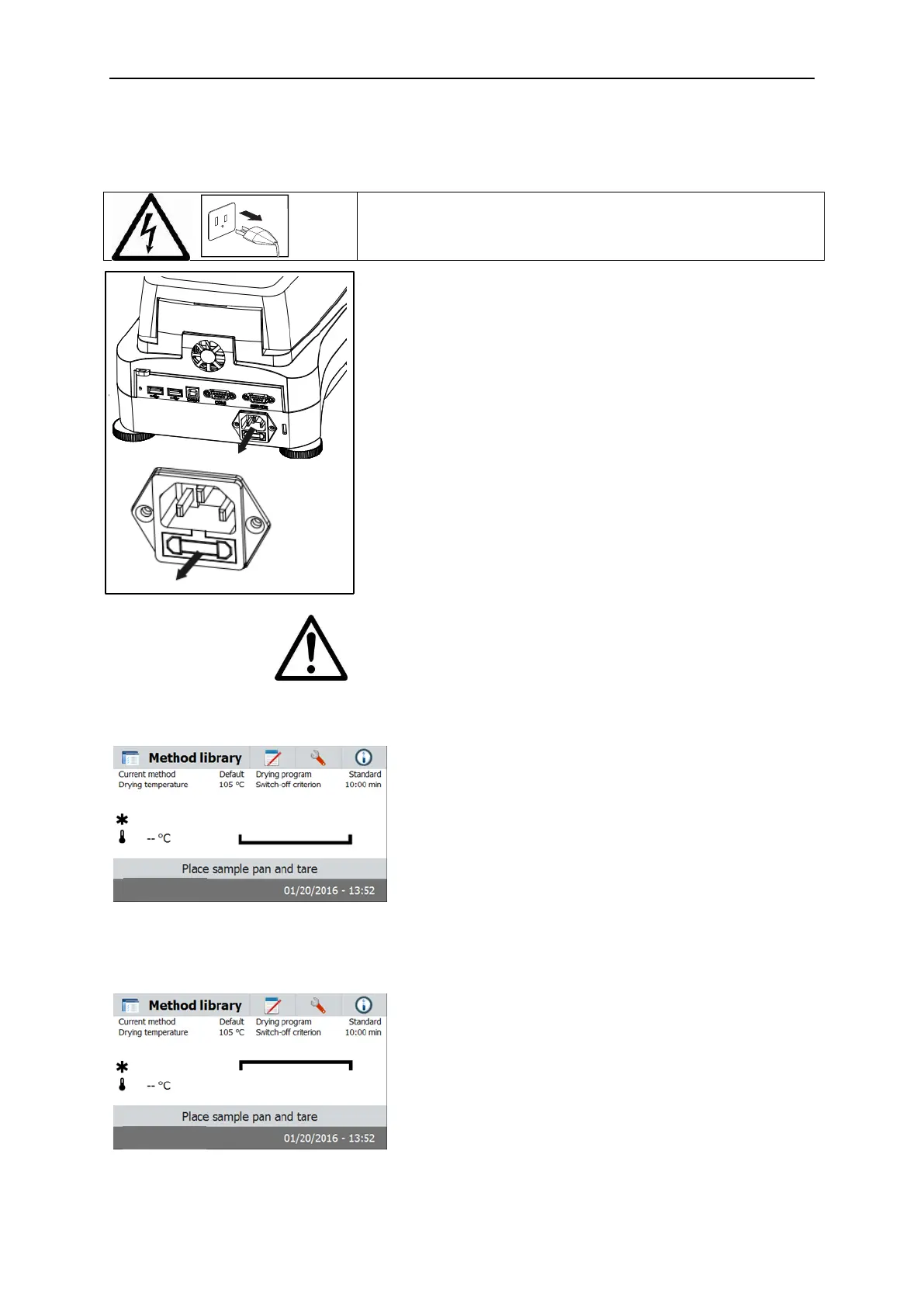
WARNING: Electric Shock Hazard. Disconnect the
equipment from the power supply before cleaning.
Using a test pen, turn the fuse holder to the left
(counterclockwise) and remove the fuse.
Check the condition of the fuse. Replace blown fuse by
those of the same type with the same rated value (6.3A
250VAC for 100-120VAC power supply or 2.5A 250VAC for
200-240VAC power supply according to the heating
element).
Attention: If the fuse is good and power is available at the
outlet, the cord or instrument may be defective. Try a new
cord. If this does not work, the instrument should be sent
back for servicing.
The use of a fuse of a different type or with a different
value, or bridging or shunting the fuse is not allowed and
can possibly cause a hazard to your safety and lead to
instrument damage!
11.3 Troubleshooting
Problem: Under load
Probable cause:
-No pan support. Put the pan support on the correct position.
Problem: Over load
Probable causes:
-Put too many sample. Try to remove the sample from the sample pan.



 To Next Page