4-14 Epson TM-U950 Commands
- Horizontally adjacent dots cannot be printed.
- Only the top bit in the secondary data bytes in the vertical direction is valid.
- After user-defined characters are defined, they are available until another definition is made;
ESC @ or GS * is executed; the printer is reset; or the power is turned off.
- A user-defined character and a downloaded bit image cannot be defined simultaneously. When
this command is executed, the downloaded bit image is cleared.
-
If the values of y, c1, c2, or x are out of the specified range, the printer ignores the command
and processes the following data as normal data.
Default:
The internal character set.
References:
ESC %, ESC ?
Example
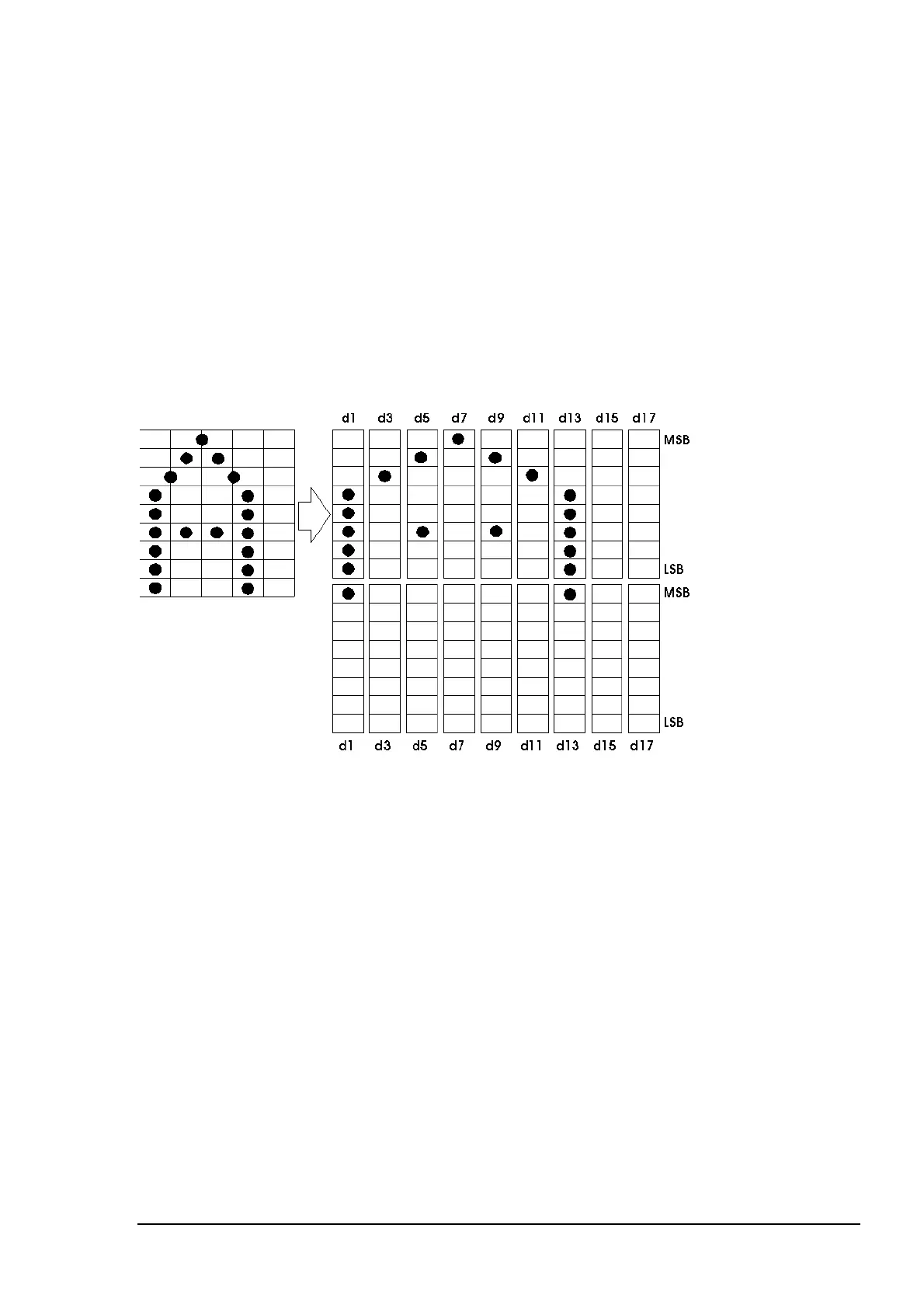
7x9 font when the dot pattern for code 20H is defined as shown below:
When the dot pattern for code 20H is defined as shown above:
ASCII code: ESC & y c1 c2 x d1 d2 d3 d4 d5 d6 d7 d8 d9 d10 d11 d12 d13 d14
Hex code: 1B 26 02 20 20 07 1F 80 20 00 44 00 80 00 44 00 20 00 1F 80
The corresponding bit is 1 when printing and 0 when not printing.















 To Next Page