Epson TM-U950 Commands 4-15
ESC * m nL nH [d]nL + 256
x
nH
Select bit-image mode
Hexadecimal code: 1B 2A ..
Range:
m = 0, 1
nL = 0-255
nH = 0-3
d = 0-255
Selects a bit-image mode using
m
for the number of dots specified by
nL
and
nH
, as follows:
m No. of Horizontal Direction Maximum number of dots
vertical
dots
Dot Density Adjacent dots Paper roll Slip
0 8 Single density Permitted 180 400
1 8 Double Density Prohibited 360 800
Notes:
-
Divide the number of dots to be printed by 256. The integer answer is
nH
and the
remainder is
nL
. Therefore, the number of dots in the horizontal direction is calculated by
nL
+
256
x
nH
.
- If the bit-image data input exceeds the number of dots to be printed on a line, the excess
data is ignored.
-
d
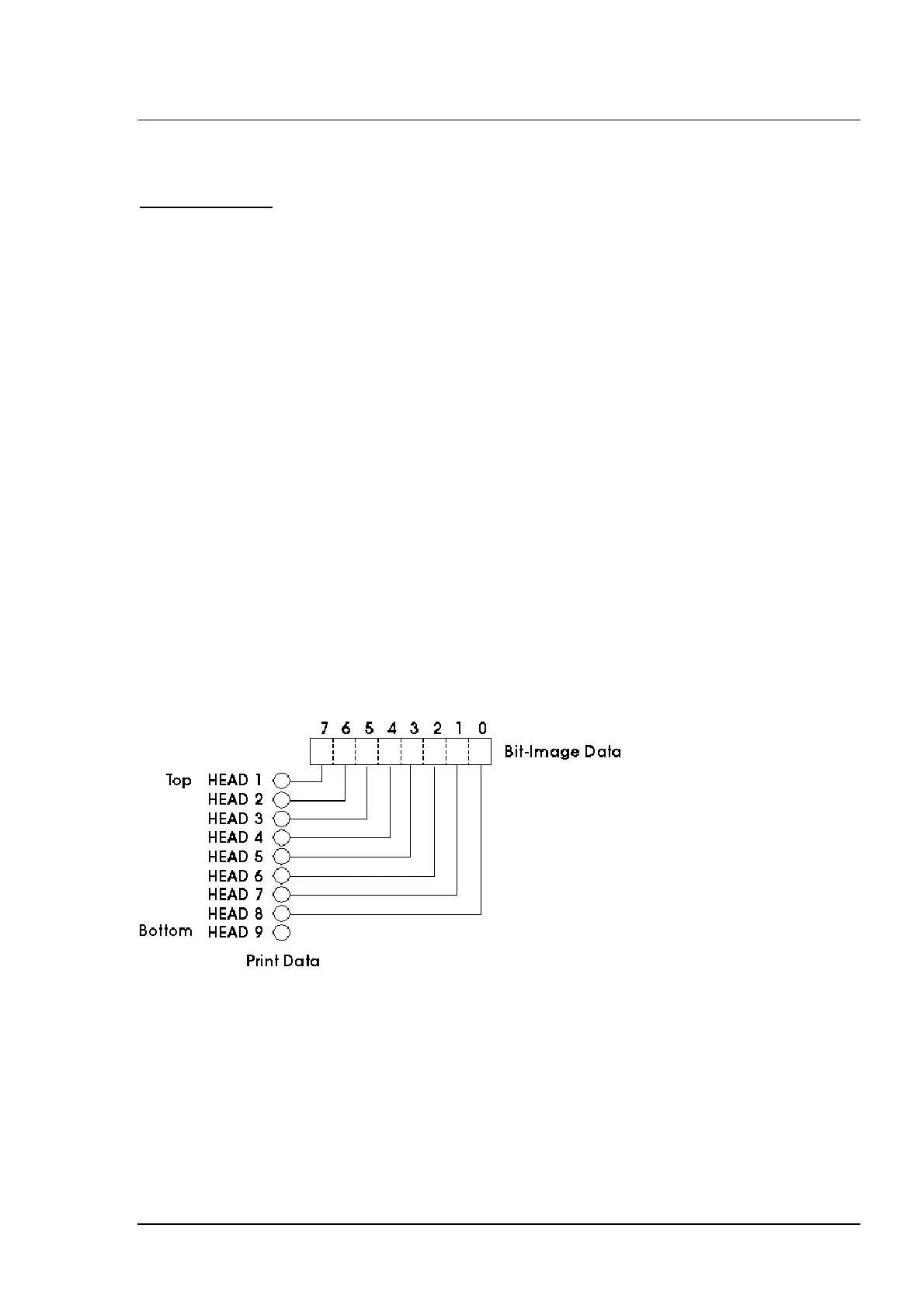
indicates the bit-image data. Set a corresponding bit to 1 to print a dot or to 0 to not print
a dot.
-
If the values of
m
and
nH
are out of the specified range, the following data are processed
as normal data.
- After printing a bit image, the printer returns to normal data processing mode.
- The relationship between the image data and the dots to be printed is shown below:















 To Next Page