Programming 5/621/6400 (04)
34
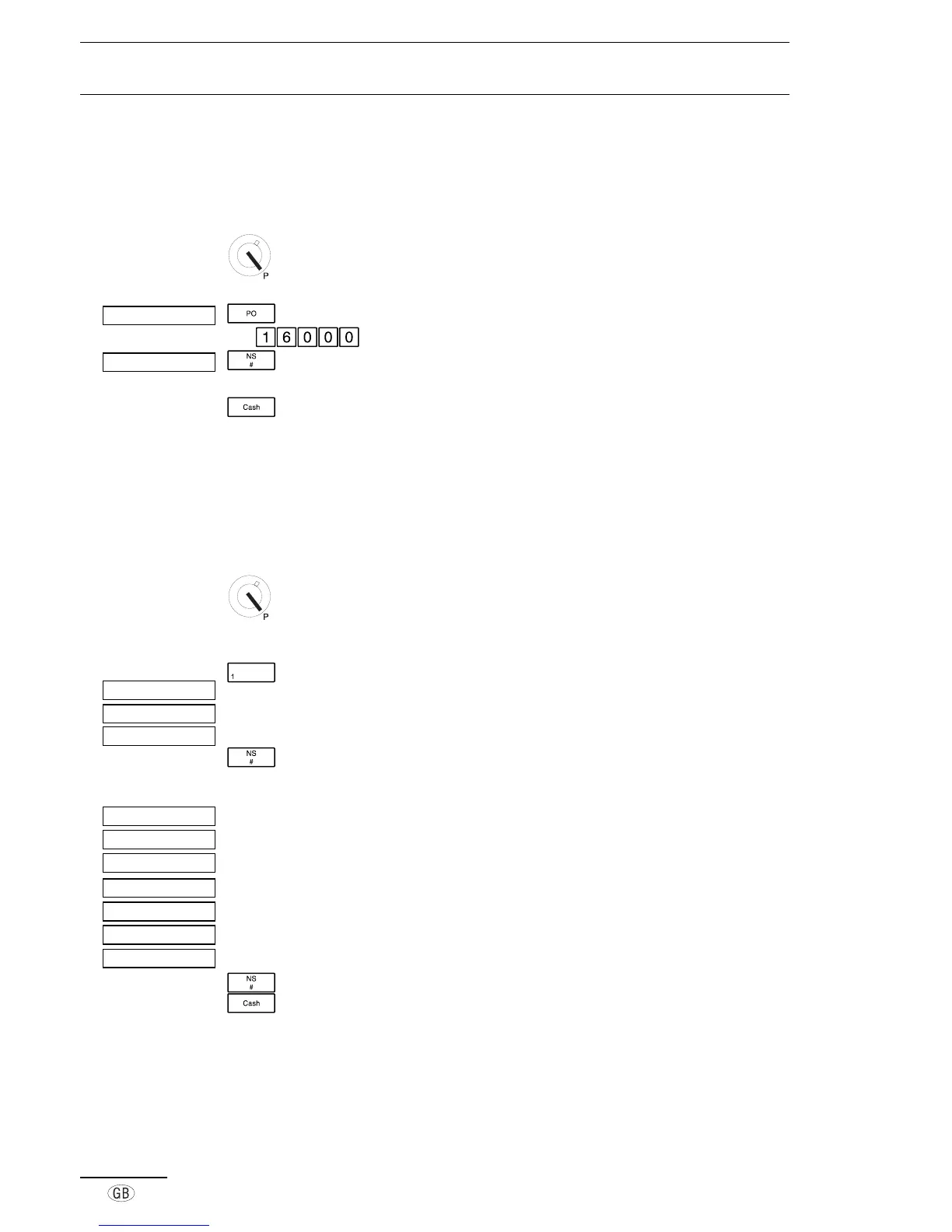
■ Programming tax rates
Departments can be assigned four different tax rates.
This program is used to define the level of the tax rate.
Activate Programming mode
Open the tax rate program
e.g. Enter the tax rate (e.g.:
16%
)
Store the tax rate and enter the value for the
next tax rate
Conclude programming and exit Programming mode
■ Programming departments
In order to categorize the range of products, PLUs can be assigned to departments.
Programming is performed in two steps; the price and the assignment must be
specified.
Activate Programming mode
Define the price
Press the required department key
Indicates the department
Indicates the price mode
Space for entering the fixed price
Move to the next setting
Define the assignment
Indicates the department
Indicates the assignment mode
0 = Price is added (1 = single receipt following initial input)
0 = No tax (1 = tax rate 1)
0 = No tax (1 = tax rate 2)
0 = No tax (1 = tax rate 3)
0 = No tax (1 = tax rate 4)
Move to the next department
Conclude programming and exit Programming mode
°°º¯¯¯¯¯¯
°±º°°°
°±Á°°°°°
°±Á°°°°°
°±Á°°°°°
°±Á°°°°±
°°º°°°
¸Ê¼¹±°°°°°
°±Á°°°±°
°±Á°°±°°
°±Á°±°°°
¸Ê¼¹±±¶°°°



 To Next Page