5/621/6400 (04) Currency conversion program
37
Currency conversion program
■ Programming currency conversion
Up to four different currencies and their conversion factors can be programmed in
order to convert an amount or total sum of a transaction. Programming is performed in
two steps; the conversion factor and the number of decimal places must be defined.
Also refer to the (Flags 32 to 34). It is necessary to distinguish between three cases:
Note: The conversion factors for the currencies must be entered as six-digit values.
The following currency conversions relate to the German conversion rate
for the Euro.
■ Euro in the period 01.01.1999 - 31.12.2001
Local currency = DM.
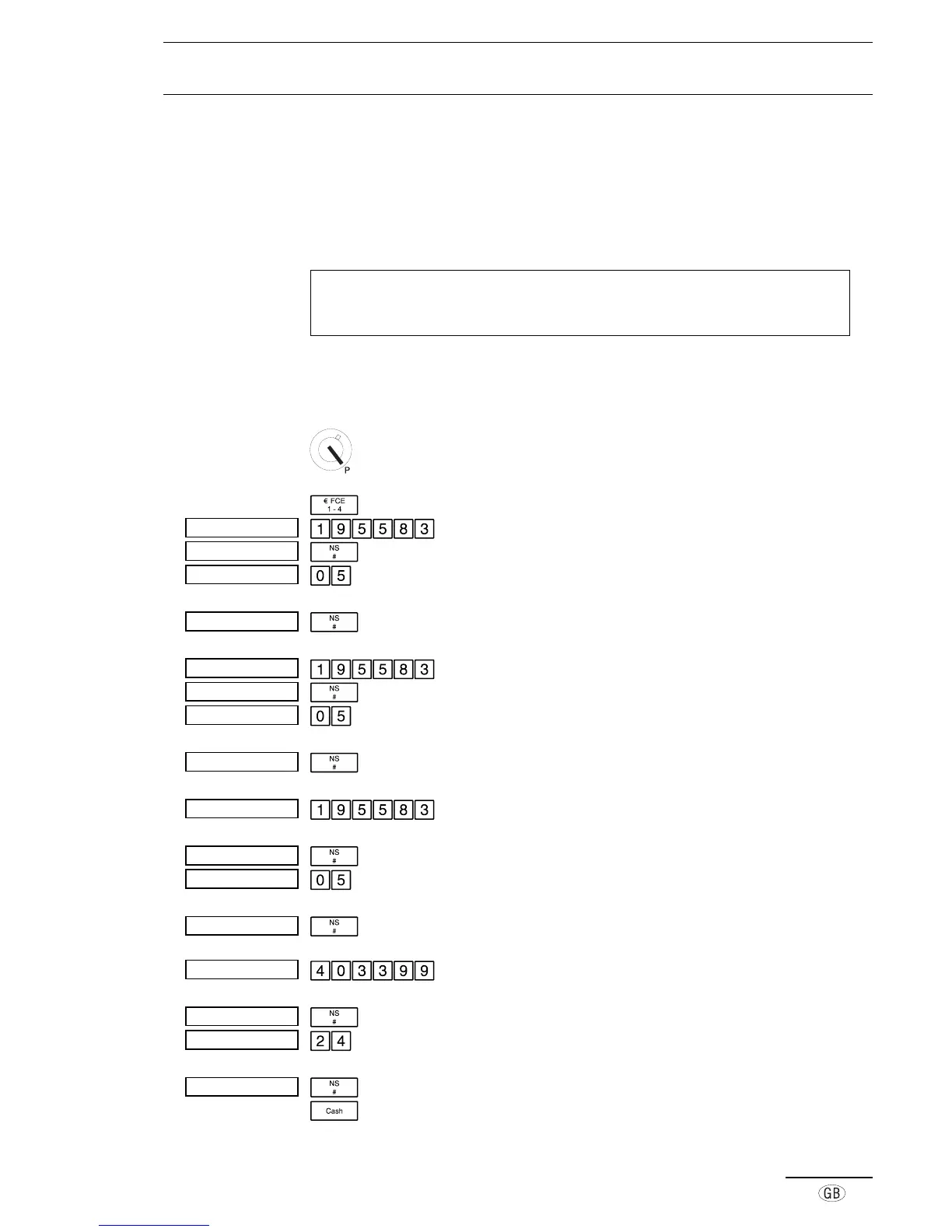
The currencies (FCE keys) must be programmed as follows:
Set the key to position P
Open the currency conversion program
Define the conversion factor for EC Card payments
Move to the next setting
0 = compulsory input; 5 = decimal places of the six-
digit conversion factor
Move to the next setting
Define the conversion factor for check payments
Move to the next setting
0 = compulsory input; 5 = decimal places of the six-
digit conversion factor
Move to the next setting
Define the conversion factor for cash payments in
Euro and Euro table (three-way conversion factor)
Move to the next setting
0 = compulsory input; 5 = decimal places of the six-
digit conversion factor
Move to the next setting
Define the conversion factor for the first foreign
currency (e.g. Belgian Francs, BEF)
Move to the next setting
2 = compulsory input; 4 = decimal places of the six-
digit conversion factor
Move to the next setting
Close the currency conversion program
Á¿¹±±¯µµ®³
Á¿¹±°
Á¿¹²±¯µµ®³
Á¿¹²°
Á¿¹³±¯µµ®³
Á¿¹³°
À»¼±°µ
À»¼±°°
À»¼²°µ
À»¼²°°
À»¼³°µ
À»¼³°°
Á¿¹´´°³³¯¯
Á¿¹´°
À»¼´²´
À»¼´°°



 To Next Page