Programming 5/621/6400 (04)
36
■ Programming PLU numbers
Each individual PLU can be assigned a number and then assigned to a previously
selected department. Programming is carried out in two steps; the price and the
assignment must be defined. The tax is allocated according to that defined for the
departments.
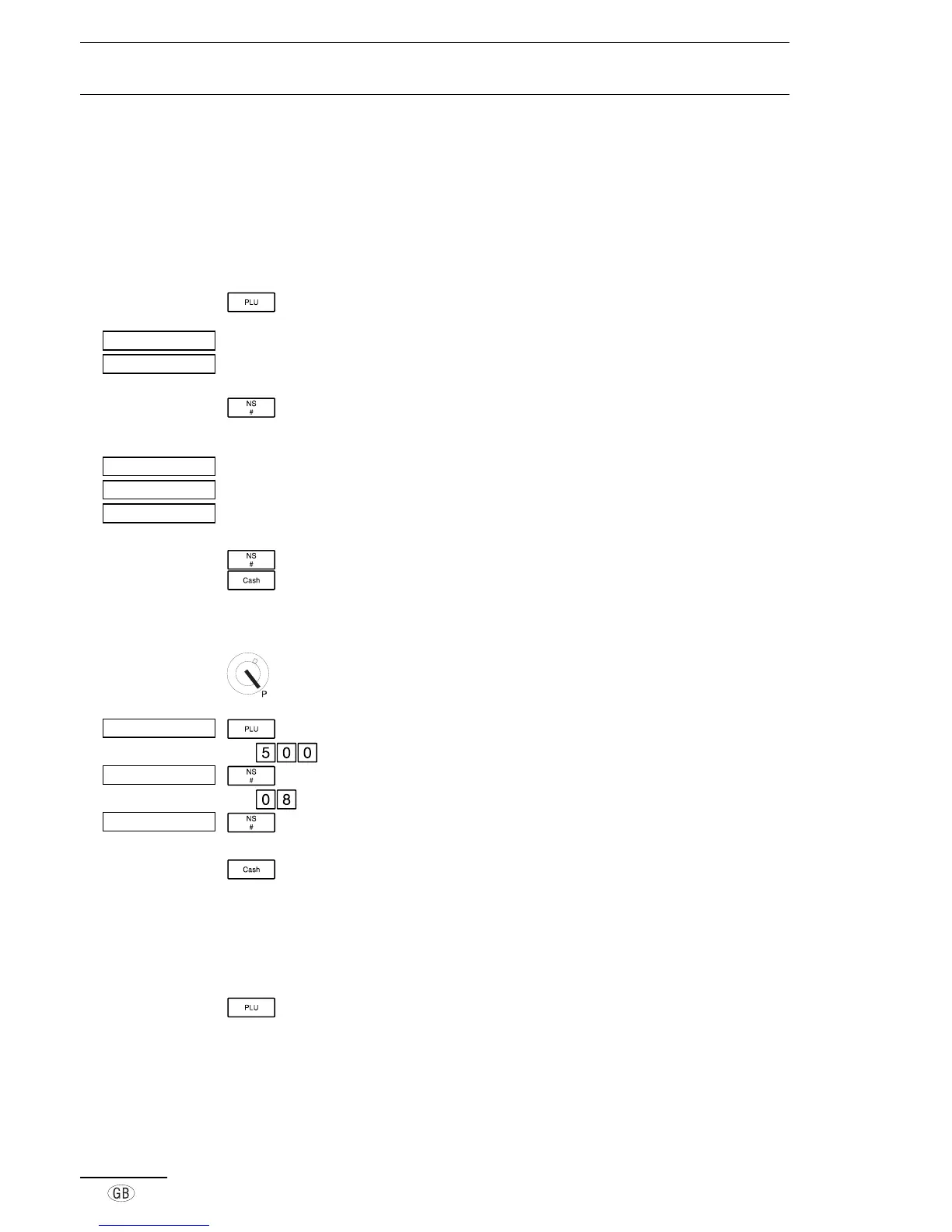
Define the price
Press the PLU key
Indicates the PLU number
Space for entering the price
Move to the next setting
Define the assignment
Indicates the PLU number
Indicates the assignment mode
Department assignment (01 to 12)
Store assignment
Close the PLU program
An example of a PLU is provided below:
Set key to position P
Open the PLU program
e.g.
Enter the fixed price
Store the fixed price
e.g. Enter the assignment (08 = department 8)
Store the assignment and move to the next PLU
number
Close the PLU program
■ Modifying and adding PLU numbers
Any specific PLU number can be modified or a new PLU number can be added.
Simply select the relevant PLU or one which has not yet been assigned and press the
key.
Then proceed as described above.
°°±º¯¯¯¯¯



 To Next Page