EasyManua.ls Logo

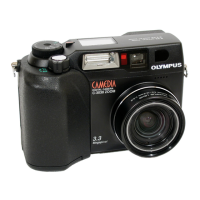
Olympus C-3020 Zoom - User Manual

Olympus C-3020 Zoom
206 pages
Print Icon
To Next Page IconTo Next Page
Loading...
Thank you for purchasing an Olympus digital camera. Before you
start to use your new camera, please read these instructions
carefully to enjoy optimum performance and a longer service life.
Keep this manual in a safe place for future reference.
We recommend that you take test shots to get accustomed to
your camera before taking important photographs.
REFERENCE MANUAL

Table of Contents

Questions and Answers

  • C
    Craig YatesJul 30, 2025
    Why is my Olympus C-3020 Zoom Digital Camera not working?
    • M
      Michael AguilarJul 30, 2025
      Your Olympus Digital Camera might not be working for several reasons: the power is off (set the mode dial to any position except OFF), the batteries are loaded incorrectly (reload them correctly), the batteries are exhausted (replace them), the batteries are too cold (keep them warm), it is connected to a computer (it will not operate while connected), or the camera is in sleep mode (operate the camera).
  • S
    Samantha PaulAug 5, 2025
    How to fix an Olympus C-3020 Zoom that won't turn on?
    • S
      Shelby KnightAug 5, 2025
      If your Olympus Digital Camera won't turn on, ensure that: the mode dial is not set to OFF, the batteries are correctly loaded, the batteries are not exhausted, the batteries are not too cold, it is not connected to a personal computer, and the camera is not in sleep mode. Try adjusting these settings to resolve the issue.
  • K
    Kristin GordonAug 11, 2025
    What to do if my Olympus C-3020 Zoom doesn't take pictures?
    • M
      michelle39Aug 11, 2025
      If your Olympus Digital Camera isn't taking pictures, it could be due to several reasons: the mode dial is set to the wrong position (set it to any position except ), the memory gauge is full (wait until there is room), the flash hasn't finished charging (wait until the orange lamp stops blinking), the card access lamp is blinking after shooting a movie (wait until it stops blinking), there's a problem with the card (see the error code chart), the card is full (replace it or delete unwanted pictures), the batteries are dead (replace them), the control panel indications disappear (replace the batteries), or there's no card in the camera (insert a new one).
  • M
    Michelle CookAug 17, 2025
    What to do if Olympus C-3020 Zoom Digital Camera buttons are unresponsive?
    • A
      Amy LopezAug 17, 2025
      If the function buttons on your Olympus Digital Camera are unresponsive, check if: the camera is powered on (mode dial not on OFF), batteries are correctly installed, batteries are charged, batteries are warm enough, the camera isn't connected to a computer, and the camera isn't in sleep mode. Try these solutions to restore functionality.
  • C
    Cheryl ThorntonAug 23, 2025
    Why won't my Olympus C-3020 Zoom Digital Camera take a picture when I press the shutter?
    • D
      Dawn RichardsonAug 23, 2025
      Your Olympus Digital Camera might not take a picture when you press the shutter button if: the mode dial is incorrectly set, the memory gauge is full, the flash is still charging, the card access lamp is blinking after movie recording, there is a problem with the card, the card is full, the batteries are dead, the control panel indications disappear, or the card is missing or write-protected. Please check these points.

Summary

Chapter 1 Getting started

Loading the batteries

Instructions for correctly inserting AA or CR-V3 batteries into the camera.

Card basics

Information on compatible SmartMedia cards and their contact/write-protect areas.

Chapter 3 Using the menus

MODE MENU functions (shooting)

Details on shooting-related functions accessible through the MODE MENU.

Chapter 4 Shooting basics

Shooting mode setting - Mode dial

Explanation of the different shooting modes available via the mode dial.

Focusing

Understanding autofocus operation and troubleshooting common focus issues.

Flash shooting

Guide to using various flash modes like Auto, Red-eye reduction, and Fill-in.

Chapter 5 Advanced shooting

Chapter 6 Adjusting image quality and exposure

Exposure compensation

Manually adjusting exposure brightness for brighter or darker images.

Chapter 7 Playback

Formatting SmartMedia removable memory cards

Preparing a SmartMedia card for use by initializing its file system.

Chapter 8 Useful Functions

Chapter 10 Transferring pictures to a computer

Connecting directly to a computer by cable

Steps for connecting the camera to a PC via USB cable.

Transferring images to a computer - Downloading

Copying image files from the camera to the computer.

Chapter 12 Miscellaneous

Troubleshooting

Common problems and their solutions, with reference page numbers.

Error codes

Explanations of error messages and their corresponding corrective actions.

Olympus C-3020 Zoom Specifications

General IconGeneral
Optical Zoom3x
Digital Zoom2.5x
Aperture Rangef/2.8 - f/11
ISO Range100 - 400
ISO SensitivityAuto, 100, 200, 400
Shutter Speed1/1000 - 8 sec
Image Sensor1/1.8 inch CCD
Effective Pixels3.2 million
Optical Sensor Resolution3.34 million
LensOlympus 3x zoom lens
Maximum Aperturef/2.8
LCD Monitor1.8 inch
Storage MediaSmartMedia
Image Resolution2048 x 1536
Focus RangeNormal: 0.5 m (1.6 ft) - infinity, Macro: 0.2 m (0.7 ft) - infinity

Related product manuals