6-6Pagina 6-6 di 57
MFOX04500910 FOX 45
6.4 Table adjustment procedures
6.4.1 Maximum pressure valve calibration
6.4.1.1 Control unit on board
1) Take the table to maximum height.
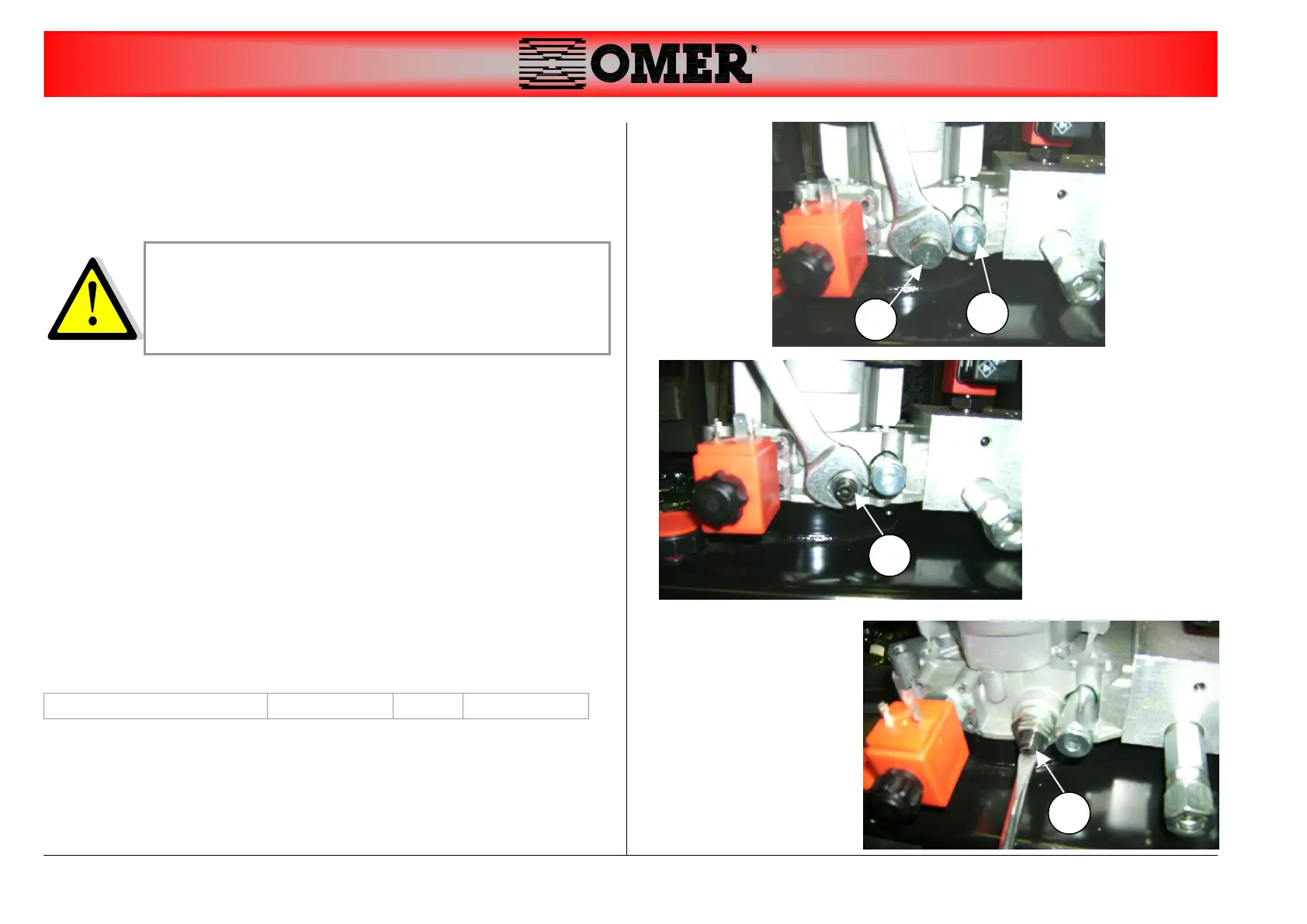
2) Connect a pressure gauge to the output (part. A)
3) Remove the cap nut (part. B)
4) Loosen the nut by turning two revolutions anticlockwise (part. C)
5) Adjust pressure with a screwdriver: (part. D)
Turn clockwise to increase calibration pressure
Turn anticlockwise to reduce calibration pressure
6) Keeping the up command pressed, check the pressure on the
pressure gauge.
7) If the pressure does not correspond to P, put the table in the
nearest mechanical safety position and repeat points 5 and 6
8) If pressure is equal to P, reassembly the nut loosened in point 4
and reassembly cap nut.
The calibration of the valve must be execute by
specialized people and authorized by the manufacturer.
After the calibration the valve must be sealed for example
with sealing wax.


 To Next Page