7
VESA 100
VESA 75
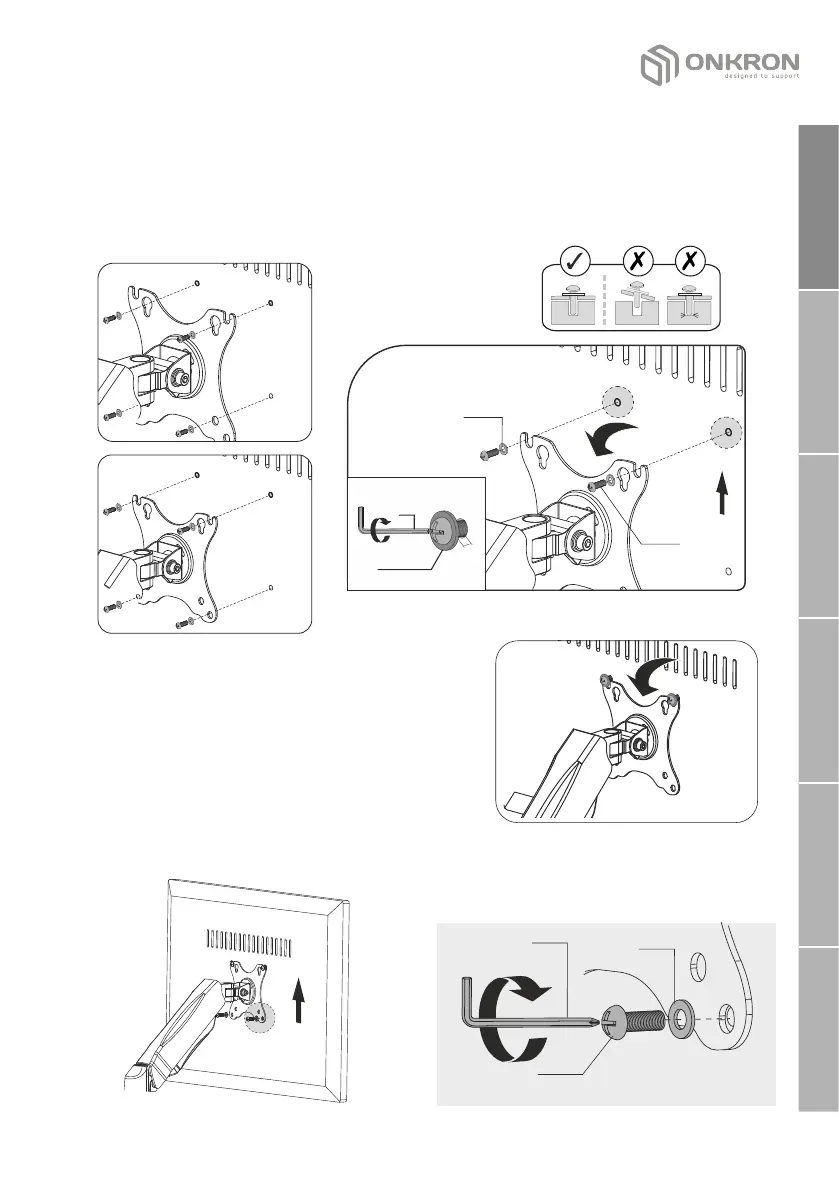
2. VESA panel installation to the monitor
Use M-A or M-B screws depending on the VESA hole size of the monitor. Use
the key (J) to screw the appropriate screws М-А or М-В and washers М-С
into the upper VESA holes of the monitor, without turning 3 mm (0.11") to
the surface of the monitor:
M-B
M-A
M-C
J
M-B
M-A
UP
џ Carefully install the monitor onto the
arm so that the screwed-in screws fall
into the upper grooves of the VESA
panel.
UP
M-B
M-A
M-C
J
џ Fix the screen to the lower holes of the
VESA panel with the two remaining
screws М-А or М-В and washers М-С
using the key (J).
3 mm
0.11"
English
Deutsche
Français
Italiano
Español
Русский


 To Next Page