9
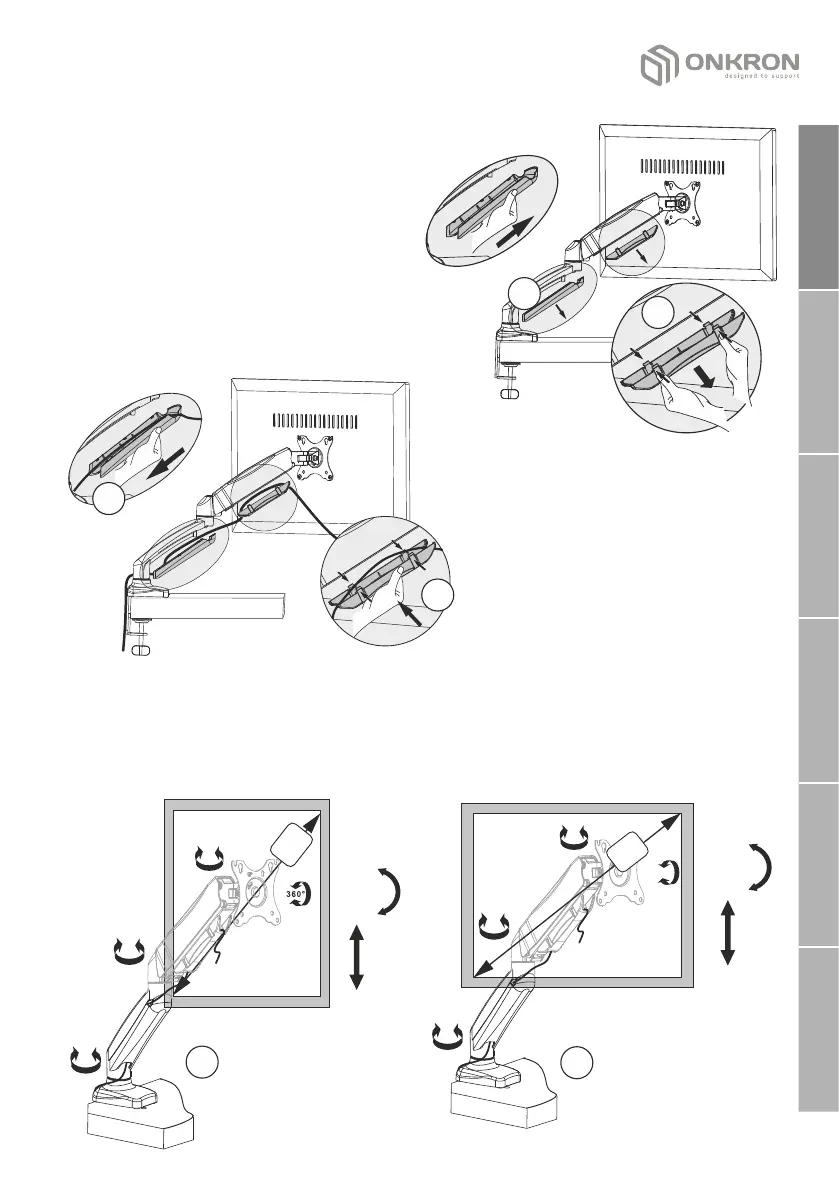
4. Cable management
4.1 Slide the bottom plastic cable
trunking up. Take it down.
4.2. Press lightly on the plugs of
the upper plastic cable trunking,
remove it.
5.3 Route the wires into the
niches of the plastic cable
ducts.
5.4 Place the lower cable duct
in p la c e, f ix in g i t w it h a
downward movement.
5.5 Install the top cable duct
using the latches.
4.1
4.2
4.4
4.5
5. Adjustment
• Set desirable position of the screen.
• Adjustment of the position of the screen of the maximum diagonal is
possible: portrait position (5.1), horizontal position (5.2).
32
5.2
+90°
-45°
360°
180°
360°
360°
32
5.1
+90°
-45°
360°
360°
180°
English
Deutsche
Français
Italiano
Español
Русский


 To Next Page