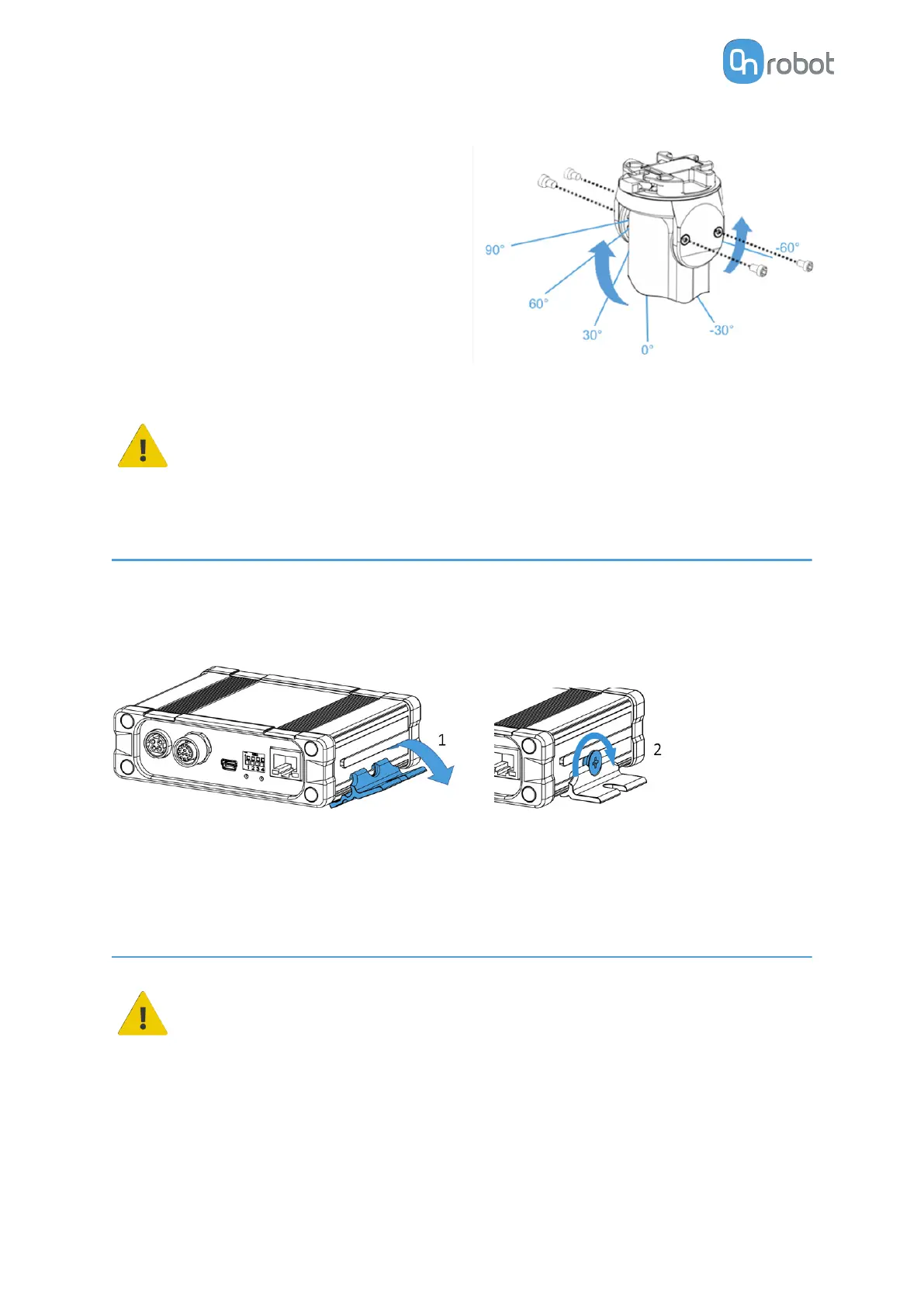
To change the relative angle of the gripper to
the Quick Changer:
•
first remove the four M4x6 screws
•
tilt the gripper between -60° and 90°
•
then put the four M4x6 screws back and
use 3.5 Nm tightening torque to
fix it.
WARNING:
Never use the device while any of the four M4x6 screws are removed.
4.3. Compute Box Mount
4.3.1. Optional - Clip-on Bracket
Optionally, fix the Compute Box to a surface using the provided Clip-on Brackets ( included
only from 17th December 2020).
Do the following on both sides of the Compute Box:
1. Hook the Clip-on Bracket to the rail on the side of the Compute Box and then flip it down.
2. Fasten the Clip-on Bracket with the plastic srew.
4.4. Wiring via Compute Box
DANGER:
Use only original OnRobot tool data cables.
Connect the following cables to wire the system:
•
Tool data cable between the tool(s) and the Compute Box
•
Ethernet cable between the robot controller and the Compute Box
•
Power supply of the Compute Box
HW INSTALLATION
13



 To Next Page