VG10 User Manual 1.1.0
Page 20 of 40
Manual control
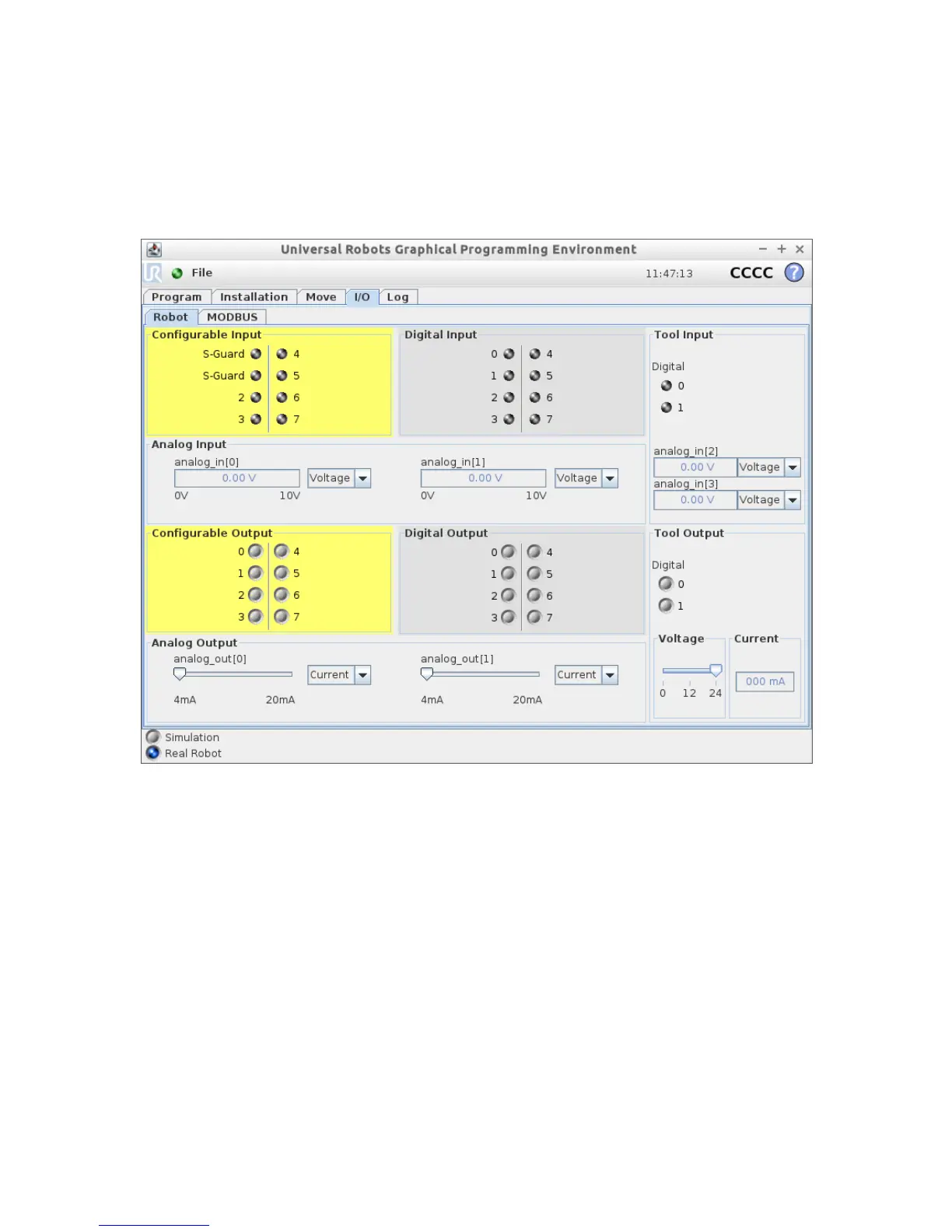
It is possible to use the VG10 completely without URCAP and script commands. This is
done by controlling the UR tool I/O directly, see UR tool I/O tab on the right side of
the screenshot below.
The UR I/O tab provides some basic manual features:
• TAI0 = Analog_in[2] = Vacuum in channel A (1V per 10% vacuum)
• TAI1 = Analog_in[3] = Vacuum in channel B (1V per 10% vacuum)
• TO0 = Tool_digital_out[0] = On/Off control channel A (vacuum preset to 60%)
• TO1 = Tool_digital_out[1] = On/Off control channel B (vacuum preset to 60%)
• TI0 = Tool_digital_input[0] = Vacuum present channel A (Vacuum > 40%)
• TI1 = Tool_digital_input[1] = Vacuum present channel B (Vacuum > 40%)
To use the basic manual features, the following must be observed:
• Tool digital I/O only works without the URCap installed
• The tool analog input range must be set to voltage [0-10V]
• The tool voltage must be set to 24V
• Reset the VG10 by turning the tool voltage off (0V) and then on again (24V)



 To Next Page