46
[Detection Area] (Default: H2)
There are 3 options, Horizontal Detection Area 1, Horizontal Detection Area 2 and Vertical Detection Area.
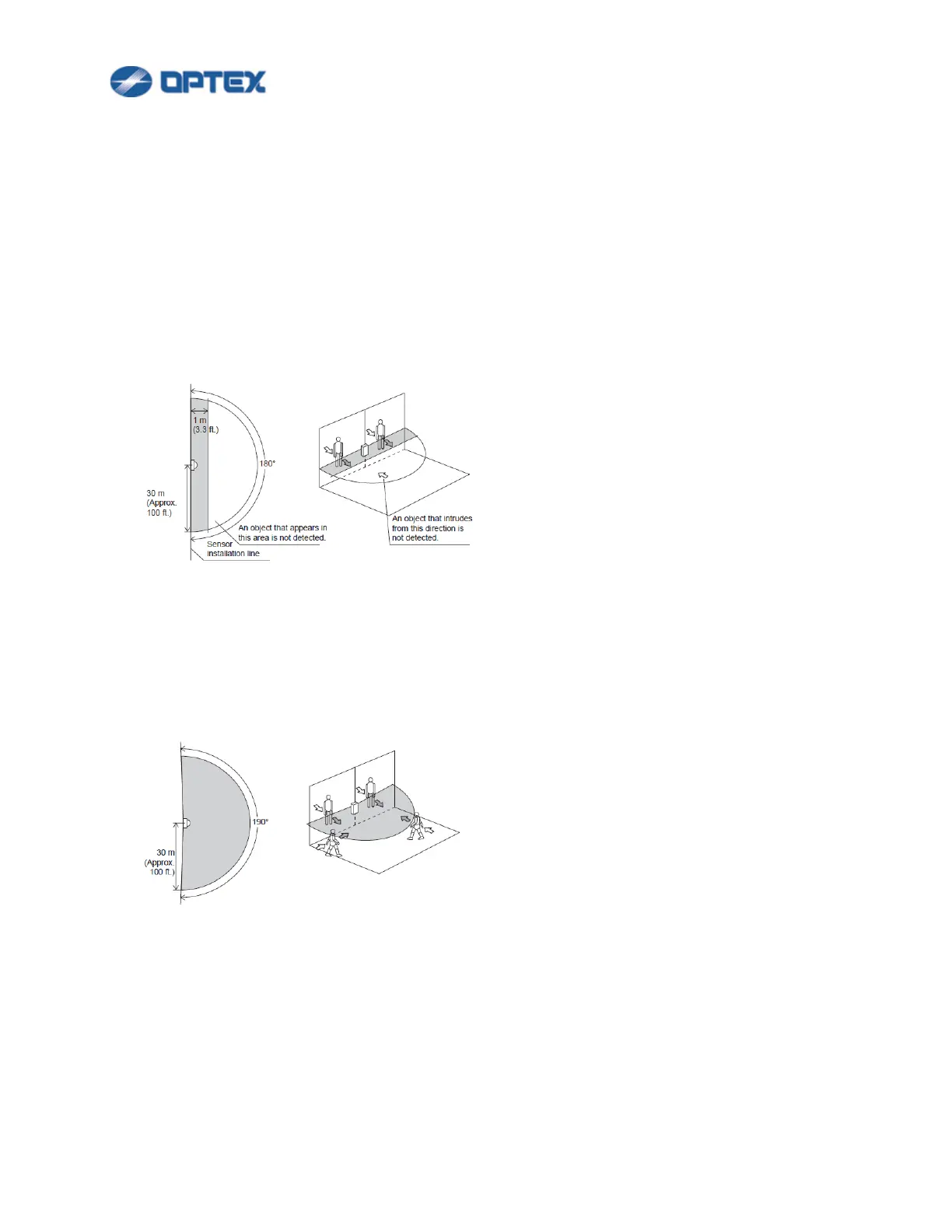
⚫ H1 (Horizontal Detection Area 1)
This mode allows setting of a fan-like detection area in the horizontal direction with a maximum radius
of 30 m (Approx.100 ft.), a spread angle of 180 degrees, and a width of 1 m (variable).
This mode detects intrusion of an object that appears from the rear side of the sensor or in a position
within 1 m (variable) from the sensor installation line and that moves toward the front of the sensor.
The Redscan will generate the alarm output 1 minute (variable) after the initial detection, so long as
the detected object stays in the detection area.
⚫ H2 (Horizontal Detection Area 2)
This mode allows setting of a fan-like detection area in the horizontal direction with a maximum radius
of 30 m (Approx. 100 ft.), a spread angle of 190 degrees.
This mode detects intrusion into the detection area from any direction.
The Redscan will generate the alarm output 1 minute (variable) after the initial detection, so long as
the detected object stays in the detection area.
⚫ Vertical (Vertical Detection Area)
This mode allows setting of a fan-like detection area in the vertical direction with a maximum radius of
30 m (Approx. 100 ft.), a spread angle of 180 degrees.
This mode creates a non detection area, 1.5 m (variable) immediately in front of the unit, in order to
avoid possible false alarms caused by birds or obstructions close to the unit.
Recommended installation height is from 4 m (Approx. 13 ft.) to 15 m (Approx. 50 ft.).



 To Next Page
 Loading...









