Intersection Equipment Installation Instructions
28
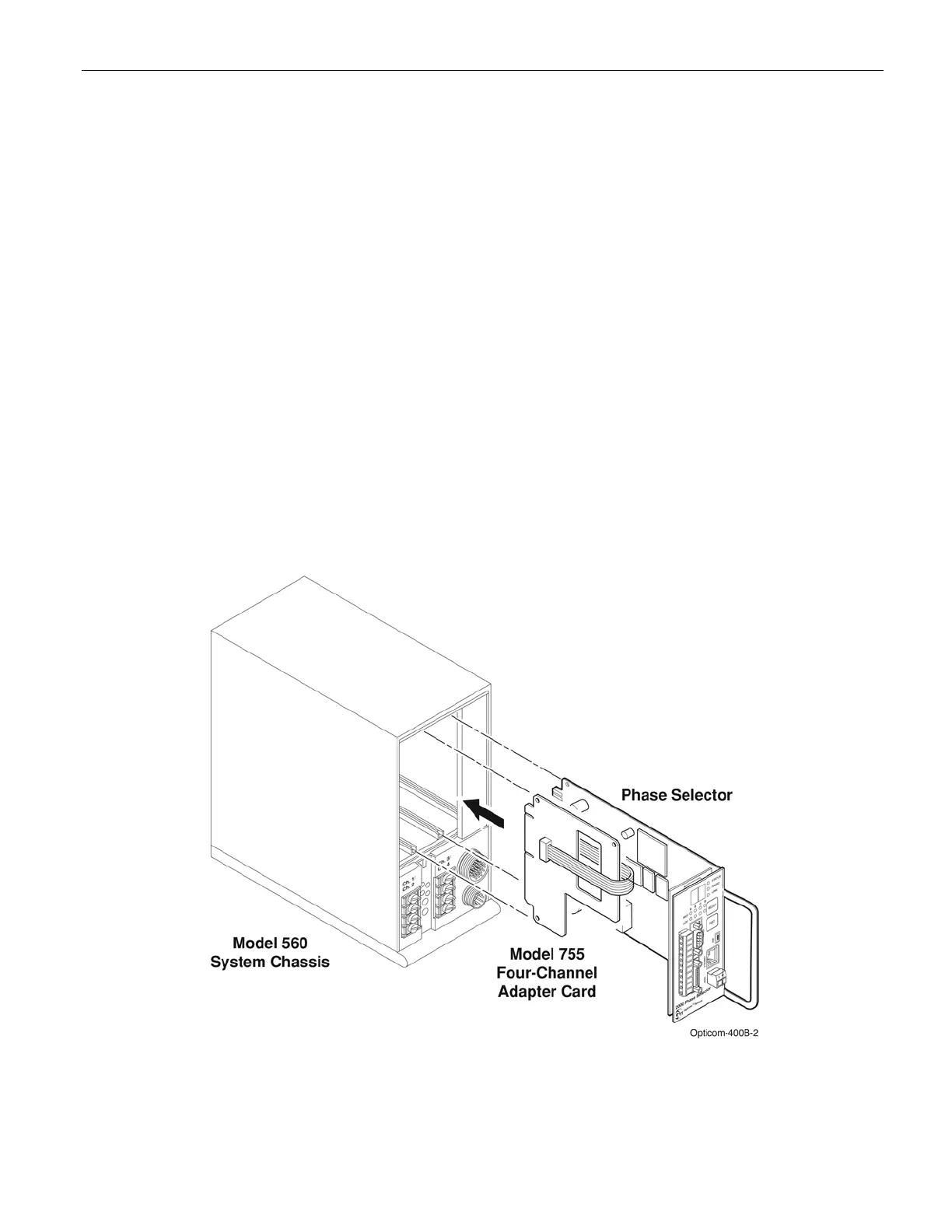
7 Model 755 Four Channel Adapter Card and Other Model Card Racks
If you are using your Model 764 phase selector in an existing model 360 or 560 system chassis or a NEMA
type card rack that is wired for two, two-channel phase selector, you will need to use a model 755 four-
channel adapter card.
The Model 360 and 560 system chassis have slots for two, two-channel phase selectors. The channel 1 and
2 IR detector inputs and preemption outputs are wired to one of these slots, and the channel 3 and 4 IR
detector inputs and preemption outputs are wired to the other slot.
The Model 755 four-channel adapter card is needed to connect the channel 1 and 2 detector inputs and
preemption outputs to the four channel phase selector.
1. Connect the ribbon cable from the model 755 four-channel adapter card to the black rectangular socket
on the phase selector. See Figure 7-1.
2. Slide the adapter card into the channel 1 / channel 2 slot of the Model 360 or 560 system chassis or the
NEMA type card rack, making sure it is fully seated.
3. Slide the phase selector into the channel 3 / channel 4 slot of the system chassis or card rack, making
sure it is fully seated.
Figure 7-1 Model 755 Adapter Card



 To Next Page