Connect another receiver.
4. LNB IN
Connect the satellite antenna cable.
5. ON/OFF
Power on/off.
6. LAN
Connect to the internet using an Ethernet cable.
7. SPDIF
Digital Audio output (Optical).
8. TV SCART
Connect to the TV using a Scart cable
9. HDMI
Connect to the TV using an HDMI cable.
10. USB2.0
USB 2.0 Host Port.
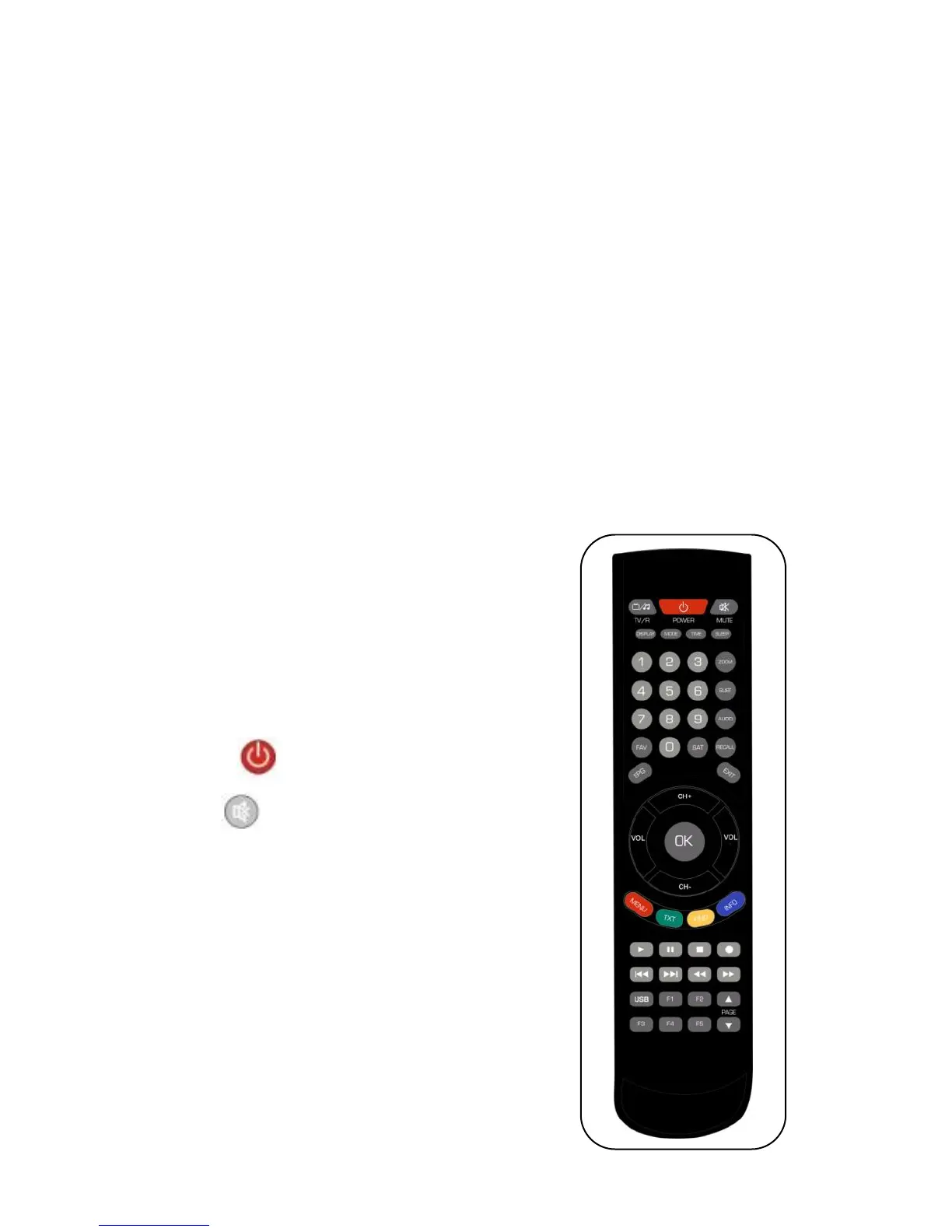
2.3 Remote Control Unit (RCU)
You can control this receiver by this remote
controller with full function.
1. TV/R: Switch between TV and RADIO.
2. POWER:
Switch between operation and standby modes.
3. MUTE: Mute audio.
4. DISPLAY: Set the HDMI mode.
5. MODE: Set the display format.
6. TIME: Setup event timer.
7. SLEEP: Set the sleep time.
8. NUMERIC KEY (0~9): Enter a TV/radio channel
number or menu option number.
9. ZOOM: Picture zooming function.
10. SUBT: Display available subtitle language list.
11. AUDIO: Display available audio list.



 To Next Page