2. Power button
Switch between operation and standby modes.
3. MENU Button
Activate the main menu in viewing mode.
4. Exit Button
Exit current menu one menu level per one pressing.
5. OK Button
Enters to the highlighted sub menu in menu mode or activates the channel list in
viewing mode.
[6,7]. VOL-/VOL+
Decrease / increase the volume in viewing mode and change settings in menu
mode.
[8,9]. CH-/CH+
Change channel in viewing mode and move the cursor up/down in menu mode.
Card reader: Insert Conax Smart Card with golden pins down
Common Interface: One slot for for Conditional Access Module (CAM)
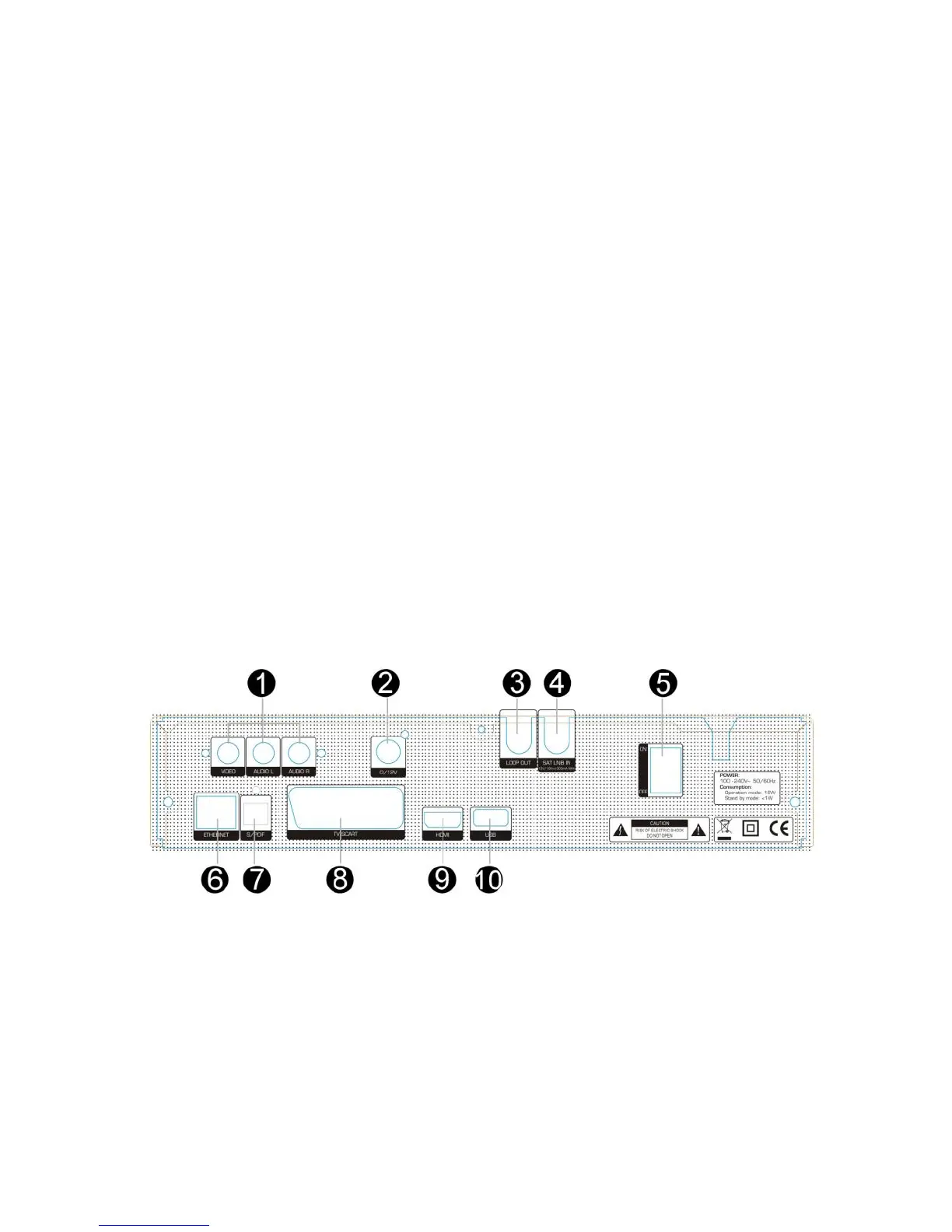
2.2 Rear Panel
Figure 3. Rear Panel
1 . AUDIO/ VIDEO OUT
Connect to the TV using a RCA cable.
2. 0/12V OUT
0/12V power output.
3. LOOP OUT



 To Next Page