© Orbotech 2005 Symbion™ Programmer Guide 57
Draft - Confidential
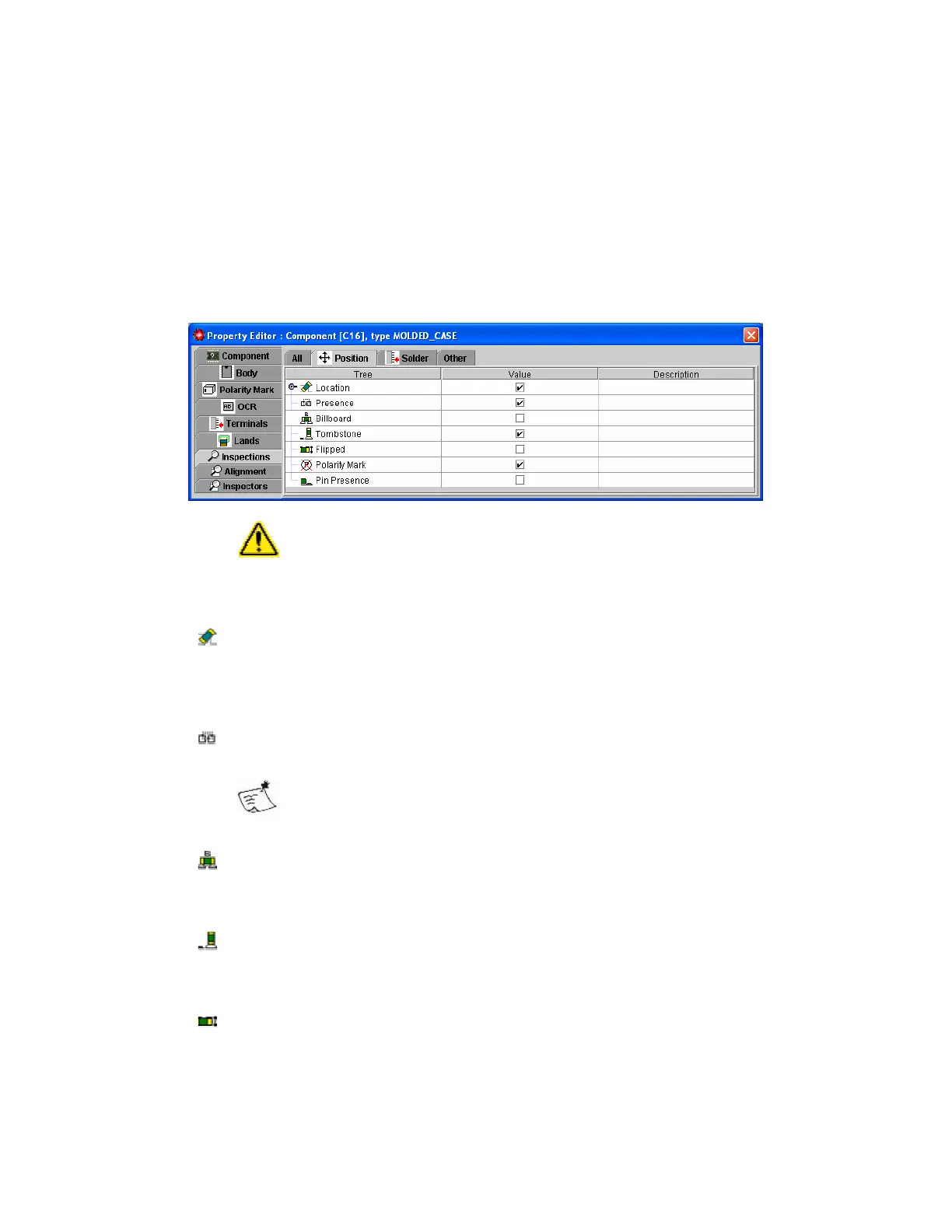
Setup for Position Inspection
Overview
The Property Editor provides a tab for Position inspections. In most cases
setup of the inspections is as simple as activating those required.
Inspections requiring more detailed setup are described in following sections.
Not all inspections described will be possible for all Inspection
Types
Possible Position inspections are;
• Location, reports an error when the component is detected as
improperly placed.
Inspection is on or off, and criteria for correct placement are determined by
the Location Model.
•
Presence, reports an error when the component is detected as not
fitted.
Depending on the Inspection Type the Presence error may also
be reported together with Billboard and Tombstone
Inspection is on or off, no other setup is required.
• Billboard, reports an error when the component is detected as being
placed on its side.
Inspection is on or off, no other setup is required.
• Tombstone, reports an error when the component is detected as being
placed on one end.
Inspection is on or off, no other setup is required.
• Flipped, reports an error when the component is detected as being
placed upside down.
Inspection is on or off, no other setup is required.



 To Next Page