© Orbotech 2005 Symbion™ Programmer Guide 83
Draft - Confidential
•
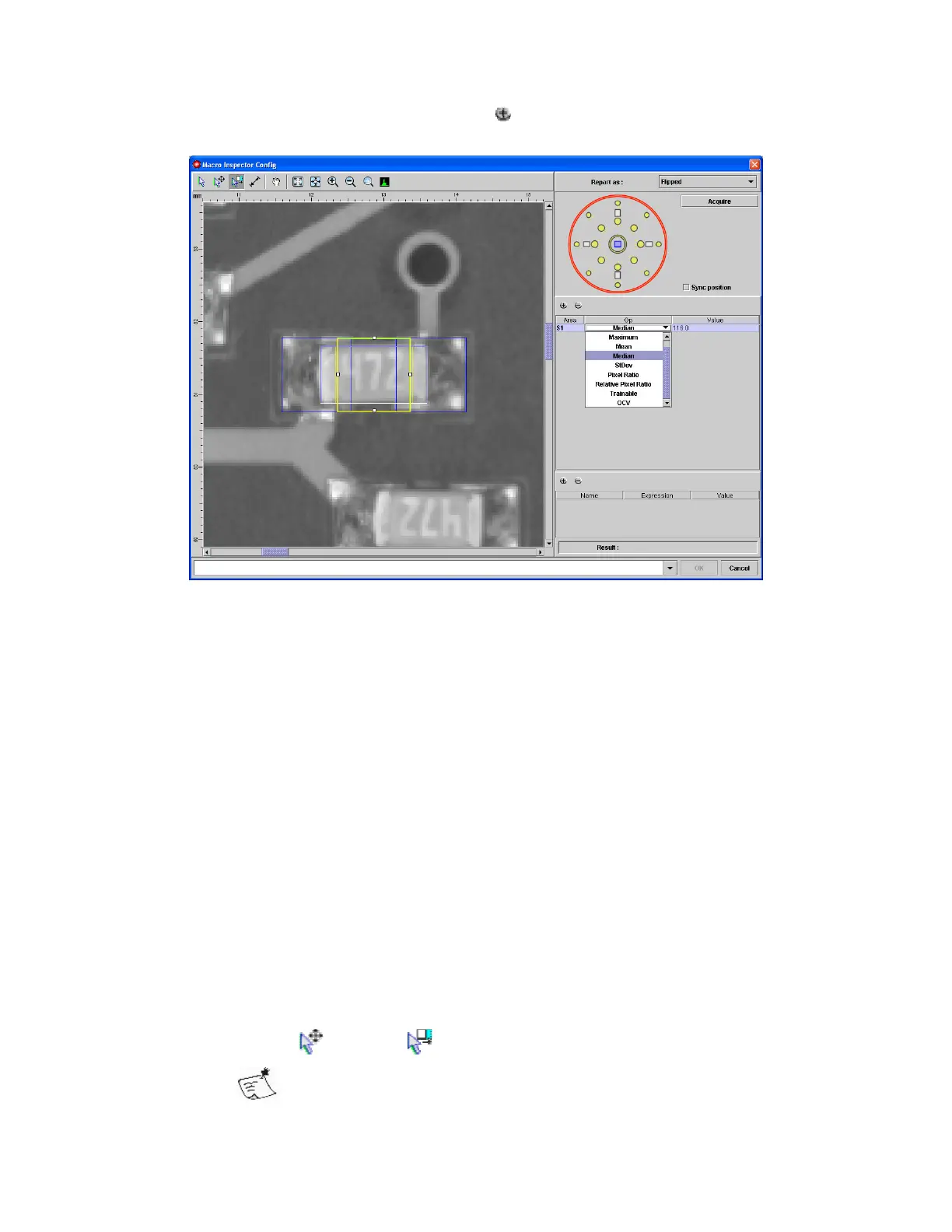
Add an area for analysis by clicking
in the Area panel (middle of the
right side)
• Once the area is added;
o Choose the lighting to be used
o Choose the operation from the Op field of the Area panel
Minimum
R
eturns the minimum brightness value
Maximum
Returns the maximum brightness value
Mean
The sum of all pixel values, divided by the
number of pixels measured
Median
The brightness value below which half the
measured pixels fall
StdDev
Returns the standard deviation (measure of
spread of values)
Pixel Ratio
Returns the ratio of pixels between a pair of
values specified in Pars
Relative Pixel Ratio
Returns the ratio of pixels between a pair of
values specified in Pars offset by the Mean
Trainable
Returns the certainty of a match with learned
examples, see Trainable Macro
OCV
Returns the certainty of a match with a
learned example of text, see OCV Macro
o
Move or Resize the area as necessary
If the area is resized, any subsequent area added will be the
same size initially.


 To Next Page
 Loading...