MATE/MATE2 Screens
76 900-0009-01-00 Rev C
STAT Screens
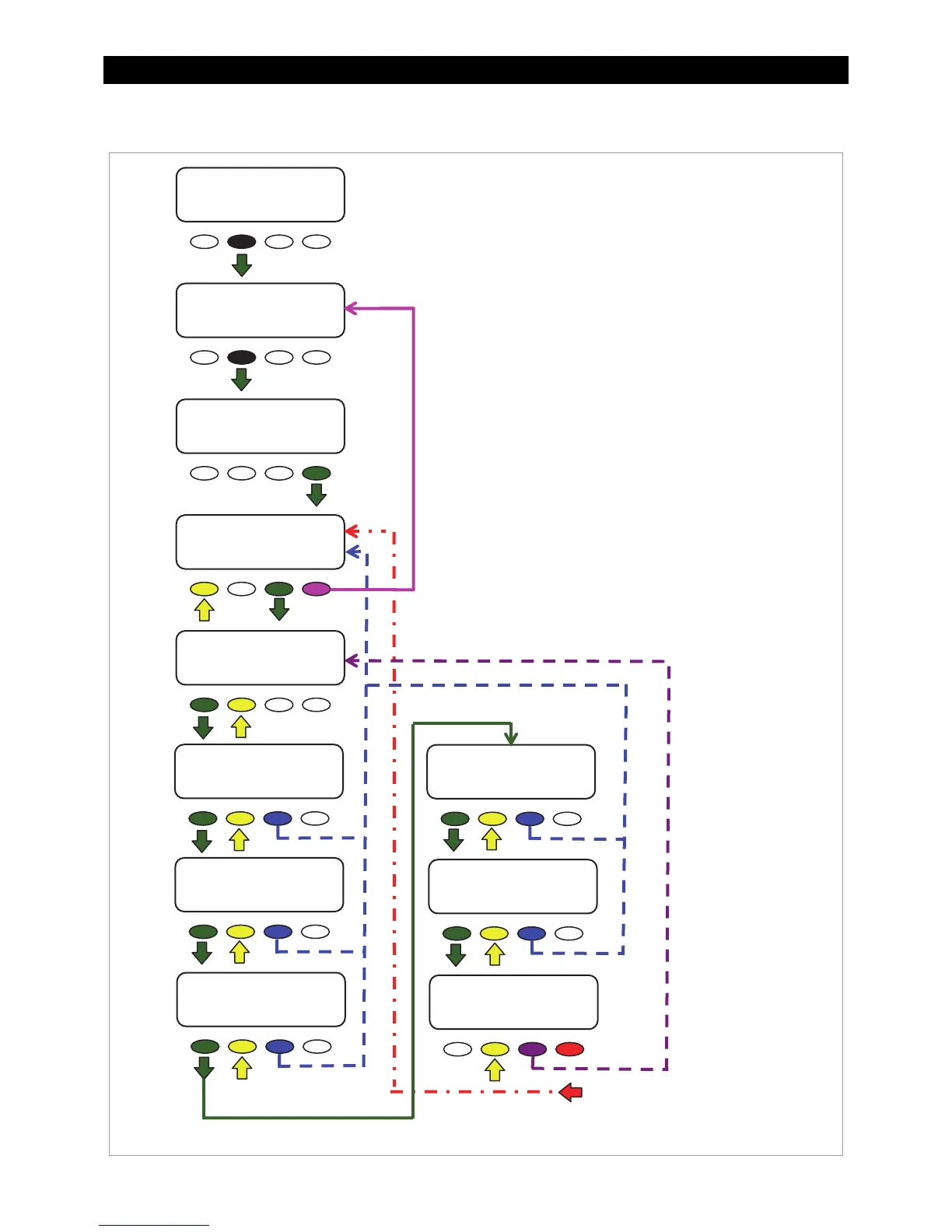
Figure 85 STATUS STAT Screens
Navigation for STATUS/CC/STAT
<STATUS>
returns to the
CC/PAGE2
screen.
<DOWN>
moves to the next menu item in
the diagram.
<UP>
moves to the previous menu item in
the diagram.
<TOP>
returns to the
CC/STAT/PAGE2
screen for the port shown, with the
exception of the “end of the cc stats” menu.
From the “end” menu, the
<TOP>
soft key
returns to the 1
st
CC/STAT
screen.
<PORT>
directs the MATE to read the next
device (port) on the HUB.
STATUS/CC/STAT----P00
end of cc stats menu
UP TOP STATUS
STATUS----------------
choose device
FX CC DC MAIN
MAIN------------------
1:35:04p
SUM STATUS SETUP ADV
STATUS/CC/PAGE1
MODE METER SETPT PG2
STATUS/CC/PAGE2-------
PG1 LOGS STAT MAIN
STATUS/CC/STAT-----P00
maximum battery
15.1 Vdc
DOWN UP PORT
STATUS/CC/STAT-----P00
voc 21.0 vdc
DOWN UP TOP PORT
STATUS/CC/STAT-----P00
max voc 21.0 vdc
DOWN UP TOP PORT
STATUS/CC/STAT-----P00
maximum wattage
400 W
DOWN UP TOP PORT
STATUS/CC/STAT-----P00
total kWH DC
307
DOWN UP TOP PORT
STATUS/CC/STAT-----P00
total kAH
25.6
DOWN UP TOP PORT
Charge Controller Stats
The STAT screens contain historical data for the
FLEXmax, including peak voltages, peak wattage,
and total accumulations. (See page 55.)
maximum battery Vdc:
voc:
max voc:
maximum wattage:
total kWH DC:
total kAH



 To Next Page