2. Preparation
18
For assistance, please contact an authorized Panasonic dealer.
2 Preparat ion2For assistance, plea se contact an auth orized Panasonic deal er.Connections and Setup
2.1 Connections
Caution:
L When you operate this product, the power outlet
should be near the product and easily
accessible.
Note:
L If any other device is connected to the same
telephone line, this unit may disturb the network
condition of the device.
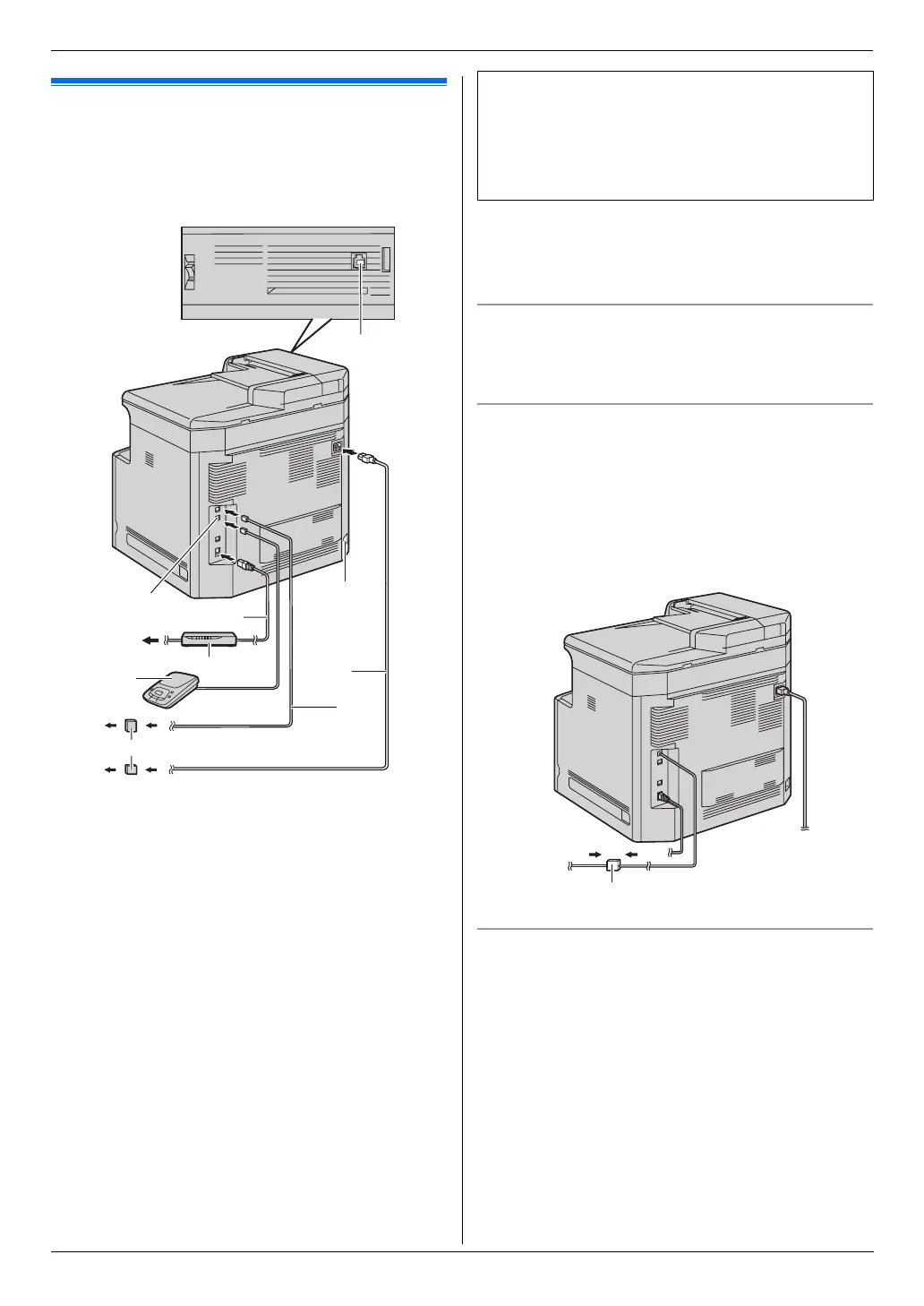
Using surge protectors
L The warranty does not cover damage due to power
line surges or lightning. For additional protection, we
recommend using a surge protector (j).
If the unit shares a single telephone line with a DSL
service
Fax transmission/reception may be disturbed, noise
interference may be heard during telephone
conversations, or Caller ID (page 56) may not function
properly. Please attach a DSL filter (k) to the telephone
line cord of the unit to prevent this. A DSL filter is
provided by your DSL service provider.
Using network router/network hub
L We recommend using network routers/network hubs
(6) under secure network environments. Consult
your network administrator for firewall settings, etc.
L The warranty does not cover damage due to security
problems or any disadvantages relating to it.
1 Power cord
L Connect to a power outlet
(120 V, 60 Hz).
2 Telephone line cord
L Connect to a single telephone line jack (RJ11).
3 [EXT] jack
L You can connect an answering machine or an
extension telephone. Remove the stopper if
attached.
4 Answering machine (not supplied)
5 To the internet
6 Network router/Network hub (not supplied)
L Also connect networked computers.
7 LAN cable (not supplied)
L To assure continued emission limit compliance,
only use a shielded LAN cable (category 5
straight cable).
8 Handset unit (optional) connection jack
L You can connect the optional handset unit (page
82). Remove the cover if attached.
9 Automatic duplex unit (optional) connector
1
5
3
6
9
j
2
4
7
8
IMPORTANT NOTICE FOR THE USB
CONNECTION
L DO NOT CONNECT THE UNIT TO A
COMPUTER WITH THE USB CABLE UNTIL
PROMPTED BY THE MULTI-FUNCTION
STATION (page 25).
k












 To Next Page