1. Introduction and Installation
8
For assistance, please contact an authorized Panasonic dealer.
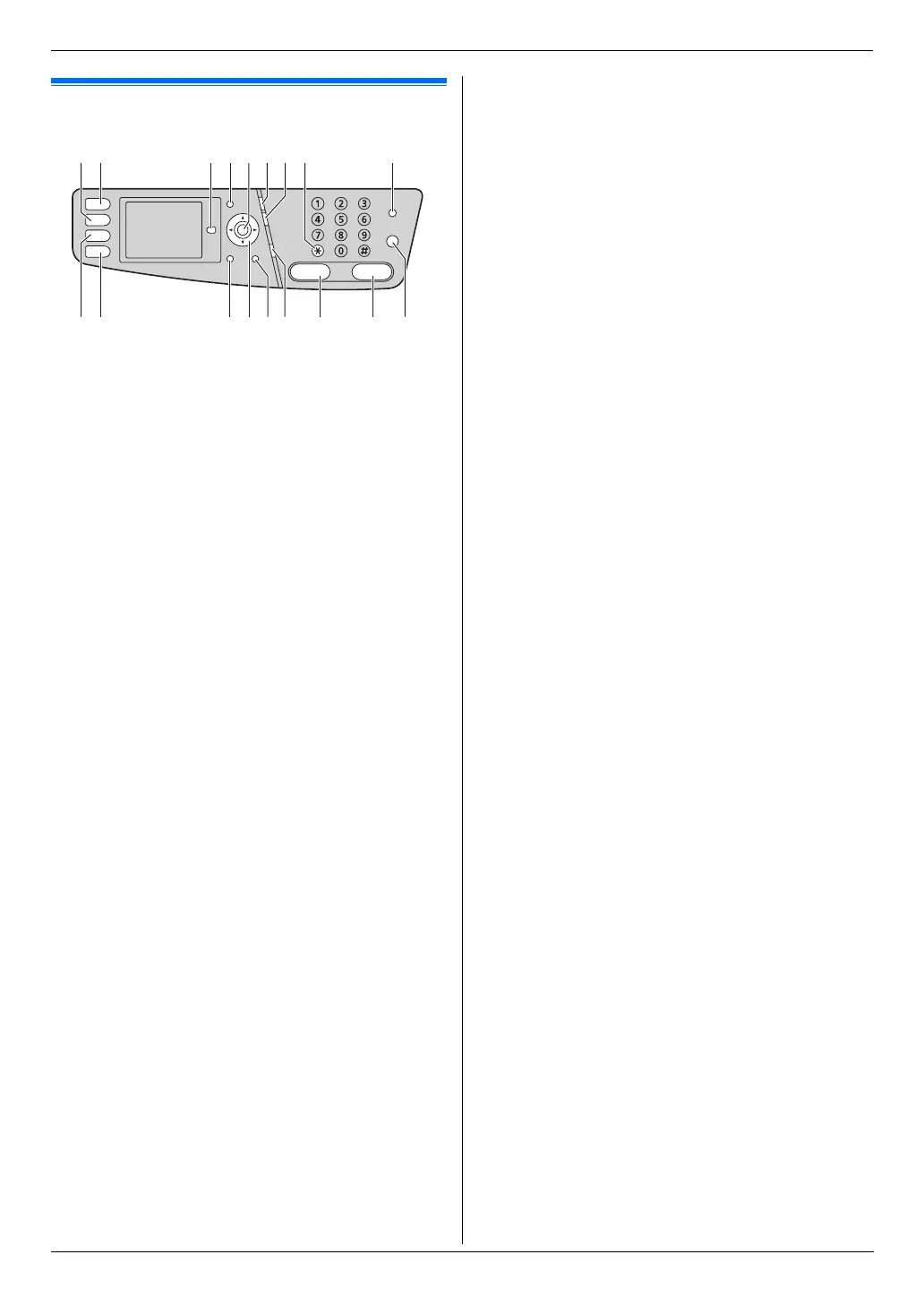
Finding t he Controls
1.3 Button descriptions
A {Copy}
L To switch to copy mode (page 20, 40).
B {Scan}
L To switch to scan mode (page 20, 35).
C {Advance}
*1
L To switch to the basic/advance settings.
D {Menu}
L To start or exit programming.
E {Set}
*1
L To store a setting during programming.
F {Redial}{Pause}
L To redial the last number dialed. If the line is busy
when you send a fax, the unit will automatically
redial the number 1 time.
L To insert a pause during dialing.
G {Flash}
L To access special telephone services or for
transferring extension calls.
H {Tone}
L To change from pulse to tone temporarily during
dialing when your line has rotary/pulse service.
I {Fax Auto Answer}
L To turn the auto answer setting ON/OFF (page
50).
J {Fax}
L To switch to fax mode (page 20, 45).
K {Print}
L To switch to print mode (page 20, 31, 33).
L {Back}
*1
L To return to the previous display.
L To erase a character/number.
M Navigator key
*1
L To select desired settings.
L To adjust the volume (page 22).
L To search for a stored item (page 47).
N {Caller ID}
L To use Caller ID features (page 56).
O {Monitor}
L To initiate dialing.
When you press {Monitor} while receiving a call,
you will be able to hear the other party, but the
other party will not be able to hear you.
P {Black}
L To copy a document in monochrome (page 40).
L To scan a document in monochrome (push scan)
(page 35).
L To print a document in monochrome (direct print)
(page 31, 33).
L To send or receive a fax (page 45, 50).
L To print a received fax document (page 52).
Q {Color}
L To copy a document in color (page 40).
L To scan a document in color (push scan) (page
35).
L To print a document in color (direct print) (page
31, 33).
R {Stop}
L To stop an operation or programming session.
*1 See page 9 for details.
A
J K ML NO RP Q
HB C D IFE G












 To Next Page