Installation
14
For fax advantage assistance, call 1-800-435-7329.
Recording paper
Letter, legal or A4 size recording paper can be loaded. The unit can hold up to 100 sheets of 75 g/m
2
(20
lb.) paper. You may use 60 g/m
2
to 90 g/m
2
(16 lb. to 24 lb.) paper. See the note for paper specifications
on page 84. For superior results, we recommend Hammermill
®
Jet Print paper.
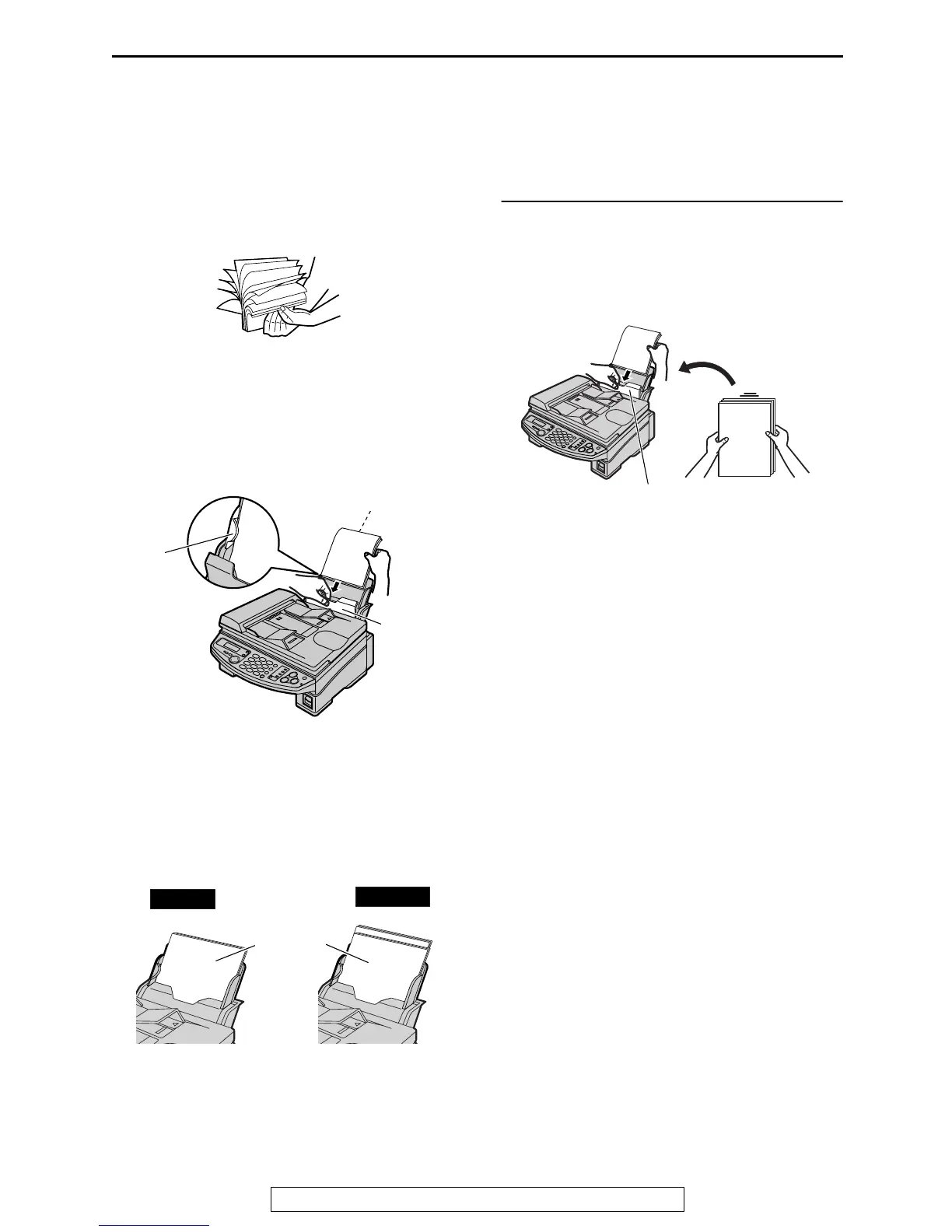
1
Fan the stack of paper to prevent a paper
jam.
2
Pull the tension plate forward and hold
open while inserting the paper.
L The paper should not be over the tab.
L If the paper is not inserted correctly,
readjust the paper, or the paper may
jam.
To add paper
1. Pull the tension plate forward and hold open
while removing all of the installed paper.
2. Add paper to the stack of paper you removed
and straighten.
3. Fan the stack of paper.
4. Pull the tension plate forward and hold open
while inserting the paper.
Tension
plate
Tab
Side to be printed
face down.
Stack of
paper
Correct
Incorrect
Tension plate











 To Next Page