Cleaning
76
For fax advantage assistance, call 1-800-435-7329.
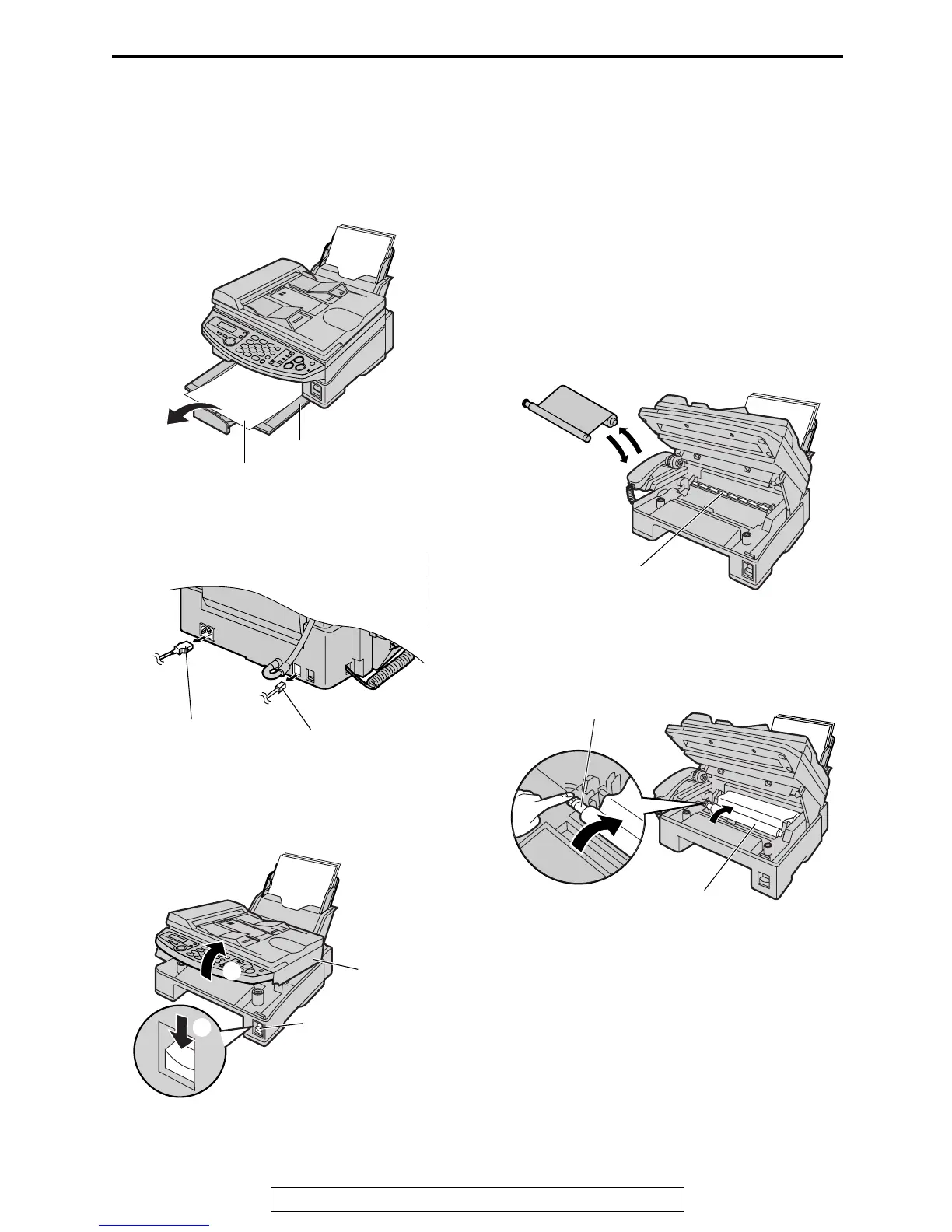
Thermal head and roller shaft
If smudges or black/white bands appear on a copied or received document, check whether there is dust
on the thermal head and roller shaft, and clean the thermal head and roller shaft to remove the dust.
1
If ejected paper is stacked on the paper
stacker, remove it.
2
Disconnect the power cord and the
telephone line cord.
3
Press down the printer cover open button
(1). Open the printer cover (2).
4
Remove the ink film and clean the thermal
head with a cloth moistened with isopropyl
rubbing alcohol, and let it dry thoroughly.
Replace the ink film.
Caution:
L
LL
L To prevent a malfunction due to
static electricity, do not use a dry
cloth and do not touch the thermal
head directly.
5
Turn the gear of blue core in the direction of
the arrow.
Paper stacker
Ejected paper
Power cord
Telephone
line cord
Printer
cover
Printer cover
open button
1
2
Thermal head
Gear of blue core
Ink film











 To Next Page