Sending Faxes
44
Documents you can send
Using the auto document feeder
Note:
L Remove clips, staples or other similar fasteners.
L Do not send the following types of documents: (Use the scanner glass for fax transmission.)
– Chemically treated paper such as carbon or carbonless duplicating paper
– Electrostatically charged paper
– Badly curled, creased or torn paper
– Paper with a coated surface
Using the scanner glass
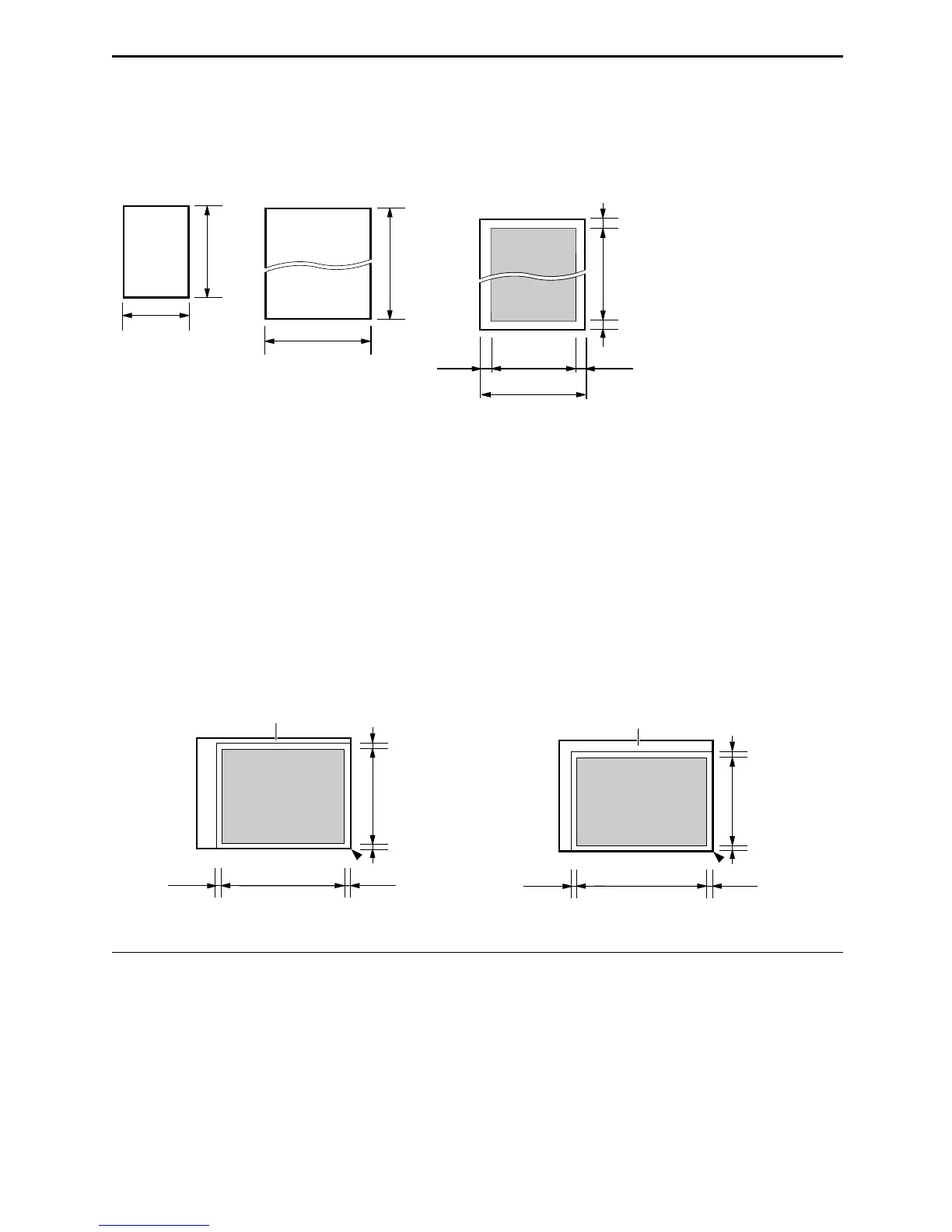
Effective scanning area on the scanner glass changes depending on the paper size setting (feature #16
on page 60).
Note for the auto document feeder and the scanner glass
L Check that ink, paste or correction fluid has dried completely.
L Do not send the following types of documents: (Use copies for fax transmission.)
– Paper with a faint image
– Paper with printing on the opposite side that can be seen through the other side (i.e. newspaper)
L To transmit the document with a width of less than standard A4 size (210 mm), we recommend
transmitting the document using the scanner glass.
Minimum size Maximum size Effective scanning area Document weight
L Single sheet:
45 g/m
2
to 90 g/m
2
(12 lb. to 24 lb.)
L Multiple sheets:
60 g/m
2
to 75 g/m
2
(16 lb. to 20 lb.)
When the paper size is set to “LETTER”: When the paper size is set to “A4”:
128 mm
(5")
182 mm
(7
3
/
16
")
600 mm
(23
5
/
8
")
216 mm
(8
1
/
2
")
Document width 216 mm (8
1
/
2
")
208 mm (8
3
/
16
")
4 mm 4 mm
4 mm
4 mm
Scanned
area
208 mm
(8
3
/
16
")
271
mm
(10
11
/
16
")
4 mm 4 mm
Scanned
area
4 mm
4 mm
Scanner glass
202 mm
(7
15
/
16
")
288
mm
(11
3
/
8
")
5 mm 4 mm
Scanned
area
4 mm
4 mm
Scanner glass











 To Next Page