Sending Faxes
43
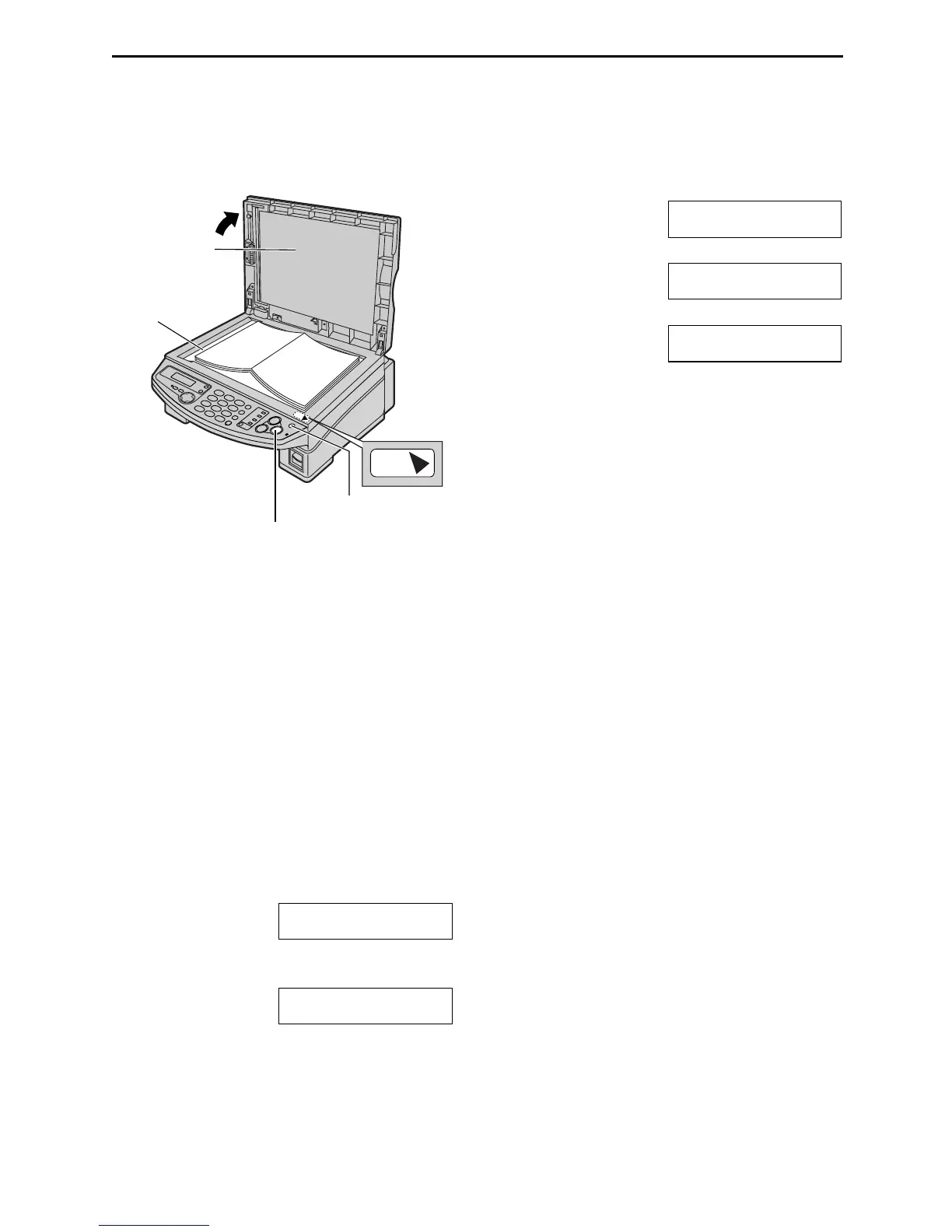
Sending a fax manually using the scanner glass
By using the scanner glass, you can send a page from booklets or small sized paper that cannot be sent
with the auto document feeder.
1
Confirm that there are no documents in the
auto document feeder.
Open the document cover.
2
Place the document FACE DOWN on the
scanner glass, aligning the top edge of the
document to the t mark on the unit.
3
Close the document cover.
L If the original is a thick book, do not
close the document cover.
4
If necessary, press {
{{
{RESOLUTION}
}}
}
repeatedly to select the desired resolution
(page 41).
5
Dial the fax number.
Example:
TEL=5678901
6
Press {
{{
{FAX/START}
}}
}.
PUT DOC ON GLASS
PRESS START
L Confirm that the document is placed
correctly on the scanner glass.
7
Press {
{{
{FAX/START}
}}
}.
Example: PAGES=01 01%
STANDARD
u
NEXT DOCUMENT
PRESS START
b
NEXT DOCUMENT
OR WAIT TO SEND
L To send a single page, wait for the fax
machine to start sending.
L To send multiple pages, place the next
page on the scanner glass and press
{
{{
{FAX/START}
}}
}.
To send more pages, repeat this
operation. When you finish scanning all
pages, wait for the fax machine to start
sending.
TOP
Document
cover
Scanner glass
{RESOLUTION}
{FAX/START}











 To Next Page