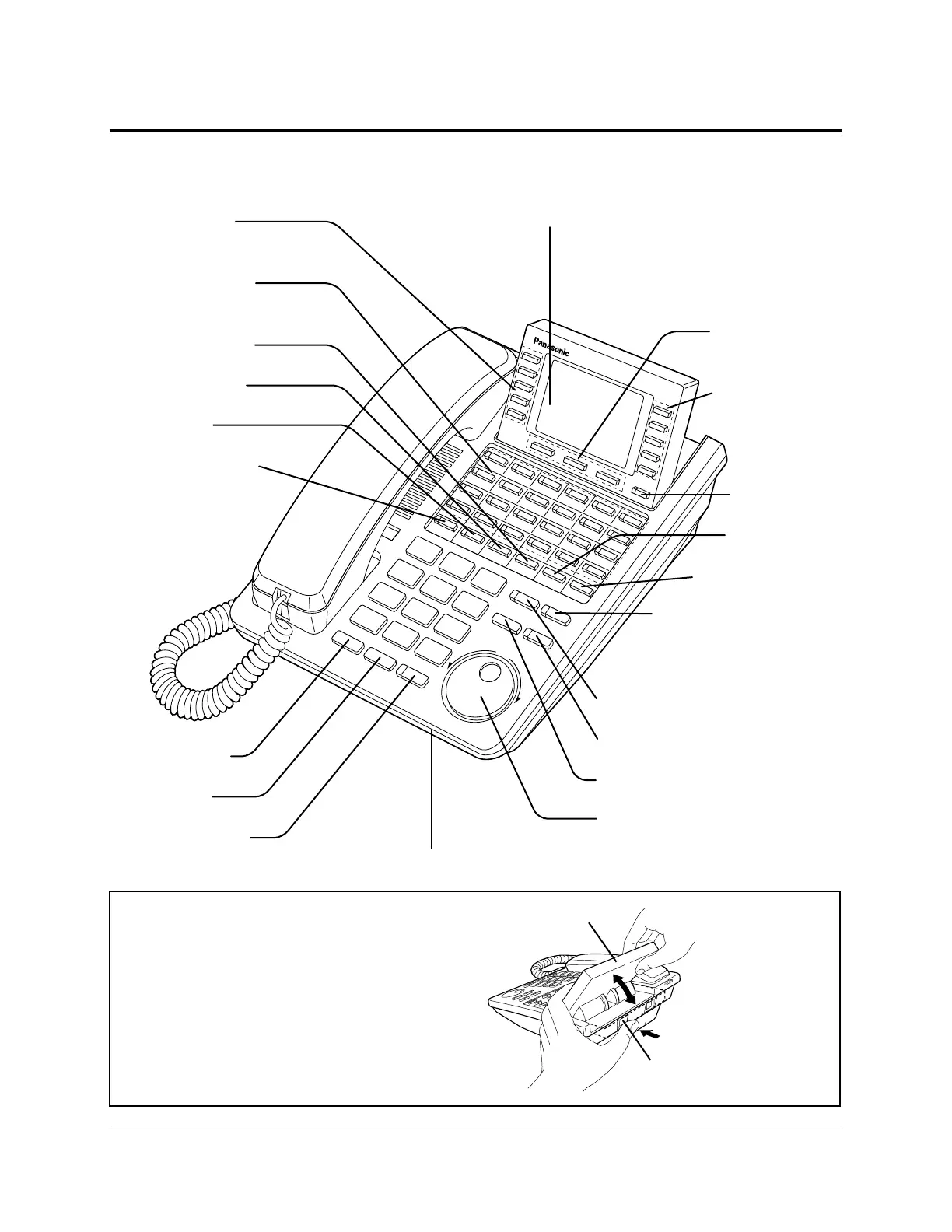
AUTO DIAL/STORE Button
AUTO ANSWER/MUTE Button
FLASH/RCL Button
Jog Dial
REDIAL Button
HOLD Button
SP-PHONE Button
Microphone
Function Buttons
(F1 through F5)
Flexible CO Buttons
(CO lines 01 through 24)
PROGRAM Button
FWD/DND Button
CONF Button
INTERCOM Button
Soft Buttons
(S1 through S3)
Function Buttons
(F6 through F10)
MESSAGE Button
SHIFT Button
PAUSE Button
TRANSFER Button
Display (Liquid Crystal Display)
With 24-character/6-line readout:
Shows the date, time, dialed number or name,
call duration time, etc. In Programming mode,
it shows the programming messages.
■ KX-T7436
To lift or set down the display:
– To lift the display
1 Press the LCD ADJ button.
2 Lift up the display.
– To set down the display
1 Press the LCD ADJ button.
2 Press down the display.
LCD ADJ button
LCD








 To Next Page