Supplying Power
io], _1 _[,[:14 a[:]l ;]_i | (:-] ivl _T_ :l
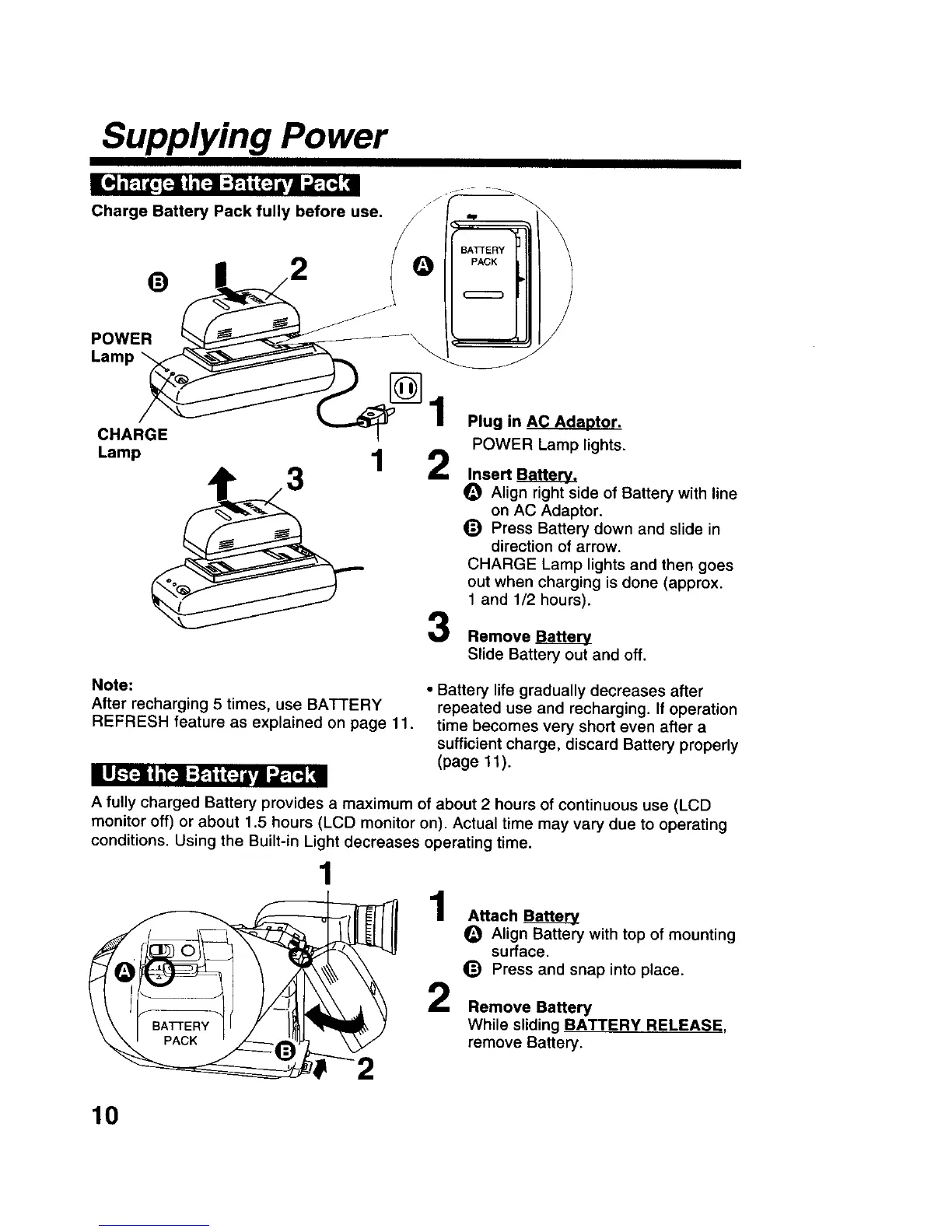
Charge Battery Pack fully before use. J ,.
BATTERY
Lamp/_
CHARGE
Lamp 1
_) Press Battel
direction of
CHARGE Lam[
out when charg
1 and 1/2 hours).
Remove
Plug in AC Adaotor.
POWER Lamp lights.
Align right side of Battery with line
on AC Adaptor.
(_) Press Battery down and slide in
direction of arrow.
CHARGE Lamp lights and then goes
out when charging is done (approx.
Slide Battery out and off.
Note:
After recharging 5 times, use BATTERY
REFRESH feature as explained on page 11.
111--[4 i =[:-! :F:1i (N/Vl :AET-_:ll
• Battery life gradually decreases after
repeated use and recharging. If operation
time becomes very short even after a
sufficient charge, discard Battery properly
(page 11).
A fully charged Battery provides a maximum of about 2 hours of continuous use (LCD
monitor off) or about 1.5 hours (LCD monitor on). Actual time may vary due to operating
conditions. Using the Built-in Light decreases operating time.
f
1
1 AttachBa__a___
Align Battery with top of mounting
O surface.
_) Press and snap into place.
2 Remove Battery
BATTERY While sliding BATTERY RELEASE,
remove Battery.
10











 To Next Page