Camera Recording
Before you begin...
• Connect Camcorder to power source,
• Insert cassette with record tab (page 13),
3
1
5
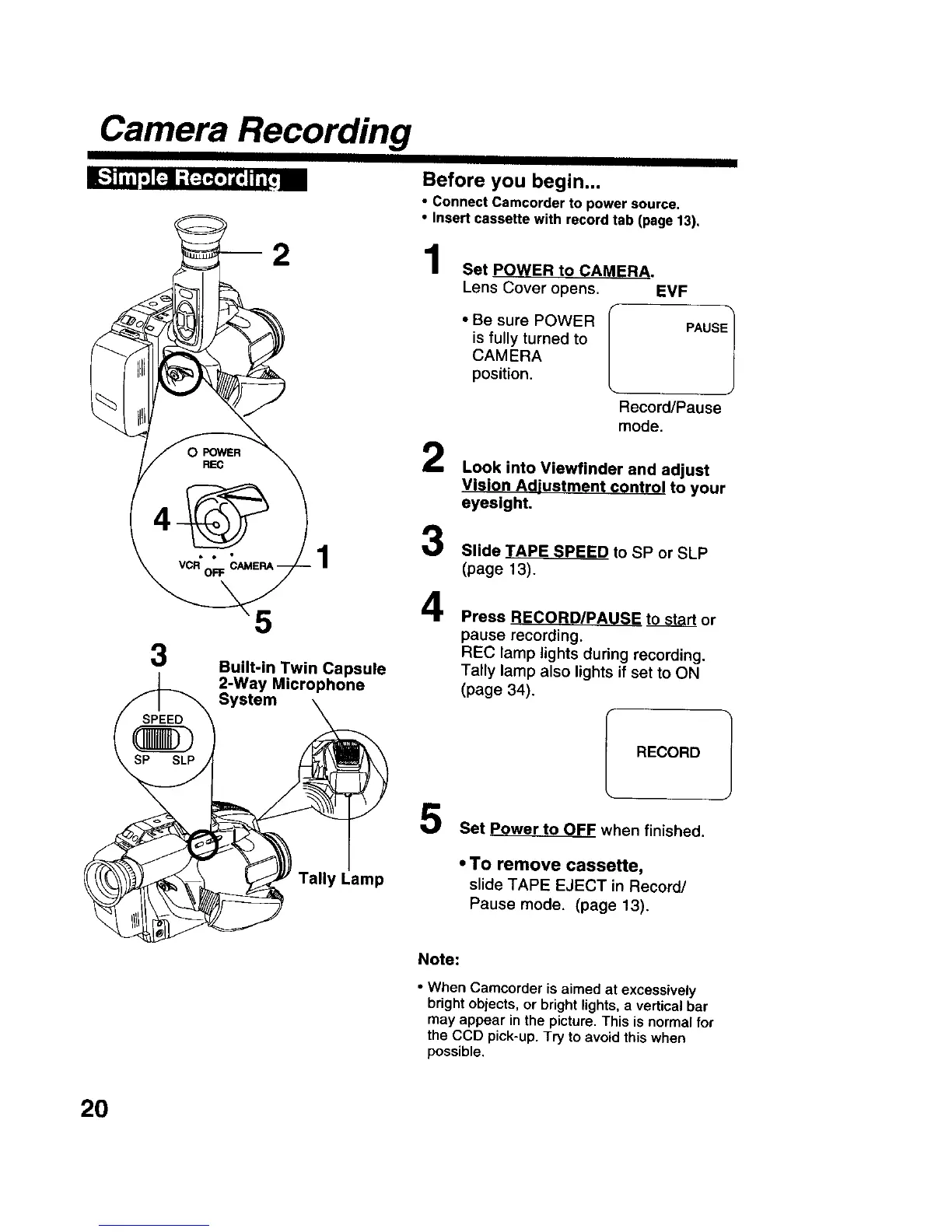
Built-in Twin Capsule
2-Way Microphone
System
1
2
3
4
Set POWER to CAMERA.
Lens Cover opens. EVF
• Be sure POWER
is fully turned to
CAMERA
position.
PAUSEl
ecord/Pause
mode.
Look into Viewfinder and adjust
Vision Adjustment control to your
eyesight,
Slide TAPE SPEED to SP or SLP
(page 13).
Press RECORD/PAUSE to start or
pause recording.
REC lamp lights during recording.
Tally lamp also lights if set to ON
(page 34).
RECORD
Tally Lamp
5
Set Power to OFF when finished.
• TO remove cassette,
slide TAPE EJECT in Record/
Pause mode. (page 13).
Note:
• When Camcorder is aimed at excessively
bright objects, or bright lights, a vertical bar
may appear in the picture. This isnormal for
the CCD pick-up. Try to avoid this when
possible.
2O











 To Next Page