Camera Recording
[u_'_lTv_.qR_'F_Jlm[:o]_][_A[";1'il['_,]_
View recording scene on the LCD (Liquid
Crystal Display).
Before you begin...
• Connect Camcorder to power source.
• Insert cassette with record tab (page 13).
4
1
2
PHONE (earphone)
jack
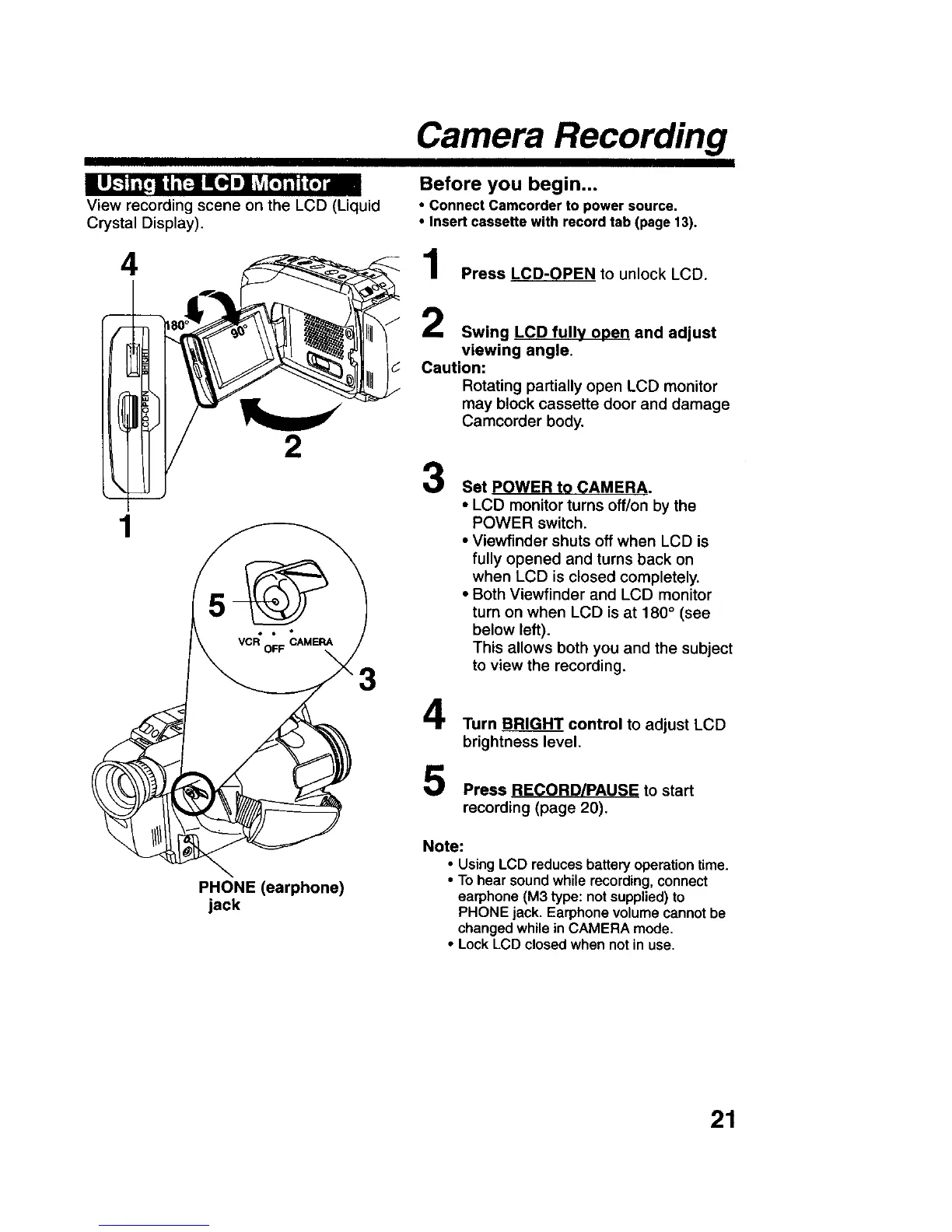
Press LCD-0PEN to unlock LCD.
Swing LCD fully open and adjust
viewing angle.
Caution:
Rotating partially open LCD monitor
may block cassette door and damage
Camcorder body.
3
Set POWER to CAMERA.
• LCD monitor turns off/on by the
POWER switch.
• Viewfinder shuts off when LCD is
fully opened and turns back on
when LCD is closed completely.
• Both Viewfinder and LCD monitor
turn on when LCD is at 180 ° (see
below left).
This allows both you and the subject
to view the recording.
4
5
Turn BRIGHT control to adjust LCD
brightness level.
Press RECORD/PAUSE to start
recording (page 20).
Note:
• Using LCD reduces battery operation time.
• To hear sound while recording, connect
earphone (M3 type: not supplied) to
PHONE jack. Earphone volume cannot be
changed while in CAMERA mode.
• Lock LCD closed when not in use.
21











 To Next Page