Setting the Clock
I['-."r_ | _1iTti I aT-.i II ii[:-.)rA[.] ,[:ll
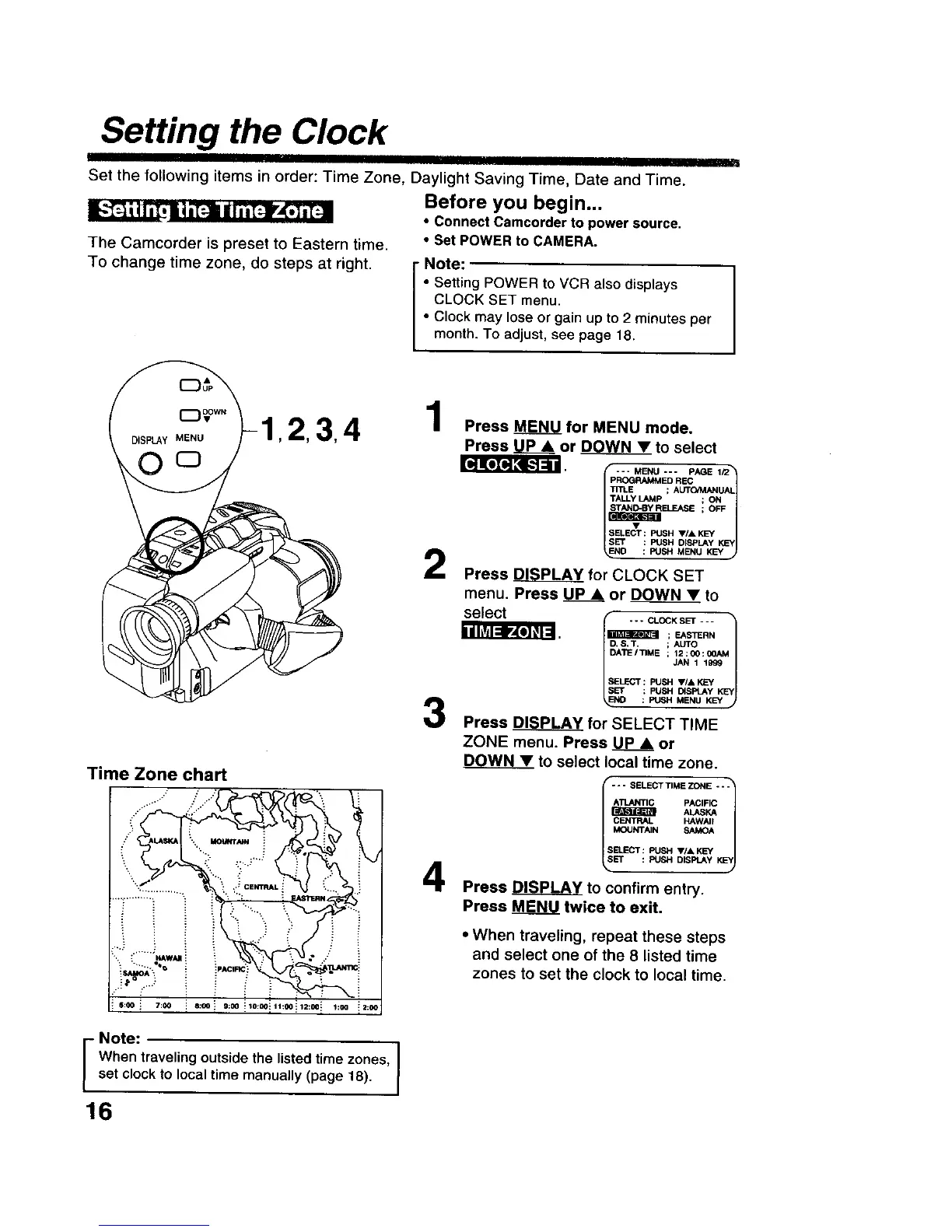
The Camcorder is preset to Eastern time.
To change time zone, do steps at right.
I
Set the following items in order: Time Zone, Daylight Saving Time, Date and Time.
Before you begin...
• connect Camcorder to power source.
• Set POWER to CAMERA.
i ote:
• Setting POWER to VCR also displays
CLOCK SET menu.
• Clock may lose or gain up to 2 minutes per
month. To adjust, see page 18.
,2,3,
O o
Time Zone chart
.+.
. ,...."
_A'_ q_ i . .
] 6:00 i 7:00 i 6:00 i 9:00 _10:00_ 11:00
4
1:00
Note:
I When traveling outside the listed time zones,set clock to local time manually (page 18).
16
1
Press MENU for MENU mode.
Press UP& or DOWN_V_Vto select
[_JKoTo,]_u
--- MENU *-- PAGE 1/2_
PROGRAMMED REC
T/TLI_ ; AUT_AL
TALLYLAMp ; ON
ELEASE ; OFF
I_SESELECT: PUSH _F/A KEY vl
SleET : PUSH D_EPLAY KEY
_.sH
D : PUSH MENU KEY
Press _ for CLOCK SET
menu. Press UP& or DOWN • to
select
- - - CLOCK SET - - -
_m ; EASTERN
. $,T. ; AUTO
DATE/TIME ; 12:00:00A5
JAN 1 1999
SELECT: PUSH VIA KEY
SET : PUSH DISPLAYKEY
NO : PUSH MENU KEY •
Press DISPLAY for SELECT TIME
ZONE menu. Press UP_.__Aor
DOWN • to select local time zone.
--- SELECTTIMEZONE "'1
A'_C PACIFIC
PJ_rPxttR ALASKA
l C_n'RN" KAWA"KEY/
MOUNTAIN SAMOA
SB.ECT : PUSH ,I, KEY
El* : PUSH DISPLAY
w
Press DISPLAY to confirm entry.
Press MENU twice to exit.
• When traveling, repeat these steps
and select one of the 8 listed time
zones to set the clock to local time.











 To Next Page