Setting the Clock
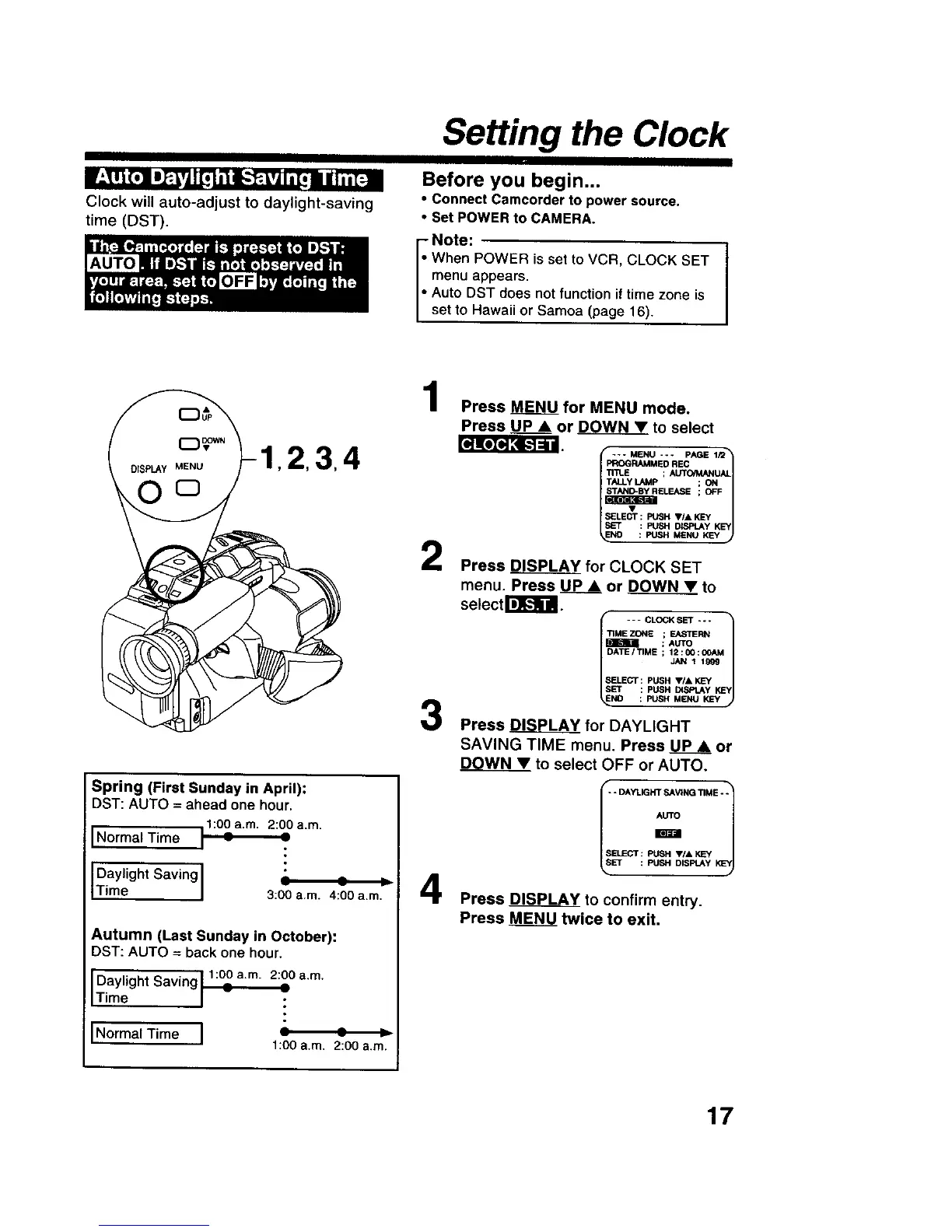
Clock will auto-adjust to daylight-saving
time (DST).
Before you begin...
• Connect Camcorder to power source,
• Set POWER to CAMERA.
- Note:
When POWER is set to VCR, CLOCK SET
menu appears.
Auto DST does not function if time zone is
set to Hawaii or Samoa (page 16).
LqK_JI_ [.-.]=ill
,2,3,4
Spring (First Sunday in April):
DST: AUTO = ahead one hour,
11:00a.m. 2:00 a.m.
Normal Time : =
I
Daylight Saving I = -- ,_
Time I 3:00 a.m. 4:00 a.m,
Autumn (Last Sunday in October):
DST: AUTO = back one hour.
1:00 a.rn. 2:00 a.m.
Daylight Saving : :
Time
Norma{ Time
i
1:00 a.m. 2:00 a.m.
1
2
3
4
Press _ for MENU mode.
Press UP • or _ to select
--- MENU --- PAGE 1Q_
PROGRAMMED REC
TALLYLAMp ; ON
ELEASE ; OFF
ELEOT: PUSH V/A KEY _
SET : PUSH DISPLAYKEY
NO : PUSH MENU KEY
Press DISPLAY for CLOCK SET
menu. Press _ or DOWN • to
setect I_l_iil.
- - - CLOCK SET - o -
/
TIME ZONE ; EASTERN
I_ME-_ ; AUTO
li ATE/TIME ; 12:00:OOAM 1
SELECT : PUSH VIA KEY
SET : PUSH DISPtAy KEY
NO : PUSH MENU KEY
Press _ for DAYLIGHT
SAVING TIME menu. Press UPA or
DOWN• to select OFF or AUTO.
I _r_i/-- DAYLIGHT SAVING TIME - -
SELECT : PUSH V/, KEY
LsSET : PUSH DISPLAY KLsYJ
Press DISPLA_YYto confirm entry.
Press MENU twice to exit•
17











 To Next Page