Copying your Tapes (dubbing)
[_
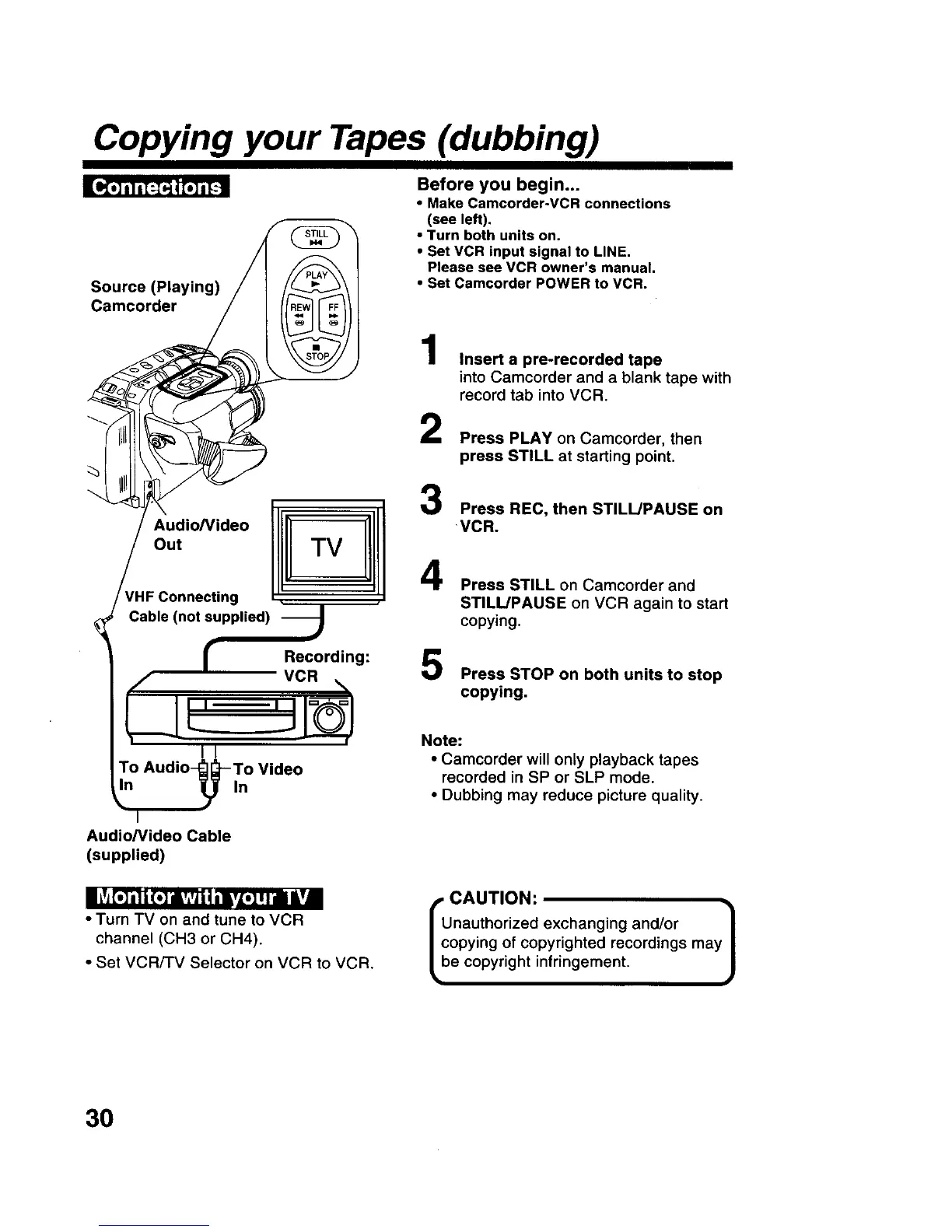
Source (Playing)
Camcorder
Before you begin...
• Make Camcorder-VCR connections
(see left).
• Turn both units on.
• Set VCR input signal to LINE.
Please see VCR owner's manual.
• Set Camcorder POWER to VCR.
Audio/Video 1I
out TV
rHF Connecting
• q
Cable (not supplied) J
r Recording:
,,/" VCR ,%
i/
To Audio_-To Video
'°
Audio/Video Cable
(supplied)
1
2
3
4
Insert a pre-recorded tape
into Camcorder and a blank tape with
record tab into VCR.
Press PLAY on Camcorder, then
press STILL at starting point.
Press REC, then STILL/PAUSE on
VCR.
5
Press STILL on Camcorder and
STILL/PAUSE on VCR again to start
copying.
Press STOP on both units to stop
copying.
Note:
• Camcorder will only playback tapes
recorded in SP or SLP mode.
• Dubbing may reduce picture quality.
| iT_[.] i| | (.] iivAvji | ilvZ.] I II |Y|
• Turn TV on and tune to VCR
channel (CH3 or CH4).
• Set VCR/-rv Selector on VCR to VCR.
, CAUTION:
Unauthorized exchanging and/or /
copying of copyrighted recordings may
J
be copyright infringement.
3O











 To Next Page