Fade
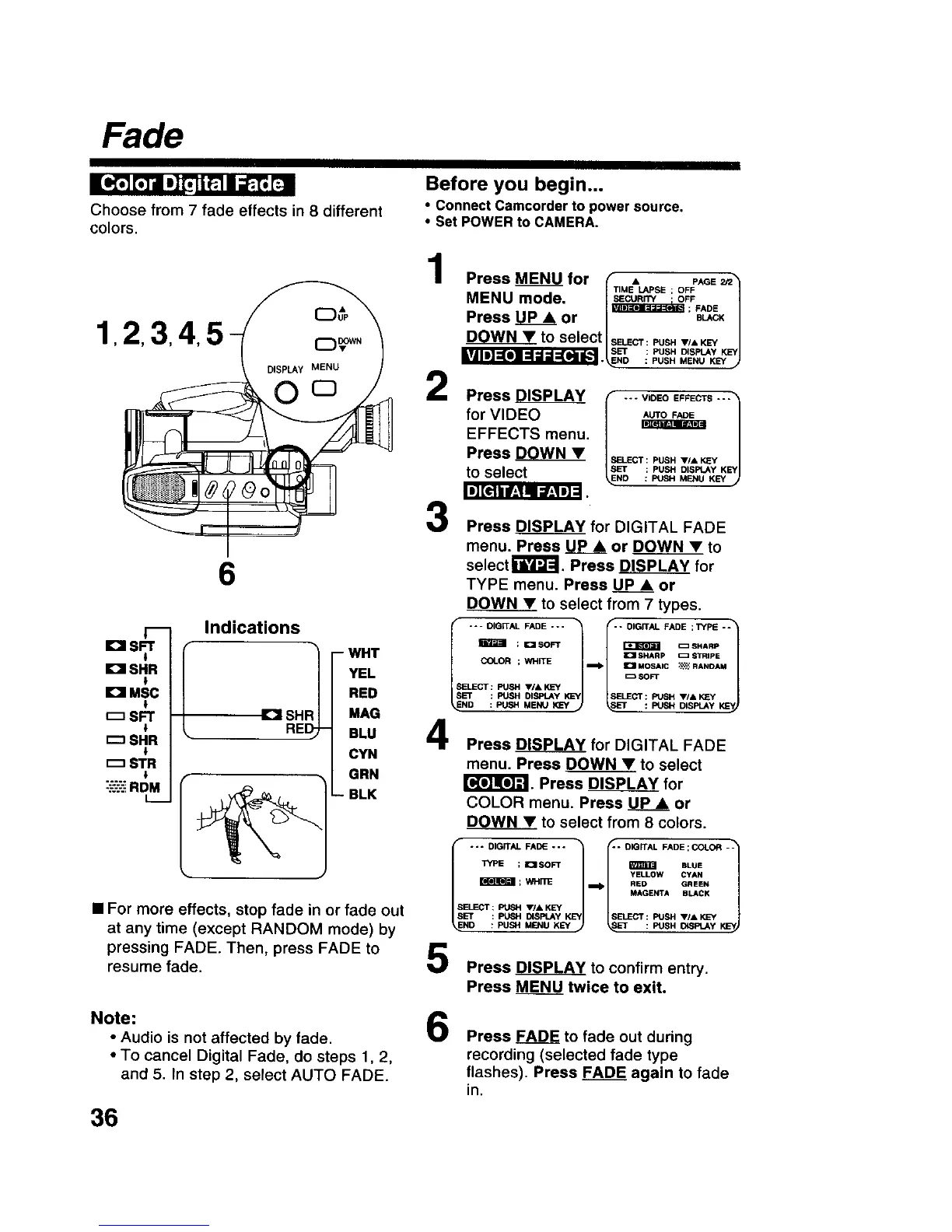
Choose from 7 fade effects in 8 different
colors.
Before you begin...
• connect Camcorder to power source.
• Set POWER to CAMERA.
1 2,3,4,
6
El SFT
i
IDI SHR
El MSC
SFT
r--_SHR
r--1STR
"-.'-'.'-':;RDM
L_
Indications
IDI SHF
WHT
YEL
RED
MAG
BLU
CYN
GRN
BLK
• For more effects, stop fade in or fade out
at any time (except RANDOM mode) by
pressing FADE. Then, press FADE to
resume fade.
Press MENU for (" • PAaE_3
-- T,.E_SE; OF_
MENU mode. I.sEcu.r_ OFF |
; FADE
Press UP A or jl BUICKJ
DOWNY to select ISELEC'r-PUSHV.,KEY /
SET i PUSH DISPLAY KEY
_._ESND : PUSH MENU KEY _J
2
3
Press _DISPLAY I V,DEOEFFECTS"1
for VIDEO
EFFECTS menu.
Press D___OWN• .__Ecr:PusHv/*
_p : PUSH DISPlAy KEYJto select .o : PUSH MENU KEY
Press _ for DIGITAL FADE
menu. Press UPA or DOWN • to
selectr_FJ'-J. Press DISPLAY for
TYPE menu. Press _ or
DOWN • to select from 7 types.
I "'-DIGWAL FADE "'"1- ; I_ISOFT I'" DIGITAL FADE ;TYPE -÷1_ =SHARP
SET _1 SHARP _ STRIP| KSYI
Press DISPLAY for DIGITAL FADE
menu. Press DOWN • to select
r_'_lr#J_. Press DISPLAY for
COLOR menu. Press UP • or
DOWN • to select from 8 colors.
f .I-- --c*"L°"
Lo'-'-J
SELECT: PUSH VIA KL=Y
SET : PUSH DISPLAY KEY SELECT : PUSH VI& KEY
NO : PUSH MENU KEY : PUSH ID_,_=_.AY
Press DISPLAY to confirm entry.
Press MENU_ twice to exit.
Note: 6
• Audio is not affected by fade.
• To cancel Digital Fade, do steps 1, 2,
and 5. In step 2, select AUTO FADE.
Press FADE to fade out during
recording (selected fade type
flashes). Press FADE again to fade
in.
36











 To Next Page