MENU Mode
lij-_ ii[e i tvjI:i +tll tvjrt_ [,4n
3
LrAi::i+Lll _v+GT;P.tJl.',[,]i[_:.], i
Before you begin...
2
3
• Connect Camcorder to power source.
• Set POWER to CAMERA.
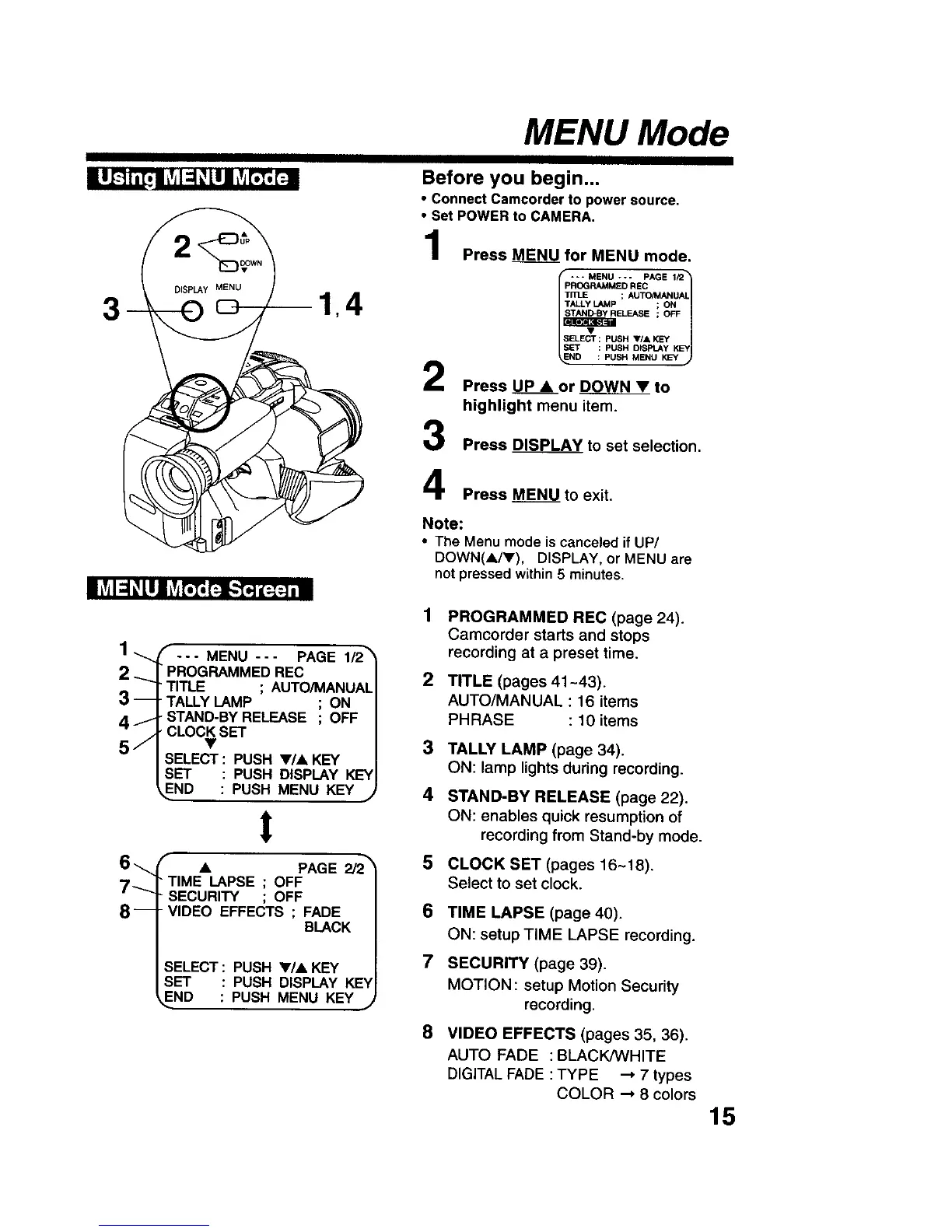
Press MENU for MENU mode,
--* MENU --- PAGE 1/2_
PROGRAMM£D REC
1
Tn]_E ; AUTO/MANUAL
TALLY LAMP ; ON
_ELEASE ; OFF
ELECT : PUSH VIA KEY y_
SET : PUSH D_SPLAY KEY
ND : PUSH MENU KEY
Press UP • or DOWN • to
highlight menu item.
Press DISPLAY to set selection.
Press MENU to exit.
Note:
• The Menu mode is canceled if UP/
DOWN(A/V), DISPLAY, or MENU are
not pressed within 5 minutes.
1
1 _ _ ... MENU --- PAGE 1/2_
2 _ PROGRAMMED REC 2
TITLE ; AUTO/MANUAL
3 -- TALLY LAMP ; ON
4 J STAND-BY RELEASE ; OFF
CLOCK SET
5 j • 3
SELECT : PUSH •/• KEY
SET : PUSH DISPLAY KEY
END : PUSH MENU KEY j 4
t
6 _ • PAGE 2/2_ 5
7"---.
PROGRAMMED REC (page 24).
Camcorder starts and stops
recording at a preset time.
TIME LAPSE ; OFF
SECURITY ; OFF
8-- VIDEO EFFECTS ; FADE
BLACK
SELECT : PUSH •/• KEY
SET : PUSH DISPLAY KE'V
END : PUSH MENU KEY ,j
TITLE (pages 41-43).
AUTO/MANUAL : 16 items
PHRASE : 10 items
TALLY LAMP (page 34).
ON: lamp lights during recording.
STAND-BY RELEASE (page 22).
ON: enables quick resumption of
recording from Stand-by mode.
CLOCK SET (pages 16~18).
Select to set clock.
6 TIME LAPSE (page 40).
ON: setup TIME LAPSE recording.
7 SECURITY (page 39).
MOTION: setup Motion Security
recording.
8
VIDEO EFFECTS (pages 35, 36).
AUTO FADE : BLACK/WHITE
DIGITAL FADE :TYPE _ 7 types
COLOR _ 8 colors
15











 To Next Page