Playing Back Recordings
II U_,P.t.] :4[,]m ;:kvJa[.] d'i(e']HILVJ_._i{._a
Speaker
m
f
:>
I
PHONE
(earphone)
jack
Before you begin...
• Connect Camcorder to power source.
• Insert recorded tape.
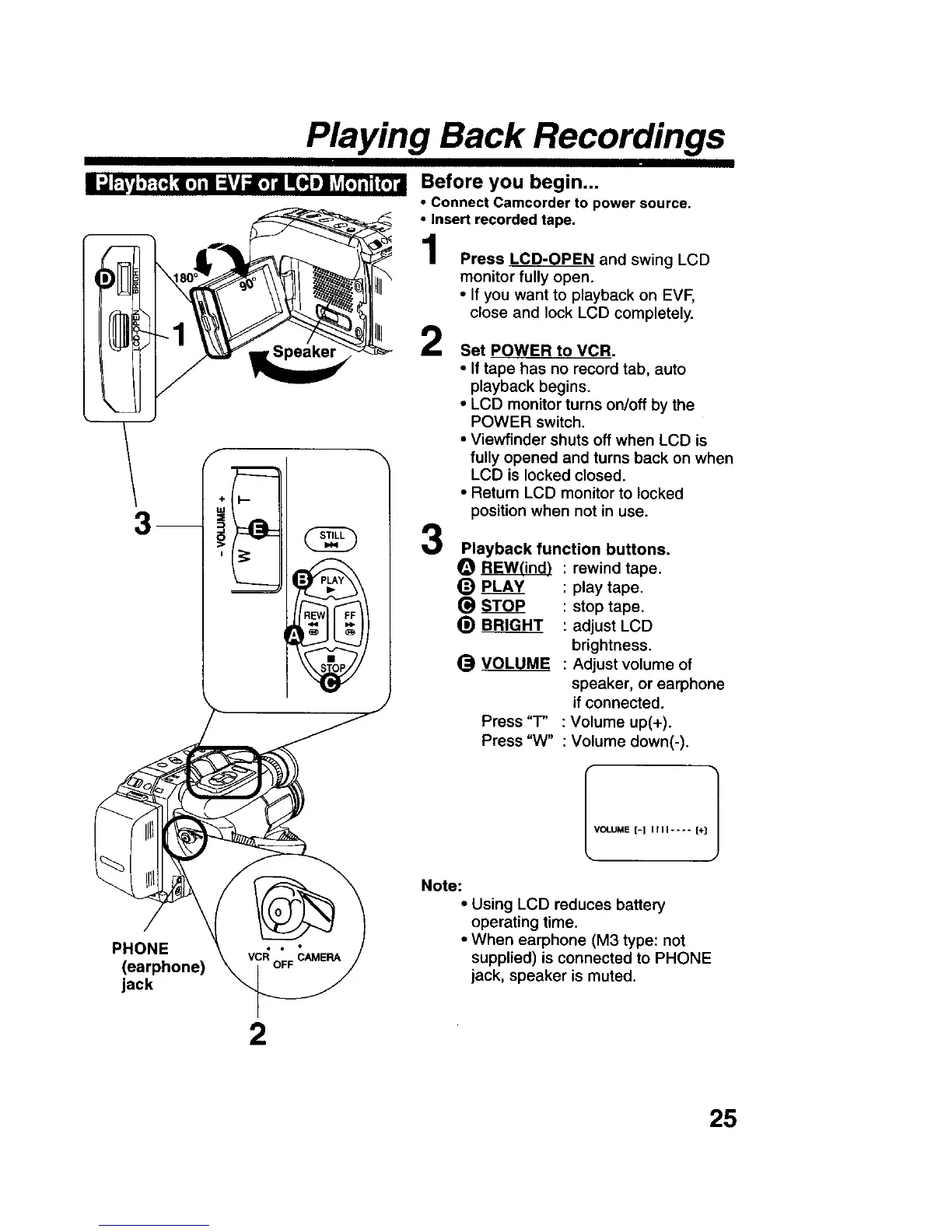
Press LCD-OPEN and swing LCD
monitor fully open.
• If you want to playback on EVF,
close and lock LCD completely.
2
3
Set POWER to VCR.
• If tape has no record tab, auto
playback begins.
• LCD monitor turns on/off by the
POWER switch,
• Viewfinder shuts off when LCD is
fully opened and turns back on when
LCD is locked closed.
• Return LCD monitor to locked
position when not in use.
Playback function buttons.
O _ : rewind tape.
(_ PLAY : play tape.
S_ : stop tape.
_) BRIGHT : adjust LCD
brightness.
_) VOLUME : Adjust volume of
speaker, or earphone
if connected.
Press "T" : Volume up(+).
Press "W" : Volume down(-).
VOLUME [=1 I t I I .... [+] 1
Note:
• Using LCD reduces battery
operating time.
• When earphone (M3 type: not
supplied) is connected to PHONE
jack, speaker is muted.
2
25











 To Next Page