Camera Recording
I IIII
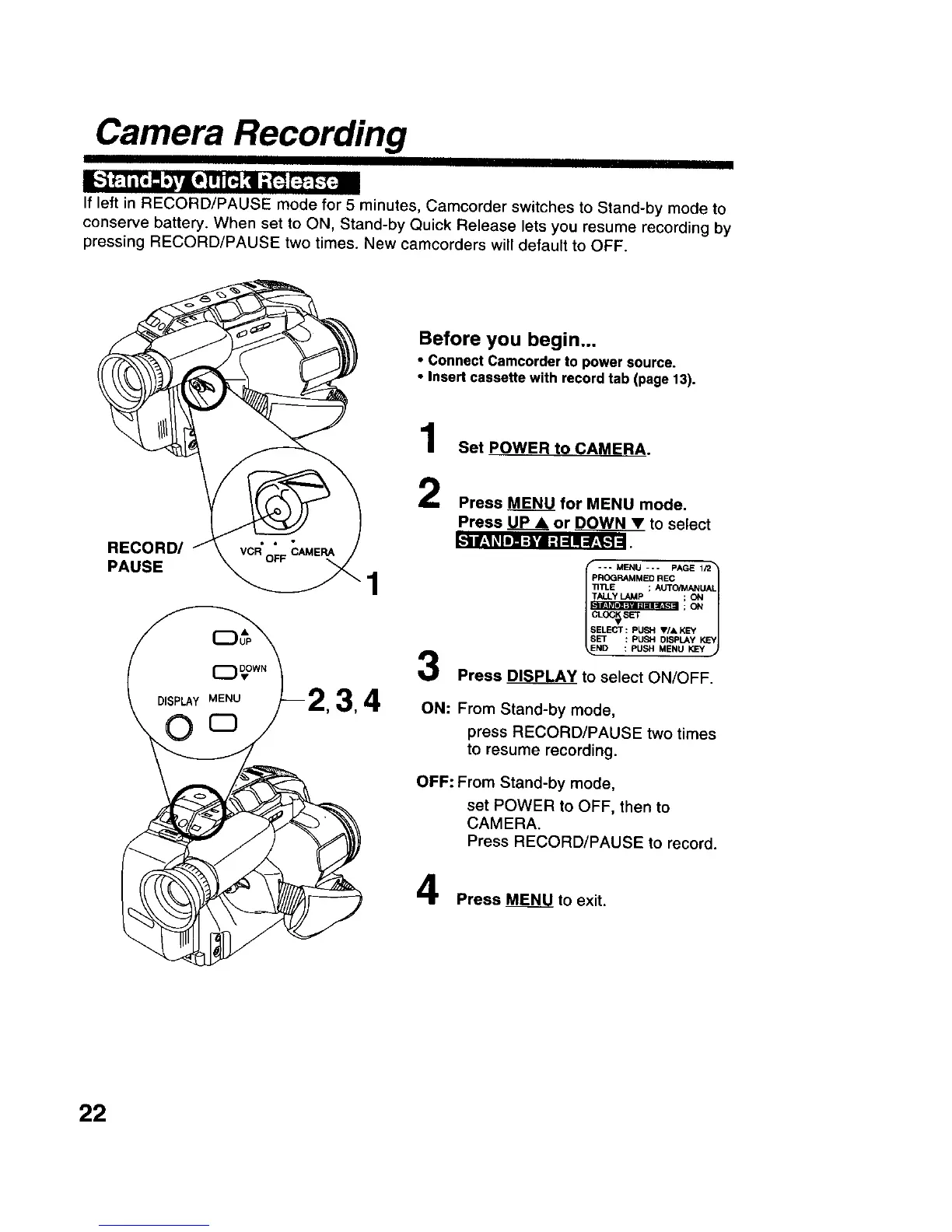
IfleftinRECORDIPAUSE mode for5 minutes, Camcorder switches to Stand-by mode to
conserve batten/.When set to ON, Stand-by Quick Release letsyou resume recordingby
pressing RECORDIPAUSE two times.New camcorders willdefaultto OFF.
_.'ti!-,1! IIll i-l'i Ill =Ill=!.,%.'_J_
RECORD/
PAUSE
Before you begin...
• Connect Camcorder to power source.
• Insert cassette with record tab (page 13).
Set POWER to CAMERA.
Press MENU for MENU mode,
Press P_LLP_Aor DOWN • to select
4
3
-- MENU --- PAGE 1/2 t
PROGRAMMED REC
TITLE ; AUTO/MANUAL
7tALLer LAMP ; O_l
llIr.'VllI_li=llI_L%_ll ; ON
OG_srr
ELECI": PUSH V/A KEY _
ND : PUSH MENU _
Press _PLAY to select ON/OFF.
ON: From Stand-by mode,
press RECORD/PAUSE two times
to resume recording.
OFF: From Stand-by mode,
set POWER to OFF, then to
CAMERA.
Press RECORD/PAUSE to record.
Press _to exit.
22











 To Next Page