Camera Recording
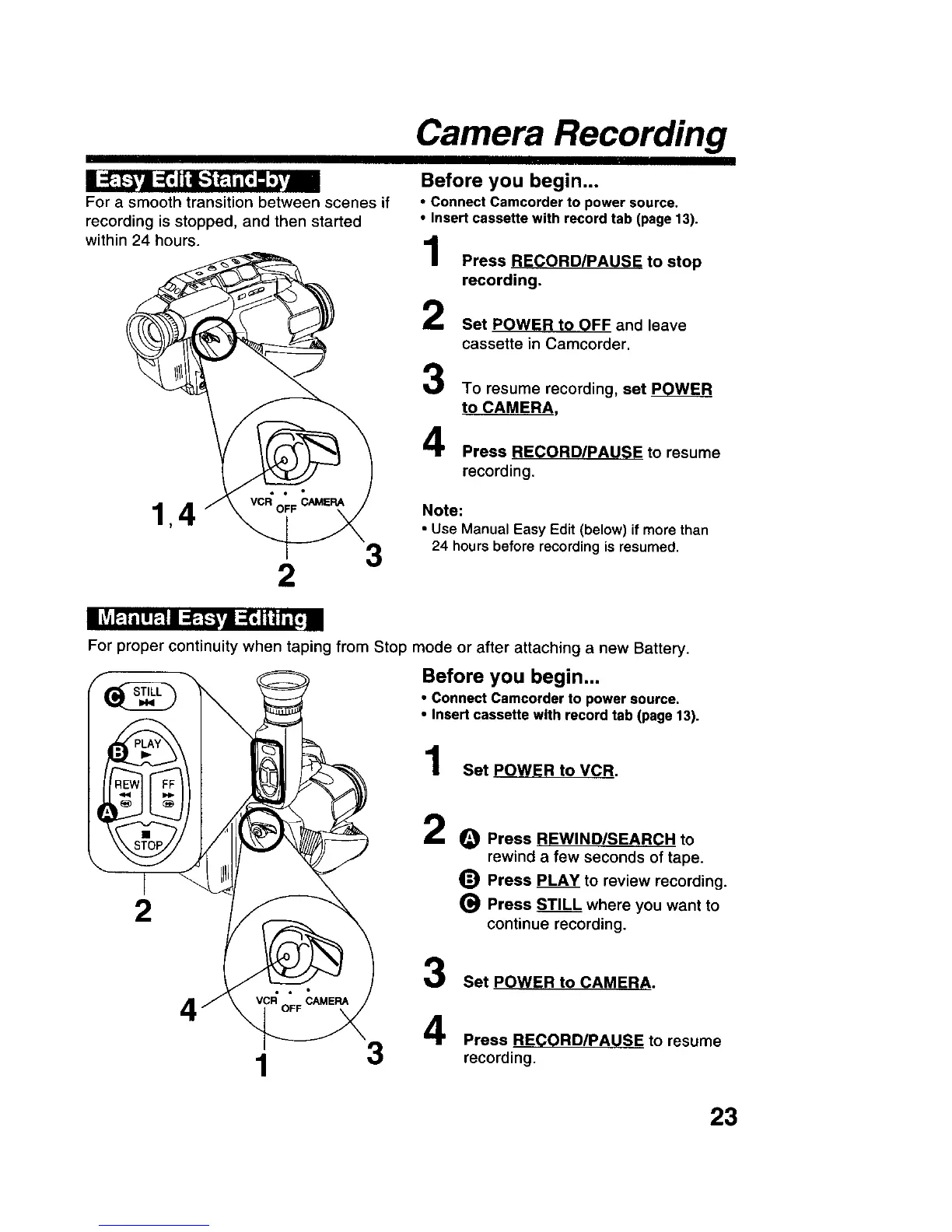
For a smooth transition between scenes if
recording is stopped, and then started
within 24 hours.
2
3
Before you begin...
• Connect Camcorder to power source.
• Insert cassette with record tab (page 13).
Press RECORD/PAUSE to stop
recording.
Set POWER to OFF and leave
cassette in Camcorder,
3
4
To resume recording, set POWER
to CAMERA,
Press RECORD/PAUSE to resume
recording.
Note:
• Use Manual Easy Edit (below) if more than
24 hours before recording is resumed,
I llj P.|il I P.11;_. [..'_Vl ;_ II]h i[i II
For proper continuity when taping from Stop mode or after attaching a new Battery.
Before you begin...
1
2
• Connect Camcorder to power source.
• Insert cassette with record tab (page 13).
Set POWER toVCR.
2
3
O Press REWIND/SEARCH to
rewind a few seconds of tape.
_) Press PLAY to review recording.
(_ Press STILL where you want to
continue recording.
Set POWER to CAMERA.
3
Press RECORD/PAUSE to resume
recording.
23











 To Next Page