Intelligent Titler
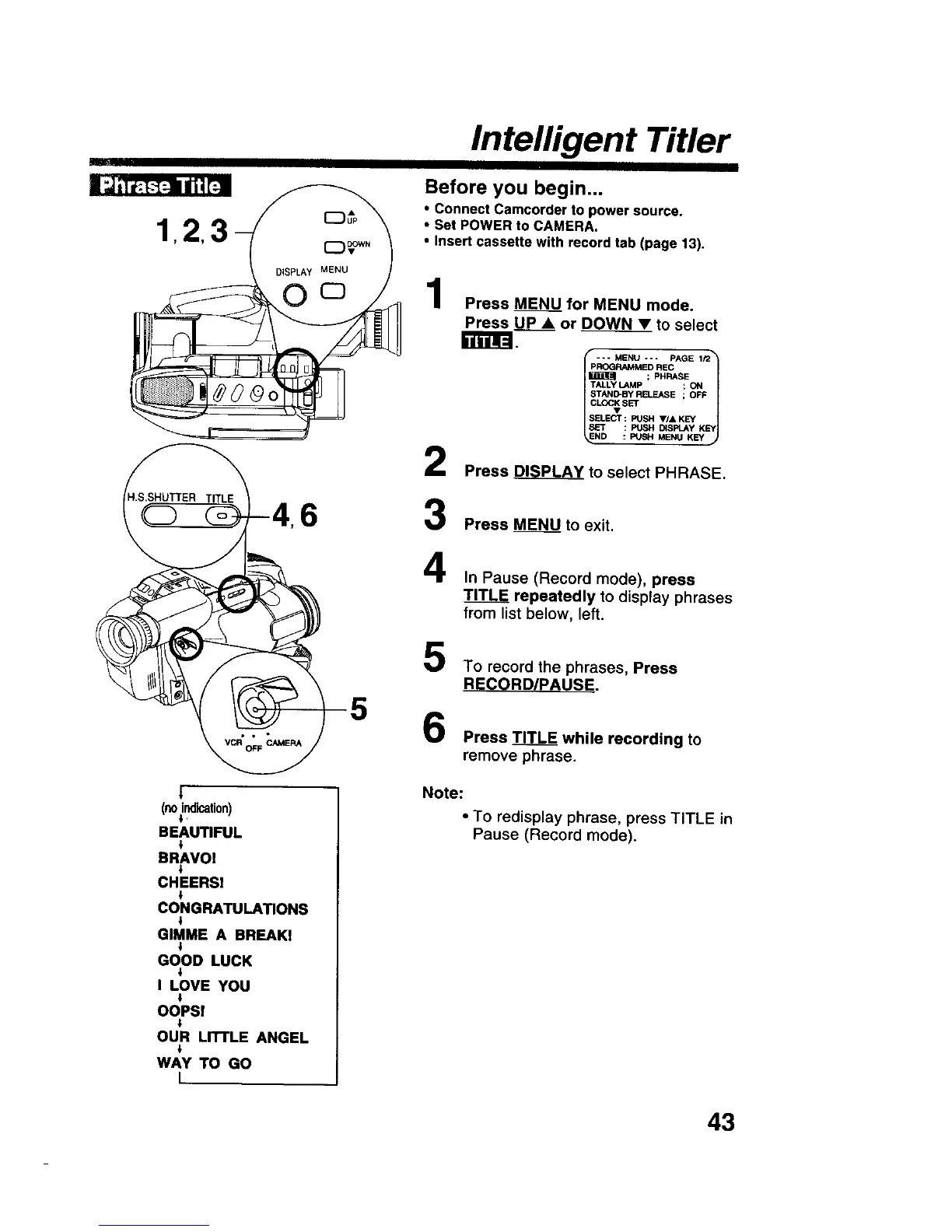
Before you begin...
• Connect Camcorder to power source.
• Set POWER to CAMERA.
• Insert cassette with record tab (page 13),
1
2
6 3
4
5
5
|
(noindication)
i
BEAUTIFUL
l
BRAVOI
CHEERS!
i
CONGRATULATIONS
l
GIMME A BREAKI
i
GOOD LUCK
I LOVE YOU
OOPS!
OUR LITTLE ANGEL
WAY "ro GO
I
Press M_ for MENU mode.
Press UP • or _ to select
r_.
pROGRAMMED REC
; PHRASE
TALLY LAMP ; ON
STAND-BY RELEASE ; OFF
CL_2;_ S_
SELECT : PUSH V/& KEY
SET : PUSH DISFI_Y KEY
ND : PUSH MENU KEY
Press _ to select PHRASE.
Press _ to exit.
In Pause (Record mode), press
TITLF= repeatedly to display phrases
from list below, left.
To record the phrases, Press
RECORD/PAUSE.
Press TITLE while recording to
remove phrase.
Note:
• To redisplay phrase, press TITLE in
Pause (Record mode).
43











 To Next Page