16
RQT9223
Connections
Basic connections
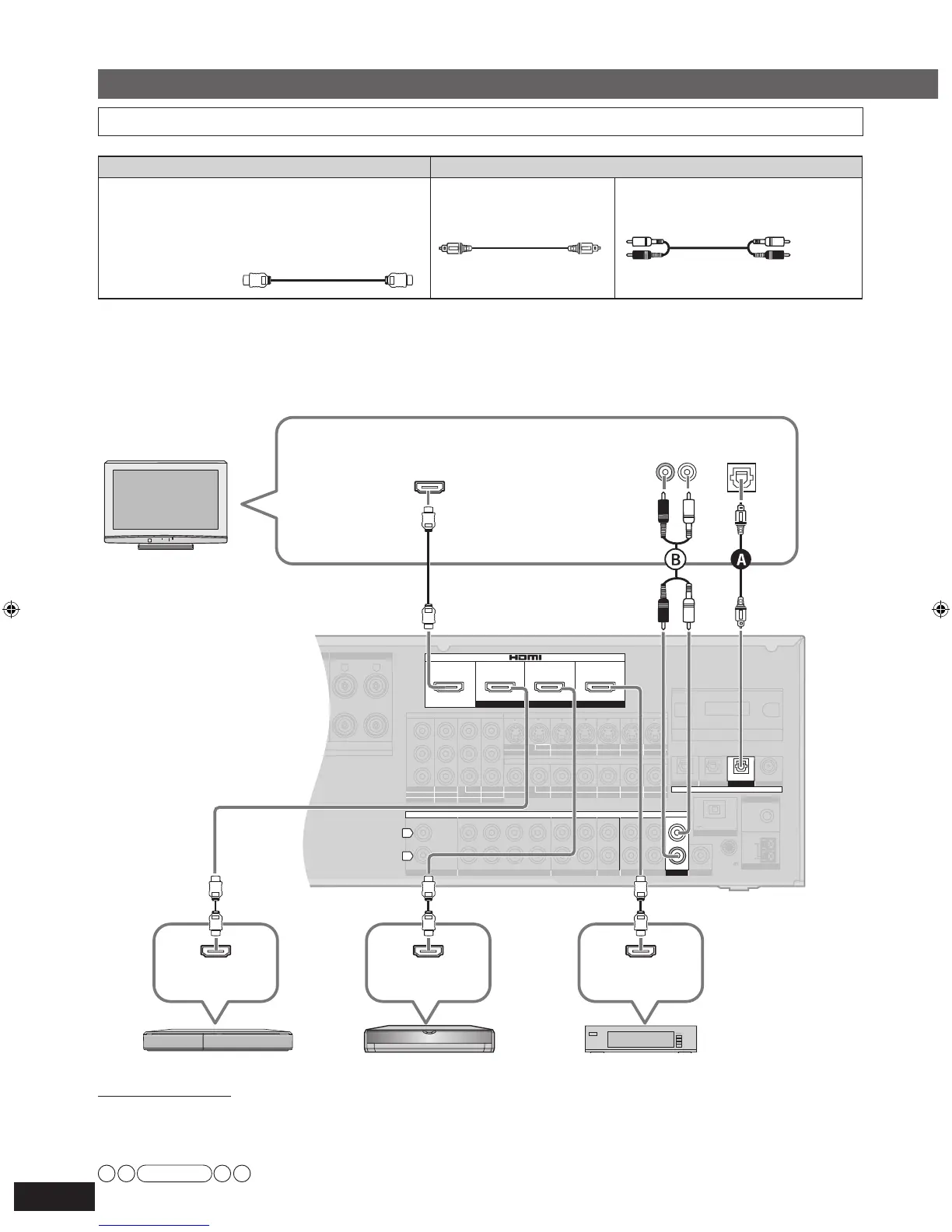
HDMI connection
The HDMI input terminal on the unit’s rear is made to specifications that presume connection of a DVD recorder / Blu-ray Disc/
DVD player etc. When other equipment is connected, sounds may not come out of the unit, or pictures shown on the equipment (TV)
connected to the HDMI output terminal may be disrupted.
In such cases, see pages 17, 18 and 19 and make connections other than HDMI.
• The audio signal transmitted through HDMI takes priority when you use both HDMI and digital terminals for connection (
➔
pages 16 to 20).
• You can change the settings on HDMI 3 terminal according to the equipment to connect (
➔
page 39).
Connecting equipment with HDMI terminal
Note
Connection cable
HDMI input
DVD recorder
Blu-ray Disc/DVD player Cable box, satellite receiver, etc.
To enjoy TV with surround sound, make connection
or
sho
wn below according to your equipment.
Video and Audio cable Audio cable
HDMI cable
(not included)
Recommended part number:
RP-CDHG10 (1.0 m/3.3 ft.), RP-CDHG15 (1.5 m/4.9 ft.),
RP-CDHG20 (2.0 m/6.6 ft.), RP-CDHG30 (3.0 m/9.8 ft.),
RP-CDHG50 (5.0 m/16.4 ft), etc.
Optical fiber cable
(not included)
Stereo connection cable
(not included)
HDMI cable notes
• It is recommended that you use Panasonic’s HDMI cable.
• This unit incorporates HDMI™ (V.1.3 with Deep Color) technology.
• Please use High Speed HDMI Cables that have the HDMI logo (as shown on the cover).
• When outputting 1080p signal, please use the HDMI cables 5.0 meters (16.4 feet) or less.
White (L)
Red (R)







 To Next Page