22
RQT9223
Connections
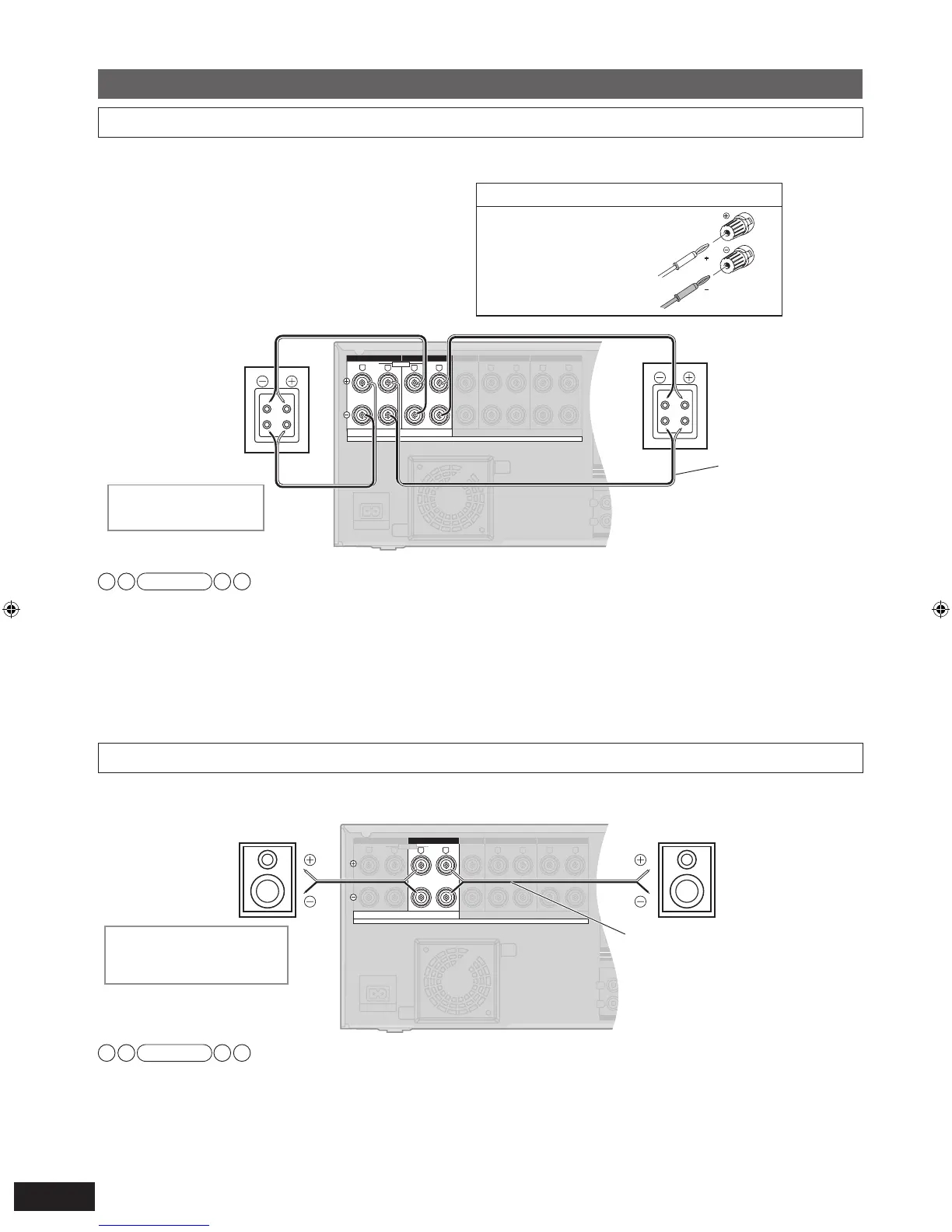
Connecting other speakers
Note
• Make sure to connect speakers’ HF terminals with the unit’s FRONT B terminals, and speakers’ LF terminals with the unit’s
FRONT A terminals.
• Different amps for high frequency and low frequency signals produce BI-AMP stereo sounds that are clearer and higher in audio
quality when you play on 2 channels sources containing analog audio and 2-channel PCM signals (
➔
page 51).
•
When connecting speakers with the impedance of 4
Ω
, mak
e sure to set “4 OHMS ” in “Setting the speaker impedance” on page 38.
• See “Notes on “To connect bi-wire speakers”” on page 50 for more details.
BI-WIRE
LF HF
L
R
FRONT A
FRONT B
CENTER
SURROUND SURROUND BACK
CD
FRONT A FRONT B CENTER
SURROUND
SURROUND BACK
L
R
IN
A
C IN~
OUT
TV MONITOR
(DVD RECORDER)
Y
P
B
P
R
R
L
RR
L L
6-8 Ω / EACH SPEAKER (CHAQUE)
A OR B/BI-WIRE : 4-8 Ω / EAC H S PEA KER (C HAQU E)
A AND B : 6-8 Ω / EAC H S PEA KER (C HAQU E)
Class2 wiring
SPEAKERS
HAUT-PARLEURS
Front speaker (R)
Speaker impedance
Front A or B: 4 to 8
Ω
Fr
ont A and B: 6 to 8
Ω
To connect bi-wire speakers
Make sure to select “YES ” in “Making bi-wire setting” (
➔
page 38) when you connect the unit to bi-wire speakers. The speakers
do not produce adequate sounds unless you make this setting.
To connect a second pair of front speakers (SPEAKERS B)
Make the following connections when you wish to install a second pair of speakers in another room and enjoy music there.
Front speaker (L)
Speaker cable
(not included)
BI-WIRE
LF HF
L
R
FRONT A
FRONT B
CENTER
SURROUND SURROUND BACK
CD
FRONT A FRONT B CENTER
SURROUND
SURROUND BACK
L
R
IN
A
C IN~
OUT
TV MONITOR
(DVD RECORDER)
Y
P
B
P
R
R
L
RR
L L
6-8 Ω / EACH SPEAKER (CHAQUE)
A OR B/BI-WIRE : 4-8 Ω / EAC H S PEA KER (C HAQU E)
A AND B : 6-8 Ω / EAC H S PEA KER (C HAQU E)
HF
LF
HF
LF
Class2 wiring
SPEAKERS
HAUT-PARLEURS
Front speaker (R)
Rear view
Speaker impedance
BI-WIRE: 4 to 8
Ω
Speaker cable
(not included)
Front speaker (L)
Rear view
Rear panel
Rear panel
Note
•
When connecting speakers with the impedance of 4
Ω
, mak
e sure to set “4 OHMS ” in “Setting the speaker impedance” on page 38.
• See “Notes on “SPEAKERS B”” on page 51 for more details.
If using 4-mm plug
Turn speaker terminals
clockwise and tighten
them before inserting
plugs into their holes.
SA-BX500-PP (RQT9223-Y)_En.indd 22 6/27/2008 4:05:43 PM







 To Next Page