19
RQT9223
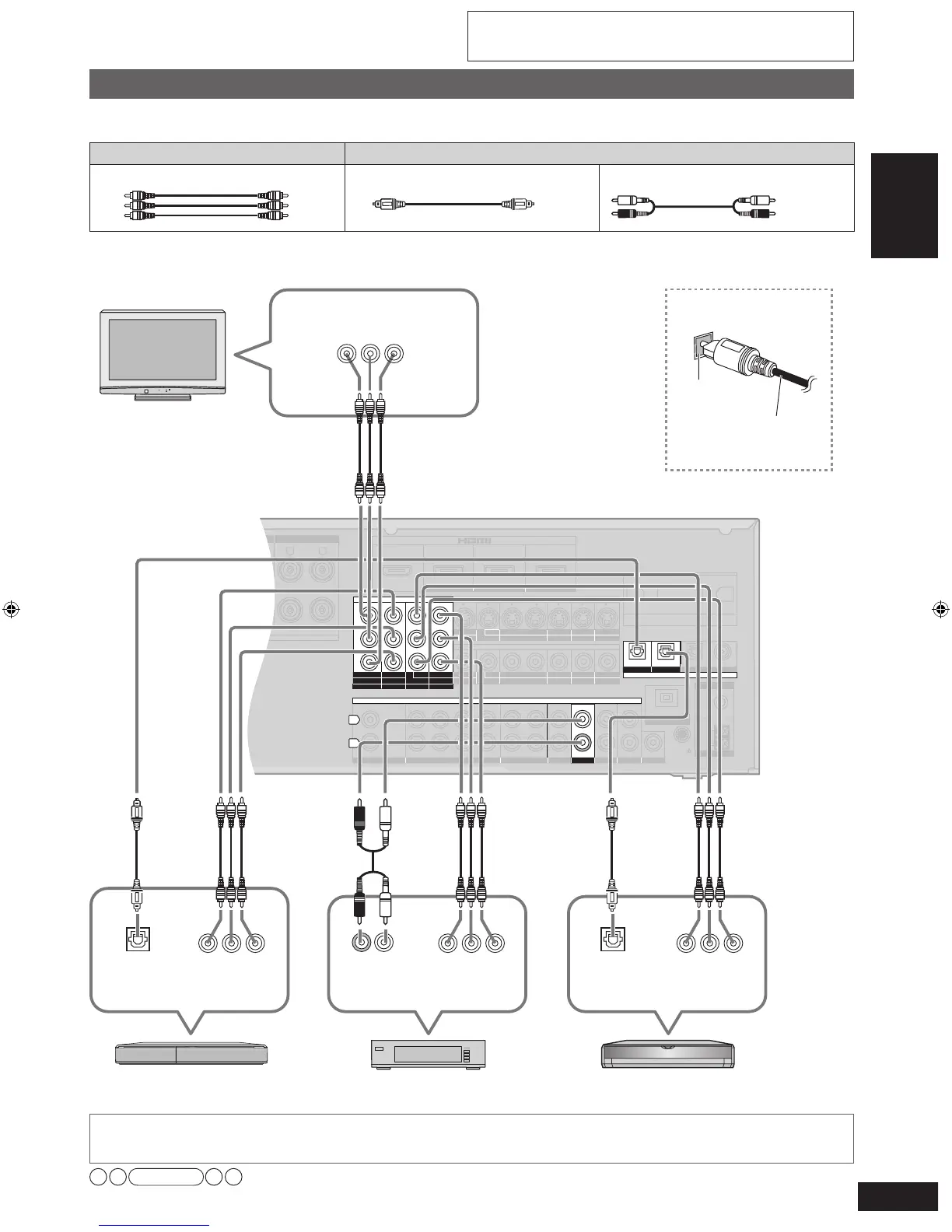
Connecting cables to component and audio terminals
Note
• The input video signal can be sent out through an output terminal of the same type only.
• You can change the settings for the digital input terminal and Component Video 3 terminal according to the equipment to connect (
➔
page 39).
• Turn off all equipment before making any connections.
• Peripheral equipment sold separately unless otherwise indicated.
• To connect equipment, refer to the appropriate operating instructions.
The component video terminals can produce more accurate colors than the S video terminals (
➔
page 18).
Connection cable
Video cable Audio cable
Video connection cable (not included)
Optical fiber cable (not included)
Stereo connection cable
(not included)
Connections
Component video terminals
The component video terminals (color-difference video terminals) output red (PR), blue (PB), and luminance (Y) signals
separately. The terminals reproduce colors with greater accuracy for this reason.
To enjoy TV with surround sound, make connection
or
instructed on pa
ge 16 according to your equipment.
SURROUND SURROUND BACK
OUT
IN IN
CD
BD/DVD PLAYER / ANALOG 8CH IN DVD RECORDER
VCR
CABLE/SAT
GAME
TV
AUDIO
SURROUND BACK
SURROUND
FRONT
SUBWOOFER
OUT
IN IN
IN
(DVD RECORDER)
(BD/DVD PLAYER)
(CABLE/SAT)
HDMI 1
HDMI
2 HDMI 3
SURROUND
SURROUND BACK
S VIDEO
COMPONENT VIDEO
L
R
IN IN IN
IN
OUT
IN
IN
OUT
OUT
IN IN IN
IN
TV MONITOR
TV MONITOR
DVD RECORDER
VCR
CABLE/SAT
GAME
DVD PLAYER
BD/(BD/
DVD PLAYER)
(DVD RECORDER)
(CABLE/SAT)
1 2
3
(DVD RECORDER) (BD/DVD PLAYER)
(TV)
(CD)
OPTICAL 1
OPTICAL 2 OPTICAL 3 COAXIAL
SUBWOOFER
Y
P
B
P
R
IN
OUT OUT
IN IN IN IN
TV MONITOR
DVD RECORDER
VCR
CABLE/SAT
GAME
DVD PLAYER
BD/
OUT
CENTER
IN
IN
FM ANT
AM ANT
LOOP
EXT
75
Ω
RR
L L
LOOP ANT
GND
VIDEO
DIGITAL IN







 To Next Page