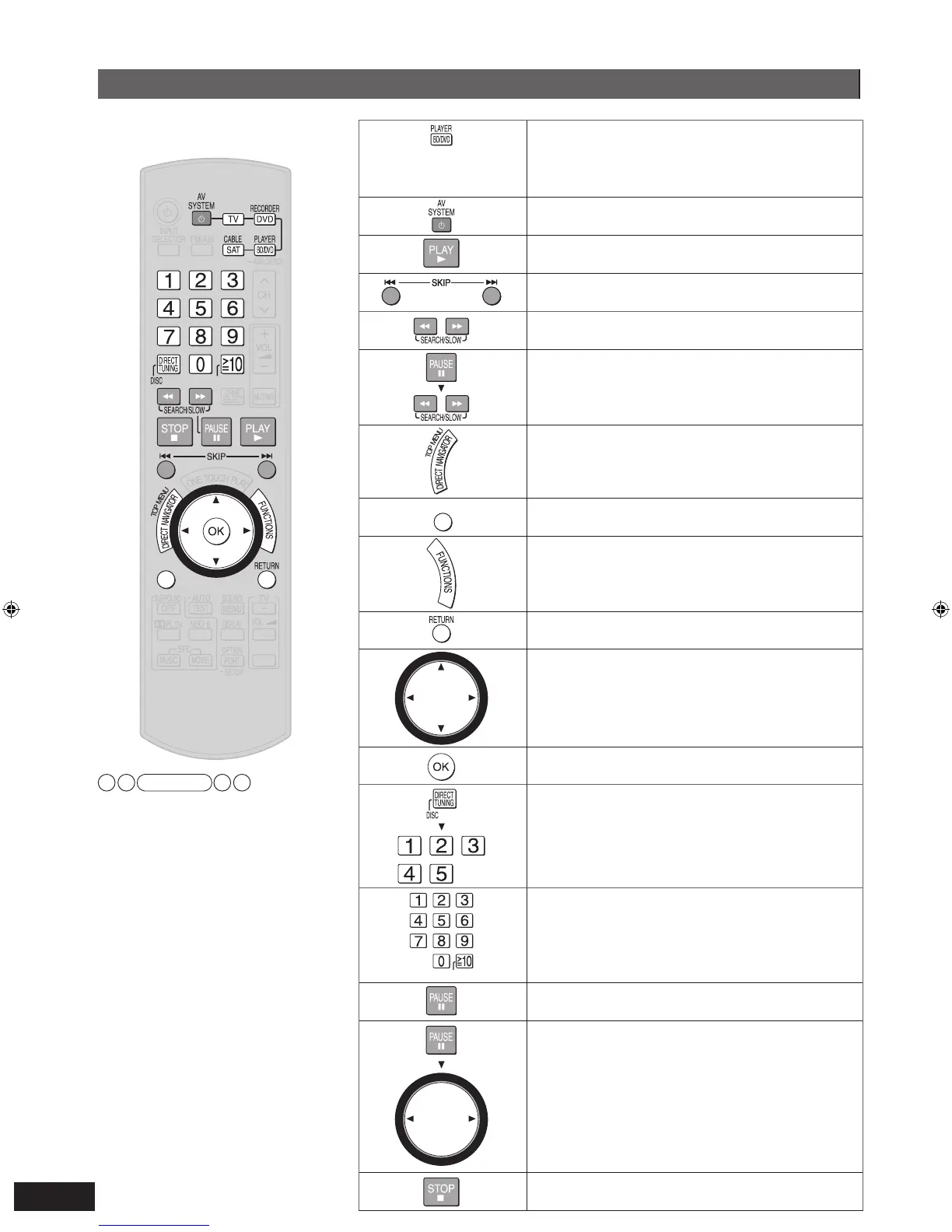
Aim the remote control at the
equipment you wish to operate.
Do not forget to press this
before operating a Blu-ray
Disc/DVD player.
To switch the unit’s input to “BD/DVD P. ”
To switch the remote control to the Blu-ray
Disc/DVD player operation mode
To turn the Blu-ray Disc/DVD player on or off
To start playback
To skip a track or chapter
To search through the disc
To play in slow-motion
To show the direct navigator (or the top
menu)
To show a sub menu
To show the FUNCTIONS window (while
stopped)
T
o return to the previous screen
To select an item
• Press to select after pressing [DIRECT NAVIGATOR,
TOP MENU], [SUB MENU], or [FUNCTIONS].
To confirm the selected item
To specify a disc (5-disc changer only)
To select a track or chapter directly
• Some of the models require you to press [OK] to
confirm after pressing numbered buttons.
To pause
To move forward or backward frame by frame
To stop playback
Note
[FUNCTIONS] activates display functions
on some of the Panasonic Blu-ray Disc/
DVD players.







 To Next Page