18
RQT9223
Connections
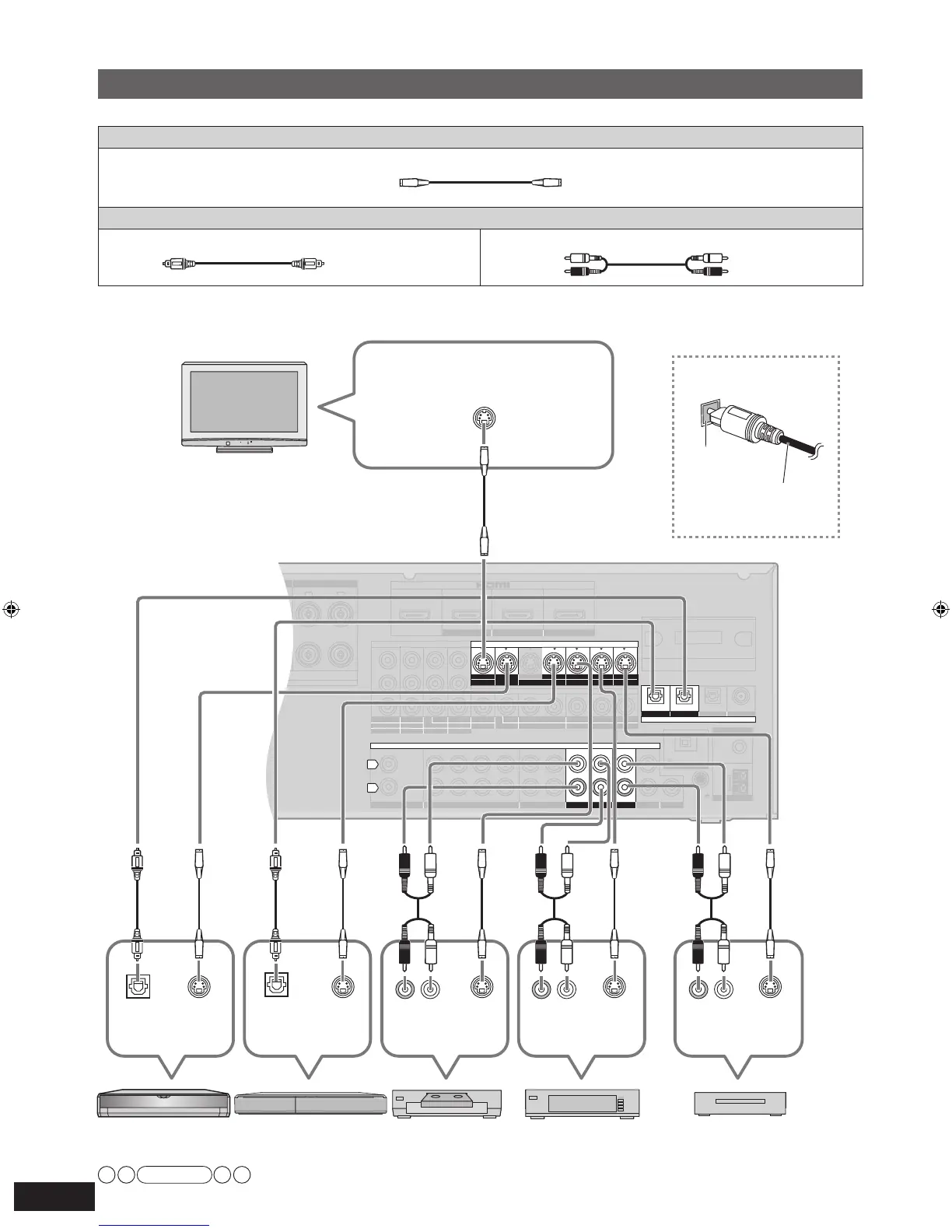
Connecting cables to S video and audio terminals
Connection cable
Video cable
S VIDEO connection cable (not included)
Audio cable
Optical fiber cable (not included) Stereo connection cable
(not included)
SURROUND SURROUND BACK
OUT
IN IN
CD
BD/DVD PLAYER / ANALOG 8CH IN DVD RECORDER
VCR
CABLE/SAT
GAME
TV
AUDIO
SURROUND BACK
SURROUND
FRONT
SUBWOOFER
OUT
IN IN
IN
(DVD RECORDER)
(BD/DVD PLAYER)
(CABLE/SAT)
HDMI 1
HDMI
2 HDMI 3
SURROUND
SURROUND BACK
S VIDEO
COMPONENT VIDEO
L
R
IN IN IN
IN
OUT
IN
IN
OUT
OUT
IN IN IN
IN
TV MONITOR
TV MONITOR
DVD RECORDER
VCR
CABLE/SAT
GAME
DVD PLAYER
BD/(BD/
DVD PLAYER)
(DVD RECORDER)
(CABLE/SAT)
1 2
3
(DVD RECORDER) (BD/DVD PLAYER)
(TV)
(CD)
OPTICAL 1
OPTICAL 2 OPTICAL 3 COAXIAL
SUBWOOFER
Y
P
B
P
R
IN
OUT OUT
IN IN IN IN
TV MONITOR
DVD RECORDER
VCR
CABLE/SAT
GAME
DVD PLAYER
BD/
OUT
CENTER
IN
IN
FM ANT
AM ANT
LOOP
EXT
75
Ω
RR
L L
LOOP ANT
GND
VIDEO
DIGITAL IN
Class2 wiring
OPTION V.1
DC OUT/SORTIE C.C.
5V 500mA MAX
CHAQUE)
S VIDEO IN
S VIDEO
OUT
Digital audio
out (optical)
(R) (L)
Audio out
DVD recorderBlu-ray Disc/
DVD player
Cable box or
satellite receiver
VCR
Note
• The input video signal can be sent out through an output terminal of the same type only.
• You can change the digital input terminal setting according to the equipment to connect (
➔
page 39).
Connecting the optical
fiber cable
Note the
shape and fit
it correctl
y
into the
terminal.
Do not
bend!
To enjoy TV with surround sound, make connection
or
instructed on pa
ge 16 according to your equipment.
Rear panel
TV
Game
S VIDEO
OUT
Digital audio
out (optical)
S VIDEO
OUT
(R) (L)
Audio out
S VIDEO
OUT
(R) (L)
Audio out
S VIDEO
OUT
White (L)
Red (R)
SA-BX500-PP (RQT9223-Y)_En.indd 18 6/27/2008 4:05:33 PM







 To Next Page